Skip to content

Plotting

This module provides a collection of plotting utilities for visualizing protein and peptide abundance data, quality control metrics, and results of statistical analyses. Functions are organized into categories based on their purpose, with paired "plot" and "mark" functions where applicable.

Functions are written to work seamlessly with the pAnnData object structure and metadata conventions in scpviz.

Convenience Plotting Wrappers

get_color: Generate a list of colors, a colormap, or a palette from package defaults.
shift_legend: Reposition an axis legend outside the plot while maintaining figure size.
plot_significance: Add a simple significance bar + label to an axis.
plot_summary: Bar plots summarizing sample-level metadata (e.g. protein counts).

Distribution and Abundance Plots

Functions:

Name Description
plot_cv

Boxplots of coefficient of variation (CV) across groups.

plot_abundance

Violin/box/strip plots of protein or peptide abundance.

plot_abundance_housekeeping

Plot abundance of housekeeping proteins.

plot_abundance_boxgrid

Multi-panel abundance summary grids (box/bar/violin/line).

plot_abundance_2D

2D scatter of abundance between two case groups.

plot_rankquant

Rank abundance scatter distributions across groups.

mark_rankquant

Highlight specific features on a rank abundance plot.

plot_raincloud

Raincloud plot (violin + box + scatter) of distributions.

mark_raincloud

Highlight specific features on a raincloud plot.

Multivariate Dimension Reduction

Functions:

Name Description
plot_pca

Principal Component Analysis (PCA) scatter plot.

plot_pca_scree

Scree plot of PCA variance explained.

plot_umap

UMAP projection for nonlinear dimensionality reduction.

resolve_plot_colors

Helper function for resolving PCA/UMAP colors.

resolve_marker_shapes

Helper function for resolving marker shapes from categorical groupings.

PCA overlays (loadings + GSEA)

Functions:

Name Description
plot_pca_gsea_pathway_vectors

Overlay PCA-GSEA pathways as arrows in PCA space.

plot_pca_protein_vectors

Overlay protein PCA loadings as arrows in PCA space.

plot_pca_gsea_bubble

Bubble plot summarizing PCA-GSEA NES/FDR across PCs.

plot_pca_gsea_heatmap

Heatmap of PCA-GSEA NES across pathways and PCs.

Clustering and Heatmaps

Functions:

Name Description
plot_clustermap

Clustered heatmap of proteins/peptides × samples.

plot_pairwise_correlation

Group- or sample-level pairwise correlation / distance heatmap with annotation bars.

Differential Expression and Volcano Plots

Functions:

Name Description
plot_volcano

Volcano plot of differential expression results.

plot_volcano_adata

Same as above, but for AnnData objects.

mark_volcano

Highlight specific features on a volcano plot with a specific color.

mark_volcano_by_significance

Similar to above, but colored by significance.

volcano_adjust_and_outline_texts

Adjust text labels for volcano plots after multiple mark_volcanos.

add_volcano_legend

Add standard legend handles for volcano plots.

Enrichment Plots

Functions:

Name Description
plot_enrichment_svg

Plot STRING enrichment results (forwarded from enrichment.py).

Set Operations

Functions:

Name Description
plot_venn

Venn diagrams for 2 to 3 sets.

plot_upset

UpSet diagrams for >3 sets.

Notes and Tips

Tip

  • Most functions accept a matplotlib.axes.Axes as the first argument for flexible subplot integration. ax can be defined as such:
import matplotlib.pyplot as plt
fig, ax = plt.subplots(figsize=(6,4)) # configure size as needed
  • "Mark" functions are designed to be used following their paired "plot" functions to highlight features of interest.

add_volcano_legend

add_volcano_legend(
    ax: "plt.Axes", colors: dict[str, str] | None = None
) -> None

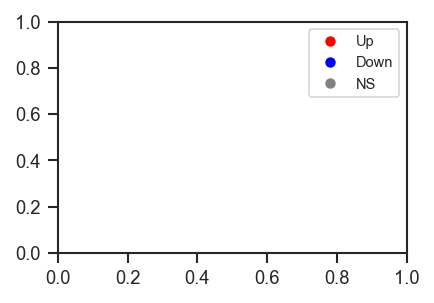
Add a standard legend for volcano plots.

This function appends a legend to a volcano plot axis, showing handles for upregulated, downregulated, and non-significant features. Colors can be customized, but default to grey, red, and blue.

Parameters:

Name Type Description Default
ax Axes

Axis object to which the legend will be added.

required
colors dict

Custom colors for significance categories. Keys must include "upregulated", "downregulated", and "not significant". Defaults to:

{
    "not significant": "grey",
    "upregulated": "red",
    "downregulated": "blue"
}
None
Example

Add legend handles for significance categories:

import matplotlib.pyplot as plt
from scpviz import plotting as scplt

fig, ax = plt.subplots(figsize=(3, 2))
scplt.add_volcano_legend(ax)
plt.show()
Add volcano legend

Returns:

Type Description
None

None

Source code in src/scpviz/plotting/volcano.py
def add_volcano_legend(ax: "plt.Axes", colors: dict[str, str] | None = None) -> None:
    """
    Add a standard legend for volcano plots.

    This function appends a legend to a volcano plot axis, showing handles for
    upregulated, downregulated, and non-significant features. Colors can be
    customized, but default to grey, red, and blue.

    Args:
        ax (matplotlib.axes.Axes): Axis object to which the legend will be added.

        colors (dict, optional): Custom colors for significance categories.
            Keys must include `"upregulated"`, `"downregulated"`, and
            `"not significant"`. Defaults to:

            ```python
            {
                "not significant": "grey",
                "upregulated": "red",
                "downregulated": "blue"
            }
            ```

    Example:
        Add legend handles for significance categories:
            ```python
            import matplotlib.pyplot as plt
            from scpviz import plotting as scplt

            fig, ax = plt.subplots(figsize=(3, 2))
            scplt.add_volcano_legend(ax)
            plt.show()
            ```

        ![Add volcano legend](../../assets/plots/add_volcano_legend.png)

    Returns:
        None
    """
    from matplotlib.lines import Line2D
    import numpy as np

    default_colors = {'not significant': 'grey', 'upregulated': 'red', 'downregulated': 'blue'}
    if colors is None:
        colors = default_colors.copy()
    else:
        default_colors.update(colors)
        colors = default_colors

    handles = [
        Line2D([0], [0], marker='o', color='w', label='Up', markerfacecolor=colors['upregulated'], markersize=6),
        Line2D([0], [0], marker='o', color='w', label='Down', markerfacecolor=colors['downregulated'], markersize=6),
        Line2D([0], [0], marker='o', color='w', label='NS', markerfacecolor=colors['not significant'], markersize=6)
    ]
    ax.legend(handles=handles, loc='upper right', frameon=True, fontsize=7)

get_color

get_color(
    resource_type: Literal["colors"], n: int
) -> list[str]
get_color(
    resource_type: Literal["cmap"], n: int | None = None
) -> (
    mcolors.LinearSegmentedColormap
    | list[mcolors.LinearSegmentedColormap]
)
get_color(
    resource_type: Literal["palette"], n: None = None
) -> list[tuple[float, float, float]]
get_color(
    resource_type: Literal["show"], n: None = None
) -> None
get_color(resource_type: str, n: int | None = None) -> Any

Generate a list of colors, a colormap, or a palette from package defaults.

Parameters:

Name Type Description Default
resource_type str

The type of resource to generate. Options are: - 'colors': Return a list of hex color codes. - 'cmap': Return a matplotlib colormap. - 'palette': Return a seaborn palette. - 'show': Display all 7 base colors.

required
n int

The number of colors or colormaps to generate. Required for 'colors' and 'cmap'. Colors will repeat if n > 7.

None

Returns:

Name Type Description
colors list of str

If resource_type='colors', a list of hex color strings. Repeats colors if n > 7.

cmap LinearSegmentedColormap

If resource_type='cmap'.

palette color_palette

If resource_type='palette'.

None Any

If resource_type='show', displays the available colors.

Default Colors

The following base colors are used (hex codes):

['#FC9744', '#00AEE8', '#9D9D9D', '#6EDC00', '#F4D03F', '#FF0000', '#A454C7']

Example

Get list of 5 colors:

colors = get_color('colors', 5)

Get default cmap:

cmap = get_color('cmap', 2)

Get default palette:

palette = get_color('palette')

Source code in src/scpviz/plotting/style.py
def get_color(resource_type: str, n: int | None = None) -> Any:
    """
    Generate a list of colors, a colormap, or a palette from package defaults.

    Args:
        resource_type (str): The type of resource to generate. Options are:
            - 'colors': Return a list of hex color codes.
            - 'cmap': Return a matplotlib colormap.
            - 'palette': Return a seaborn palette.
            - 'show': Display all 7 base colors.

        n (int, optional): The number of colors or colormaps to generate.
            Required for 'colors' and 'cmap'. Colors will repeat if n > 7.

    Returns:
        colors (list of str): If ``resource_type='colors'``, a list of hex color strings. Repeats colors if n > 7.
        cmap (matplotlib.colors.LinearSegmentedColormap): If ``resource_type='cmap'``.
        palette (seaborn.color_palette): If ``resource_type='palette'``.
        None: If ``resource_type='show'``, displays the available colors.

    !!! info "Default Colors"

        The following base colors are used (hex codes):

            ['#FC9744', '#00AEE8', '#9D9D9D', '#6EDC00', '#F4D03F', '#FF0000', '#A454C7']        

        <div style="display:flex;gap:0.5em;">
            <div style="width:1.5em;height:1.5em;background:#FC9744;border:1px solid #000"></div>
            <div style="width:1.5em;height:1.5em;background:#00AEE8;border:1px solid #000"></div>
            <div style="width:1.5em;height:1.5em;background:#9D9D9D;border:1px solid #000"></div>
            <div style="width:1.5em;height:1.5em;background:#6EDC00;border:1px solid #000"></div>
            <div style="width:1.5em;height:1.5em;background:#F4D03F;border:1px solid #000"></div>
            <div style="width:1.5em;height:1.5em;background:#FF0000;border:1px solid #000"></div>
            <div style="width:1.5em;height:1.5em;background:#A454C7;border:1px solid #000"></div>
        </div>

    Example:
        Get list of 5 colors:
            ```python
            colors = get_color('colors', 5)
            ```

        <div style="display:flex;gap:0.5em;">
            <div style="width:1.5em;height:1.5em;background:#FC9744;border:1px solid #000"></div>
            <div style="width:1.5em;height:1.5em;background:#00AEE8;border:1px solid #000"></div>
            <div style="width:1.5em;height:1.5em;background:#9D9D9D;border:1px solid #000"></div>
            <div style="width:1.5em;height:1.5em;background:#6EDC00;border:1px solid #000"></div>
            <div style="width:1.5em;height:1.5em;background:#F4D03F;border:1px solid #000"></div>
        </div>

        Get default cmap:
            ```python
            cmap = get_color('cmap', 2)
            ```
        <div style="width:150px;height:20px;background:linear-gradient(to right, white, #FC9744);border:1px solid #000"></div>
        <div style="width:150px;height:20px;background:linear-gradient(to right, white, #00AEE8);border:1px solid #000"></div>

        Get default palette:
            ```python
            palette = get_color('palette')
            ```

        <div style="display:flex;gap:0.3em;">
            <div style="width:1.2em;height:1.2em;background:#FC9744;border:1px solid #000"></div>
            <div style="width:1.2em;height:1.2em;background:#00AEE8;border:1px solid #000"></div>
            <div style="width:1.2em;height:1.2em;background:#9D9D9D;border:1px solid #000"></div>
            <div style="width:1.2em;height:1.2em;background:#6EDC00;border:1px solid #000"></div>
            <div style="width:1.2em;height:1.2em;background:#F4D03F;border:1px solid #000"></div>
            <div style="width:1.2em;height:1.2em;background:#FF0000;border:1px solid #000"></div>
            <div style="width:1.2em;height:1.2em;background:#A454C7;border:1px solid #000"></div>
        </div>
    """

    # --- 
    # Create a list of colors
    base_colors = ['#FC9744', '#00AEE8', '#9D9D9D', '#6EDC00', '#F4D03F', '#FF0000', '#A454C7']
    # ---

    if resource_type == 'colors':
        if n is None:
            raise ValueError("Parameter 'n' must be specified when resource_type is 'colors'")
        if n > len(base_colors):
            warnings.warn(f"Requested {n} colors, but only {len(base_colors)} available. Reusing from the start.")
        return [base_colors[i % len(base_colors)] for i in range(n)]

    elif resource_type == 'cmap':
        if n is None:
            n = 1  # Default to generating one colormap from the first base color
        if n > len(base_colors):
            warnings.warn(f"Requested {n} colormaps, but only {len(base_colors)} base colors. Reusing from the start.")
        cmaps = []
        for i in range(n):
            color = base_colors[i % len(base_colors)]
            cmap = mcolors.LinearSegmentedColormap.from_list(f'cmap_{i}', ['white', color])
            cmaps.append(cmap)
        return cmaps if n > 1 else cmaps[0]

    elif resource_type == 'palette':
        return sns.color_palette(base_colors)

    elif resource_type == 'show':
        # Show palette and colormaps
        fig, axs = plt.subplots(2, 1, figsize=(10, 5), gridspec_kw={'height_ratios': [1, 1]})

        # Format labels as "n: #HEX"
        hex_labels = [f"{i}: {mcolors.to_hex(color)}" for i, color in enumerate(base_colors)]

        # --- Palette ---
        for i, color in enumerate(base_colors):
            axs[0].bar(i, 1, color=color)
        axs[0].set_title("Base Colors (Colors and Palette)")
        axs[0].set_xticks(range(len(base_colors)))
        axs[0].set_xticklabels(hex_labels, rotation=45, ha='right')
        axs[0].set_yticks([])

        # --- Colormaps ---
        gradient = np.linspace(0, 1, 256).reshape(1, -1)
        n_colors = len(base_colors)

        for i, color in enumerate(base_colors):
            cmap = mcolors.LinearSegmentedColormap.from_list(f'cmap_{i}', ['white', color])
            axs[1].imshow(
                gradient,
                aspect='auto',
                cmap=cmap,
                extent=(i, i + 1, 0, 1)
            )

        axs[1].set_title("Colormaps")
        axs[1].set_xlim(0, n_colors)
        axs[1].set_xticks(np.arange(n_colors) + 0.5)
        axs[1].set_xticklabels(hex_labels, rotation=45, ha='right')
        axs[1].set_yticks([])

        plt.tight_layout()
        plt.show()
        return None

    else:
        raise ValueError("Invalid resource_type. Options are 'colors', 'cmap', and 'palette'")

mark_raincloud

mark_raincloud(
    plot: "plt.Axes",
    pdata: pAnnData,
    mark_df: DataFrame,
    class_values: list[str],
    layer: str = "X",
    on: str = "protein",
    lowest_index: int = 0,
    color: str = "red",
    s: float = 10,
    alpha: float = 1,
) -> Any

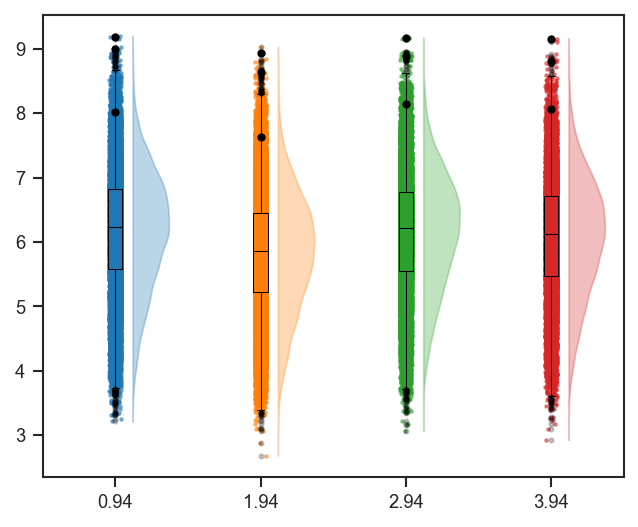
Highlight specific features on a raincloud plot.

This function marks selected proteins or peptides on an existing raincloud plot, using summary statistics written to .var during plot_raincloud().

Parameters:

Name Type Description Default
plot Axes

Axis containing the raincloud plot.

required
pdata pAnnData

Input pAnnData object.

required
mark_df DataFrame

DataFrame containing entries to highlight. Must include an "Entry" column.

required
class_values list of str

Class values to highlight (must match those used in plot_raincloud).

required
layer str

Data layer to use. Default is "X".

'X'
on str

Data level, either "protein" or "peptide". Default is "protein".

'protein'
lowest_index int

Offset for horizontal positioning. Default is 0.

0
color str

Marker color. Default is "red".

'red'
s float

Marker size. Default is 10.

10
alpha float

Marker transparency. Default is 1.

1

Returns:

Name Type Description
ax Axes

Axis with highlighted features.

Tip

Works best when paired with plot_raincloud(), which computes and stores the required statistics in .var.

Example

Highlight proteins on a raincloud after plot_raincloud (same grouping and colors as that plot):

import matplotlib.cm as cm
import matplotlib.pyplot as plt
import pandas as pd
from scpviz import plotting as scplt
from scpviz import utils as scu

classes_2 = ["cellline", "condition"]
class_list = scu.get_classlist(pdata.prot, classes_2)
rain_colors = [cm.tab10(i % 10) for i in range(len(class_list))]

var = pdata.prot.var
want = ["GAPDH", "TUBB", "ACTB"]
if "Genes" not in var.columns:
    acc = list(var.index[:3])
else:
    m = var["Genes"].astype(str).isin(want)
    acc = list(var.index[m][:3])
    if len(acc) < 3:
        acc = list(var.index[:3])
sub = var.loc[acc].copy().reset_index()
id_col = "index" if "index" in sub.columns else sub.columns[0]
mark_df = sub.rename(columns={id_col: "accession"})
if "Genes" in mark_df.columns:
    mark_df = mark_df.rename(columns={"Genes": "gene_primary"})
mark_df = mark_df[[c for c in ("accession", "gene_primary") if c in mark_df.columns]]

fig, ax = plt.subplots(figsize=(5, 4))
scplt.plot_raincloud(ax, pdata, classes=classes_2, color=rain_colors)
scplt.mark_raincloud(
    ax,
    pdata,
    mark_df=mark_df,
    class_values=class_list[: min(4, len(class_list))],
    color="black",
)
plt.show()
Mark raincloud

See Also

plot_raincloud: Generate raincloud plots with distributions per group.
plot_rankquant: Alternative distribution visualization using rank abundance.

Source code in src/scpviz/plotting/abundance.py
def mark_raincloud(plot: "plt.Axes", pdata: pAnnData, mark_df: pd.DataFrame, class_values: list[str], layer: str = "X", on: str = "protein", lowest_index: int = 0, color: str = "red", s: float = 10, alpha: float = 1) -> Any:
    """
    Highlight specific features on a raincloud plot.

    This function marks selected proteins or peptides on an existing
    raincloud plot, using summary statistics written to `.var` during
    `plot_raincloud()`.

    Args:
        plot (matplotlib.axes.Axes): Axis containing the raincloud plot.
        pdata (pAnnData): Input pAnnData object.
        mark_df (pandas.DataFrame): DataFrame containing entries to highlight.
            Must include an `"Entry"` column.
        class_values (list of str): Class values to highlight (must match those
            used in `plot_raincloud`).
        layer (str): Data layer to use. Default is `"X"`.
        on (str): Data level, either `"protein"` or `"peptide"`. Default is `"protein"`.
        lowest_index (int): Offset for horizontal positioning. Default is 0.
        color (str): Marker color. Default is `"red"`.
        s (float): Marker size. Default is 10.
        alpha (float): Marker transparency. Default is 1.

    Returns:
        ax (matplotlib.axes.Axes): Axis with highlighted features.

    !!! tip 

        Works best when paired with `plot_raincloud()`, which computes and
        stores the required statistics in `.var`.

    Example:
        Highlight proteins on a raincloud after ``plot_raincloud`` (same grouping and colors as that plot):
            ```python
            import matplotlib.cm as cm
            import matplotlib.pyplot as plt
            import pandas as pd
            from scpviz import plotting as scplt
            from scpviz import utils as scu

            classes_2 = ["cellline", "condition"]
            class_list = scu.get_classlist(pdata.prot, classes_2)
            rain_colors = [cm.tab10(i % 10) for i in range(len(class_list))]

            var = pdata.prot.var
            want = ["GAPDH", "TUBB", "ACTB"]
            if "Genes" not in var.columns:
                acc = list(var.index[:3])
            else:
                m = var["Genes"].astype(str).isin(want)
                acc = list(var.index[m][:3])
                if len(acc) < 3:
                    acc = list(var.index[:3])
            sub = var.loc[acc].copy().reset_index()
            id_col = "index" if "index" in sub.columns else sub.columns[0]
            mark_df = sub.rename(columns={id_col: "accession"})
            if "Genes" in mark_df.columns:
                mark_df = mark_df.rename(columns={"Genes": "gene_primary"})
            mark_df = mark_df[[c for c in ("accession", "gene_primary") if c in mark_df.columns]]

            fig, ax = plt.subplots(figsize=(5, 4))
            scplt.plot_raincloud(ax, pdata, classes=classes_2, color=rain_colors)
            scplt.mark_raincloud(
                ax,
                pdata,
                mark_df=mark_df,
                class_values=class_list[: min(4, len(class_list))],
                color="black",
            )
            plt.show()
            ```

        ![Mark raincloud](../../assets/plots/mark_raincloud.png)

    See Also:
        plot_raincloud: Generate raincloud plots with distributions per group.  
        plot_rankquant: Alternative distribution visualization using rank abundance.
    """
    adata = _plotting_pkg_utils().get_adata(pdata, on)
    # get entry label
    id_precedence = [
            "accession",    # new default with new Uniprot API
            "Entry",        # legacy uniprot API?
            "id",
            "Accession",
            "Protein IDs",
            ]

    id_col = next((c for c in id_precedence if c in mark_df.columns), None)
    if id_col is None:
        raise ValueError(
            f"mark_df is missing an accession/ID column. "
            f"Tried: {id_precedence}. Columns are: {list(mark_df.columns)}"
        )

    names = mark_df[id_col].astype(str).tolist()

    # TEST: check if names are in the data
    pdata._check_rankcol(on, class_values)

    for j, class_value in enumerate(class_values):
        print('Class: ', class_value)

        for i, txt in enumerate(names):
            try:
                y = np.log10(adata.var['Average: '+class_value].loc[txt])
                x = lowest_index + j + .14 + 0.8
            except Exception as e:
                print(f"Name {txt} not found in {on}.var. Check {on} name for spelling errors and whether it is in data.")
                continue
            plot.scatter(x,y,marker='o',color=color,s=s, alpha=alpha)

mark_rankquant

mark_rankquant(
    plot: "plt.Axes",
    pdata: pAnnData,
    mark_df: DataFrame,
    class_values: list[str],
    layer: str = "X",
    on: str = "protein",
    color: str = "red",
    s: float = 10,
    alpha: float = 1,
    show_label: bool = True,
    label_type: str = "accession",
) -> Any

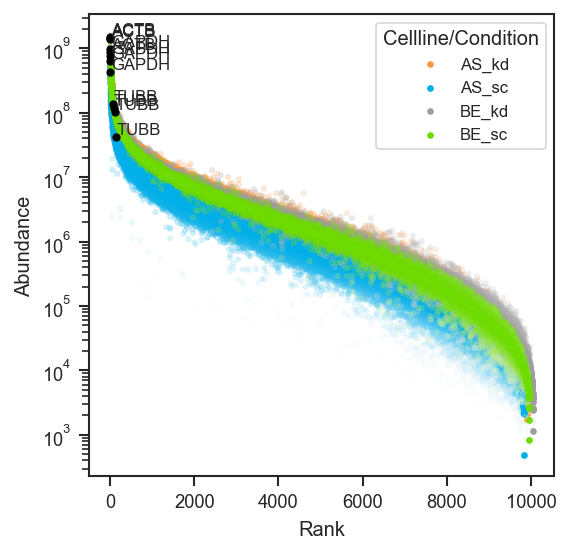
Highlight specific features on a rank abundance plot.

This function marks selected proteins or peptides on an existing rank abundance plot, optionally adding labels. It uses statistics stored in .var during plot_rankquant().

Parameters:

Name Type Description Default
plot Axes

Axis containing the rank abundance plot.

required
pdata pAnnData

Input pAnnData object.

required
mark_df DataFrame

Features to highlight.

  • DataFrame: Must include an "accession" column, and optionally "gene_primary" if label_type="gene".
    A typical way to generate this is using scutils.get_upset_query(), e.g.:
    size_upset = scutils.get_upset_contents(pdata_filter, classes="size")
    prot_sc_df = scutils.get_upset_query(size_upset, present=["sc"], absent=["5k", "10k", "20k"])
    
required
class_values list of str

Class values to highlight (must match those used in plot_rankquant).

required
layer str

Data layer to use. Default is "X".

'X'
on str

Data level, either "protein" or "peptide". Default is "protein".

'protein'
color str

Marker color. Default is "red".

'red'
s float

Marker size. Default is 10.

10
alpha float

Marker transparency. Default is 1.

1
show_label bool

Whether to display labels for highlighted features. Default is True.

True
label_type str

Label type. Options: - "accession": show accession IDs. - "gene": map to gene names using "Gene Names" in mark_df.

'accession'

Returns:

Name Type Description
ax Axes

Axis with highlighted features.

Tip

Works best when paired with plot_rankquant(), which stores Average, Stdev, and Rank statistics in .var. Call plot_rankquant() first to generate these values, then use mark_rankquant() to overlay highlights.

Example

Overlay markers after a bulk rank-quant plot:

import matplotlib.pyplot as plt
import pandas as pd
from scpviz import plotting as scplt
from scpviz import utils as scu

classes_2 = ["cellline", "condition"]
class_list = scu.get_classlist(pdata.prot, classes_2)
acc = list(pdata.prot.var_names[:3])
mark_df = pd.DataFrame({"accession": acc})
if "Genes" in pdata.prot.var.columns:
    mark_df["gene_primary"] = pdata.prot.var.loc[acc, "Genes"].astype(str).values

fig, ax = plt.subplots(figsize=(4, 4))
scplt.plot_rankquant(ax, pdata, classes=classes_2)
scplt.mark_rankquant(
    ax,
    pdata,
    mark_df=mark_df,
    class_values=class_list[: min(4, len(class_list))],
    color="black",
    label_type="gene",
)
plt.show()
Mark rankquant

See Also

plot_rankquant: Generate rank abundance plots with statistics stored in .var. get_upset_query: Create a DataFrame of proteins based on set intersections (obs membership).

Source code in src/scpviz/plotting/abundance.py
def mark_rankquant(plot: "plt.Axes", pdata: pAnnData, mark_df: pd.DataFrame, class_values: list[str], layer: str = "X", on: str = "protein", color: str = "red", s: float = 10, alpha: float = 1, show_label: bool = True, label_type: str = "accession") -> Any:
    """
    Highlight specific features on a rank abundance plot.

    This function marks selected proteins or peptides on an existing rank
    abundance plot, optionally adding labels. It uses statistics stored in
    `.var` during `plot_rankquant()`.

    Args:
        plot (matplotlib.axes.Axes): Axis containing the rank abundance plot.
        pdata (pAnnData): Input pAnnData object.
        mark_df (pandas.DataFrame): Features to highlight.

            - DataFrame: Must include an `"accession"` column, and optionally
              `"gene_primary"` if `label_type="gene"`.  
              A typical way to generate this is using
              `scutils.get_upset_query()`, e.g.:
              ```python
              size_upset = scutils.get_upset_contents(pdata_filter, classes="size")
              prot_sc_df = scutils.get_upset_query(size_upset, present=["sc"], absent=["5k", "10k", "20k"])
              ```

        class_values (list of str): Class values to highlight (must match those
            used in `plot_rankquant`).
        layer (str): Data layer to use. Default is `"X"`.
        on (str): Data level, either `"protein"` or `"peptide"`. Default is `"protein"`.
        color (str): Marker color. Default is `"red"`.
        s (float): Marker size. Default is 10.
        alpha (float): Marker transparency. Default is 1.
        show_label (bool): Whether to display labels for highlighted features.
            Default is True.
        label_type (str): Label type. Options:
            - `"accession"`: show accession IDs.
            - `"gene"`: map to gene names using `"Gene Names"` in `mark_df`.

    Returns:
        ax (matplotlib.axes.Axes): Axis with highlighted features.

    !!! tip 

        Works best when paired with `plot_rankquant()`, which stores `Average`,
        `Stdev`, and `Rank` statistics in `.var`. Call `plot_rankquant()` first
        to generate these values, then use `mark_rankquant()` to overlay
        highlights.

    Example:
        Overlay markers after a bulk rank-quant plot:
            ```python
            import matplotlib.pyplot as plt
            import pandas as pd
            from scpviz import plotting as scplt
            from scpviz import utils as scu

            classes_2 = ["cellline", "condition"]
            class_list = scu.get_classlist(pdata.prot, classes_2)
            acc = list(pdata.prot.var_names[:3])
            mark_df = pd.DataFrame({"accession": acc})
            if "Genes" in pdata.prot.var.columns:
                mark_df["gene_primary"] = pdata.prot.var.loc[acc, "Genes"].astype(str).values

            fig, ax = plt.subplots(figsize=(4, 4))
            scplt.plot_rankquant(ax, pdata, classes=classes_2)
            scplt.mark_rankquant(
                ax,
                pdata,
                mark_df=mark_df,
                class_values=class_list[: min(4, len(class_list))],
                color="black",
                label_type="gene",
            )
            plt.show()
            ```

        ![Mark rankquant](../../assets/plots/mark_rankquant.png)

    See Also:
        plot_rankquant: Generate rank abundance plots with statistics stored in `.var`.
        get_upset_query: Create a DataFrame of proteins based on set intersections (obs membership).
    """
    adata = utils.get_adata(pdata, on)

    # get entry label
    id_precedence = [
            "accession",    # new default with new Uniprot API
            "Entry",        # legacy uniprot API?
            "id",
            "Accession",
            "Protein IDs",
            ]

    id_col = next((c for c in id_precedence if c in mark_df.columns), None)
    if id_col is None:
        raise ValueError(
            f"mark_df is missing an accession/ID column. "
            f"Tried: {id_precedence}. Columns are: {list(mark_df.columns)}"
        )

    names = mark_df[id_col].astype(str).tolist()

    # get gene label if needed
    gene_precedence = [
            "gene_primary",   # NEW default
            "Gene Names",
            "Genes",
            "gene_names",
            "Gene",
        ]

    gene_col = next((c for c in gene_precedence if c in mark_df.columns), None)

    # TEST: check if names are in the data
    pdata._check_rankcol(on, class_values)

    for j, class_value in enumerate(class_values):
        print('Class: ', class_value)

        for i, txt in enumerate(names):
            try:
                avg = adata.var[f"Average: {class_value}"].loc[txt]
                rank = adata.var[f"Rank: {class_value}"].loc[txt]
            except Exception as e:
                print(f"Name {txt} not found in {on}.var. Check {on} name for spelling errors and whether it is in data.")
                continue

            label_txt = txt
            if show_label:
                if label_type == 'accession':
                    pass
                elif label_type == 'gene':
                    if gene_col and txt in mark_df[id_col].values:
                        match = mark_df.loc[mark_df[id_col] == txt, gene_col]
                        if not match.empty:
                            label_txt = str(match.values[0])

                plot.annotate(label_txt, (rank, avg), xytext=(rank+10,avg*1.1), fontsize=8)
            plot.scatter(rank, avg, marker='o', color=color, s=s, alpha=alpha)
    return plot

mark_volcano

mark_volcano(
    ax: "plt.Axes",
    volcano_df: DataFrame,
    label: Any,
    label_color: str = "black",
    text_color: str | None = None,
    label_type: str = "Gene",
    s: float = 10,
    alpha: float = 1,
    show_names: bool = True,
    fontsize: int = 8,
    return_texts: bool = False,
) -> Any

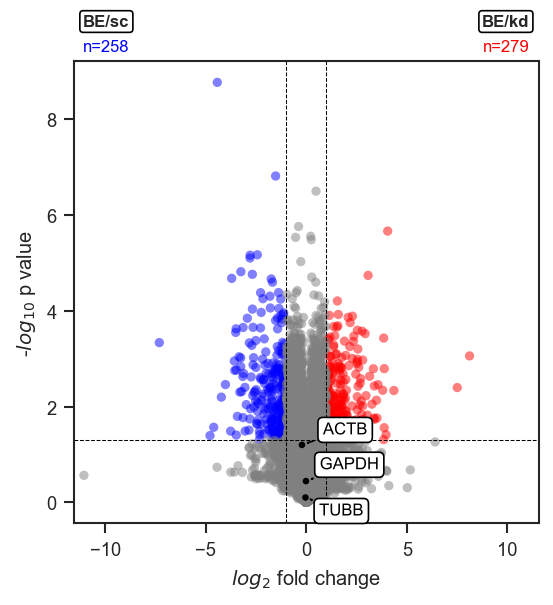
Mark a volcano plot with specific proteins or genes.

This function highlights selected features on an existing volcano plot, optionally labeling them with names.

Parameters:

Name Type Description Default
ax Axes

Axis on which to plot.

required
volcano_df DataFrame

DataFrame returned by plot_volcano() or pdata.de(), containing differential expression results.

required
label list

Features to highlight. Can also be a nested list, with separate lists of features for different cases.

required
label_color str or list

Marker color(s). Defaults to "black". If a list is provided, each case receives a different color.

'black'
text_color str

Text color. Defaults to the same as label_color if not explicitly provided.

None
label_type str

Type of label to display. Default is "Gene".

'Gene'
s float

Marker size. Default is 10.

10
alpha float

Marker transparency. Default is 1.

1
show_names bool

Whether to show labels for the selected features. Default is True.

True
fontsize int

Font size for labels. Default is 8.

8
return_texts bool

Whether to return the list of created text artists. This is useful when labeling multiple groups and performing a single global adjust_text() call at the end.

False

Returns:

Name Type Description
ax Axes

Axis with the highlighted volcano plot.

Example

Highlight specific features on a volcano plot:

import matplotlib.pyplot as plt
from scpviz import plotting as scplt

fig, ax = plt.subplots(figsize=(4, 4))
values = [
    {"cellline": "BE", "condition": "kd"},
    {"cellline": "BE", "condition": "sc"},
]
ax, volcano_df = scplt.plot_volcano(
    ax, pdata_norm, values=values, return_df=True, label=[0, 0]
)
scplt.mark_volcano(ax, volcano_df, label=["GAPDH", "TUBB", "ACTB"])
plt.show()
Mark volcano

Note

This function works especially well in combination with plot_volcano(..., no_marks=True) to render all points in grey, followed by mark_volcano() to selectively highlight features of interest.

Source code in src/scpviz/plotting/volcano.py
def mark_volcano(ax: "plt.Axes", volcano_df: pd.DataFrame, label: Any, label_color: str = "black", text_color: str | None = None, label_type: str = 'Gene', s: float = 10, alpha: float = 1, show_names: bool = True, fontsize: int = 8, return_texts: bool = False) -> Any:
    """
    Mark a volcano plot with specific proteins or genes.

    This function highlights selected features on an existing volcano plot,
    optionally labeling them with names.

    Args:
        ax (matplotlib.axes.Axes): Axis on which to plot.
        volcano_df (pandas.DataFrame): DataFrame returned by `plot_volcano()` or
            `pdata.de()`, containing differential expression results.
        label (list): Features to highlight. Can also be a nested list, with
            separate lists of features for different cases.
        label_color (str or list, optional): Marker color(s). Defaults to `"black"`.
            If a list is provided, each case receives a different color.
        text_color (str, optional): Text color. Defaults to the same as label_color if not explicitly provided.
        label_type (str): Type of label to display. Default is `"Gene"`.
        s (float): Marker size. Default is 10.
        alpha (float): Marker transparency. Default is 1.
        show_names (bool): Whether to show labels for the selected features.
            Default is True.
        fontsize (int): Font size for labels. Default is 8.
        return_texts (bool): Whether to return the list of created text artists.
            This is useful when labeling multiple groups and performing a single
            global `adjust_text()` call at the end.

    Returns:
        ax (matplotlib.axes.Axes): Axis with the highlighted volcano plot.

    Example:
        Highlight specific features on a volcano plot:
            ```python
            import matplotlib.pyplot as plt
            from scpviz import plotting as scplt

            fig, ax = plt.subplots(figsize=(4, 4))
            values = [
                {"cellline": "BE", "condition": "kd"},
                {"cellline": "BE", "condition": "sc"},
            ]
            ax, volcano_df = scplt.plot_volcano(
                ax, pdata_norm, values=values, return_df=True, label=[0, 0]
            )
            scplt.mark_volcano(ax, volcano_df, label=["GAPDH", "TUBB", "ACTB"])
            plt.show()
            ```

        ![Mark volcano](../../assets/plots/mark_volcano.png)

    Note:
        This function works especially well in combination with
        `plot_volcano(..., no_marks=True)` to render all points in grey,
        followed by `mark_volcano()` to selectively highlight features of interest.
    """
    if return_texts and not show_names:
        print(f"{utils.format_log_prefix('warn_only')} "
            "return_texts=True but show_names=False; no text labels will be returned.")

    if not isinstance(label[0], list):
        label = [label]
        label_color = [label_color] if isinstance(label_color, str) else label_color

    if "Genes" in volcano_df.columns:
        gene_col = volcano_df["Genes"].astype(str)
    else:
        # fallback: use the index as feature names
        gene_col = volcano_df.index.astype(str)

    all_texts = []
    for i, label_group in enumerate(label):
        color = label_color[i % len(label_color)] if isinstance(label_color, list) else label_color
        txt_color = text_color if text_color is not None else color

        # Match by index or 'Genes' column
        match_mask = (
            volcano_df.index.isin(label_group) |
            gene_col.isin(label_group)
        )
        match_df = volcano_df[match_mask]

        ax.scatter(match_df['log2fc'], match_df['-log10(p_value)'],
                   c=color, s=s, alpha=alpha, edgecolors='none')

        if show_names:
            texts = []
            for idx, row in match_df.iterrows():
                if label_type == "Gene" and "Genes" in volcano_df.columns:
                    text = row.get("Genes", idx)
                else:
                    text = idx

                txt = ax.text(row['log2fc'], row['-log10(p_value)'],
                              s=text,
                              fontsize=fontsize,
                              color=txt_color ,
                              bbox=dict(facecolor='white', edgecolor=txt_color , boxstyle='round'))
                txt.set_path_effects([PathEffects.withStroke(linewidth=3, foreground='w')])
                texts.append(txt)
                all_texts.append(txt)

            if not return_texts:
                adjust_text(texts, expand=(2, 2),
                            arrowprops=dict(arrowstyle='->', color=txt_color , zorder=5))

    if return_texts:
        return ax, all_texts
    return ax

mark_volcano_by_significance

mark_volcano_by_significance(
    ax: "plt.Axes",
    volcano_df: DataFrame,
    label: Any,
    color: Any = None,
    text_color: str | None = None,
    label_type: str = "Gene",
    s: float = 10,
    alpha: float = 1,
    show_names: bool = True,
    fontsize: int = 8,
    return_texts: bool = False,
) -> Any

Mark a volcano plot with specific proteins or genes, colored by significance.

This function highlights selected features on an existing volcano plot, using the significance column in volcano_df to determine colors (e.g. "upregulated", "downregulated", "not significant").

Parameters:

Name Type Description Default
ax Axes

Axis on which to plot.

required
volcano_df DataFrame

DataFrame returned by plot_volcano() or pdata.de(), containing differential expression results and a significance column with values such as: "upregulated", "downregulated", "not significant".

required
label list

Features to highlight. Can also be a nested list, with separate lists of features for different cases. All features are colored according to their significance, not by group.

required
color dict

Mapping from significance category to color. Defaults to: { "not significant": "grey", "upregulated": "red", "downregulated": "blue", } You can override any of these by passing a dict with the same keys.

None
text_color str

Text color. Default is None, which makes each label follow its corresponding marker color. - If str: all labels use the same text color. - If dict: mapping from significance category to text color (e.g. "upregulated", "downregulated", "not significant"). Categories not found in the dict fall back to the "not significant" text color (or black if not provided).

None
label_type str

Type of label to display. Default is "Gene".

'Gene'
s float

Marker size. Default is 10.

10
alpha float

Marker transparency. Default is 1.

1
show_names bool

Whether to show labels for the selected features. Default is True.

True
fontsize int

Font size for labels. Default is 8.

8
return_texts bool

Whether to return the list of created text artists. This is useful when labeling multiple groups and performing a single global adjust_text() call at the end.

False

Returns:

Name Type Description
Any

matplotlib.axes.Axes: Axis with highlighted points if return_texts=False.

tuple (Axes, list)

Returned if return_texts=True, where the list contains the text artists for further adjustment.

Example

Highlight specific features on a volcano plot using significance colors; label is required. This example marks the top up- and down-regulated features by significance_score:

import matplotlib.pyplot as plt
from scpviz import plotting as scplt

fig, ax = plt.subplots(figsize=(4, 4))
values = [
    {"cellline": "BE", "condition": "kd"},
    {"cellline": "BE", "condition": "sc"},
]
ax, volcano_df = scplt.plot_volcano(
    ax, pdata_norm, values=values, return_df=True, label=[0, 0]
)
up_ids = (
    volcano_df[volcano_df["significance"] == "upregulated"]
    .sort_values("significance_score", ascending=False)
    .head(5)
    .index.tolist()
)
down_ids = (
    volcano_df[volcano_df["significance"] == "downregulated"]
    .sort_values("significance_score", ascending=True)
    .head(5)
    .index.tolist()
)
scplt.mark_volcano_by_significance(ax, volcano_df, label=up_ids + down_ids)
plt.show()
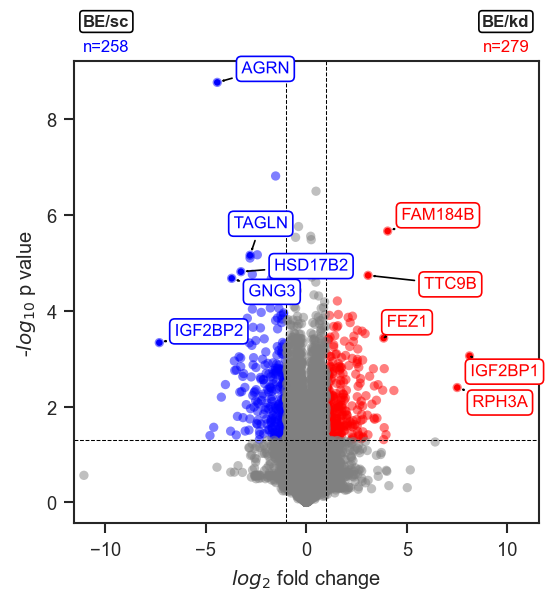
Mark volcano by significance

Note

This function is designed to work seamlessly with plot_volcano(..., no_marks=True) for workflows where you first plot all points in grey and then selectively highlight features of interest.

Source code in src/scpviz/plotting/volcano.py
def mark_volcano_by_significance(
    ax: "plt.Axes",
    volcano_df: pd.DataFrame,
    label: Any,
    color: Any = None,
    text_color: str | None = None,
    label_type: str = "Gene",
    s: float = 10,
    alpha: float = 1,
    show_names: bool = True,
    fontsize: int = 8,
    return_texts: bool = False,
) -> Any:
    """
    Mark a volcano plot with specific proteins or genes, colored by significance.

    This function highlights selected features on an existing volcano plot,
    using the `significance` column in `volcano_df` to determine colors
    (e.g. "upregulated", "downregulated", "not significant").

    Args:
        ax (matplotlib.axes.Axes): Axis on which to plot.
        volcano_df (pandas.DataFrame): DataFrame returned by `plot_volcano()` or
            `pdata.de()`, containing differential expression results and a
            `significance` column with values such as:
            "upregulated", "downregulated", "not significant".
        label (list): Features to highlight. Can also be a nested list, with
            separate lists of features for different cases. All features are
            colored according to their `significance`, not by group.
        color (dict, optional): Mapping from significance category to color.
            Defaults to:
                {
                    "not significant": "grey",
                    "upregulated": "red",
                    "downregulated": "blue",
                }
            You can override any of these by passing a dict with the same keys.
        text_color (str, optional): Text color. Default is None, which makes each label follow its corresponding marker color.
            - If str: all labels use the same text color.
            - If dict: mapping from significance category to text color
              (e.g. "upregulated", "downregulated", "not significant").
              Categories not found in the dict fall back to the `"not significant"`
              text color (or black if not provided).

        label_type (str): Type of label to display. Default is `"Gene"`.
        s (float): Marker size. Default is 10.
        alpha (float): Marker transparency. Default is 1.
        show_names (bool): Whether to show labels for the selected features.
            Default is True.
        fontsize (int): Font size for labels. Default is 8.
        return_texts (bool): Whether to return the list of created text artists.
            This is useful when labeling multiple groups and performing a single
            global `adjust_text()` call at the end.

    Returns:
        matplotlib.axes.Axes: Axis with highlighted points if `return_texts=False`.
        tuple (matplotlib.axes.Axes, list): Returned if `return_texts=True`,
            where the list contains the text artists for further adjustment.

    Example:
        Highlight specific features on a volcano plot using significance colors;
        ``label`` is required. This example marks the top up- and down-regulated
        features by ``significance_score``:
            ```python
            import matplotlib.pyplot as plt
            from scpviz import plotting as scplt

            fig, ax = plt.subplots(figsize=(4, 4))
            values = [
                {"cellline": "BE", "condition": "kd"},
                {"cellline": "BE", "condition": "sc"},
            ]
            ax, volcano_df = scplt.plot_volcano(
                ax, pdata_norm, values=values, return_df=True, label=[0, 0]
            )
            up_ids = (
                volcano_df[volcano_df["significance"] == "upregulated"]
                .sort_values("significance_score", ascending=False)
                .head(5)
                .index.tolist()
            )
            down_ids = (
                volcano_df[volcano_df["significance"] == "downregulated"]
                .sort_values("significance_score", ascending=True)
                .head(5)
                .index.tolist()
            )
            scplt.mark_volcano_by_significance(ax, volcano_df, label=up_ids + down_ids)
            plt.show()
            ```

        ![Mark volcano by significance](../../assets/plots/mark_volcano_by_significance.png)

    Note:
        This function is designed to work seamlessly with
        `plot_volcano(..., no_marks=True)` for workflows where you first plot
        all points in grey and then selectively highlight features of interest.
    """

    default_color = {
        "not significant": "grey",
        "upregulated": "red",
        "downregulated": "blue",
    }
    if color:
        default_color.update(color)

    if "significance" not in volcano_df.columns:
        raise ValueError(
            "volcano_df must contain a 'significance' column to use "
            "`mark_volcano_by_significance`."
        )

    if return_texts and not show_names:
        print(f"{utils.format_log_prefix('warn_only')} "
            "return_texts=True but show_names=False; no text labels will be returned.")

    if not isinstance(label[0], list):
        label = [label]

    # Decide what we match on for names
    if "Genes" in volcano_df.columns:
        gene_col = volcano_df["Genes"].astype(str)
    else:
        gene_col = volcano_df.index.astype(str)

    all_texts = []
    for label_group in label:
        # Match by index or 'Genes' column
        match_mask = (
            volcano_df.index.isin(label_group) |
            gene_col.isin(label_group)
        )
        match_df = volcano_df[match_mask].copy()

        if match_df.empty:
            continue

        sig_series = match_df["significance"].astype(str)
        point_colors = sig_series.map(default_color).fillna(default_color["not significant"])

        ax.scatter(
            match_df["log2fc"],
            match_df["-log10(p_value)"],
            c=point_colors,
            s=s,
            alpha=alpha,
            edgecolors="none",
        )

        if show_names:
            texts = []

            # Resolve text colors
            if text_color is None:
                text_colors = point_colors  # follow marker color (per-point)
            elif isinstance(text_color, dict):
                tc = sig_series.map(text_color)
                fallback = text_color.get("not significant", "black")
                text_colors = tc.fillna(fallback)
            else:
                text_colors = [text_color] * len(match_df)  # single str

            for (idx, row), c, tc in zip(match_df.iterrows(), point_colors, text_colors):
                if label_type == "Gene" and "Genes" in volcano_df.columns:
                    text = row.get("Genes", idx)
                else:
                    text = idx

                txt = ax.text(
                    row["log2fc"],
                    row["-log10(p_value)"],
                    s=text,
                    fontsize=fontsize,
                    color=tc,
                    bbox=dict(facecolor="white", edgecolor=tc, boxstyle="round"),
                )
                txt.set_path_effects(
                    [PathEffects.withStroke(linewidth=3, foreground="w")]
                )
                texts.append(txt)
                all_texts.append(txt)

            if not return_texts:
                adjust_text(
                    texts,
                    expand=(2, 2),
                    arrowprops=dict(arrowstyle="->", color="black", zorder=5),
                )

    if return_texts:
        return ax, all_texts
    return ax

plot_abundance

plot_abundance(
    ax: "plt.Axes | None",
    pdata: pAnnData,
    namelist: list[str] | None = None,
    layer: str = "X",
    on: str = "protein",
    classes=None,
    return_df=False,
    order=None,
    palette=None,
    log=False,
    facet=None,
    height=4,
    aspect=0.5,
    plot_points=True,
    x_label="gene",
    kind="auto",
    **kwargs: Any
)

Plot abundance of proteins or peptides across samples.

This function visualizes expression values for selected proteins or peptides using violin + box + strip plots, or bar plots when the number of replicates per group is small. Supports grouping, faceting, and custom ordering.

Important default behavior: - Abundances are not log-transformed by default (log=False) - The plotted abundance values remain raw - The y-axis is transformed to log10 scale, so the plot displays log10(abundance) even when raw abundances are used.

Parameters:

Name Type Description Default
ax Axes

Axis to plot on. Ignored if facet is used.

required
pdata pAnnData

Input pAnnData object.

required
namelist list of str

List of accessions or gene names to plot. If None, all available features are considered.

None
layer str

Data layer to use for abundance values. Default is 'X'.

'X'
on str

Data level to plot, either 'protein' or 'peptide'.

'protein'
classes str or list of str

.obs column(s) to use for grouping samples. Determines coloring and grouping structure.

None
return_df bool

If True, returns the DataFrame of replicate and summary values.

False
order dict or list

Custom order of classes. For dictionary input, keys are class names and values are the ordered categories.
Example: order = {"condition": ["sc", "kd"]}.

None
palette list or dict

Color palette mapping groups to colors.

None
log bool

If True, apply log2 transformation to abundance values. Default is False (raw values used; y-axis log10-scaled instead).

False
facet str

.obs column to facet by, creating multiple subplots.

None
height float

Height of each facet plot. Default is 4.

4
aspect float

Aspect ratio of each facet plot. Default is 0.5.

0.5
plot_points bool

Whether to overlay stripplot of individual samples.

True
x_label str

Label for the x-axis, either 'gene' or 'accession'.

'gene'
kind str

Type of plot. Options:

  • 'auto': Default; uses barplot if groups have ≤ 3 samples, otherwise violin.
  • 'violin': Always use violin + box + strip.
  • 'bar': Always use barplot.
'auto'
**kwargs Any

Additional keyword arguments passed to seaborn plotting functions.

{}

Returns:

Name Type Description
ax Axes or FacetGrid

The axis or facet grid containing the plot.

df (DataFrame, optional)

Returned if return_df=True.

Example

Plot abundance of selected marker proteins grouped by cell line and condition:

import matplotlib.pyplot as plt
from scpviz import plotting as scplt

fig, ax = plt.subplots(figsize=(4, 4))
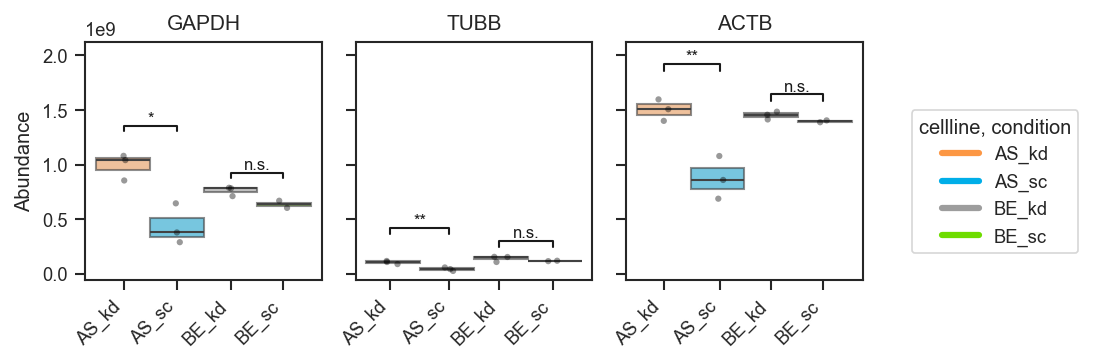
scplt.plot_abundance(
    ax, pdata, namelist=["GAPDH", "TUBB", "ACTB"], classes=["cellline", "condition"]
)
plt.show()
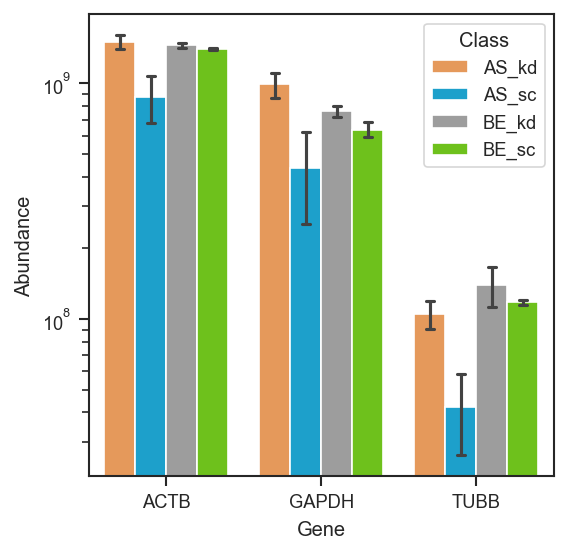
Plot abundance

Source code in src/scpviz/plotting/abundance.py
def plot_abundance(ax: "plt.Axes | None", pdata: pAnnData, namelist: list[str] | None = None, layer: str = "X", on: str = "protein",
                   classes=None, return_df=False, order=None, palette=None,
                   log=False, facet=None, height=4, aspect=0.5,
                   plot_points=True, x_label='gene', kind='auto', **kwargs: Any):
    """
    Plot abundance of proteins or peptides across samples.

    This function visualizes expression values for selected proteins or peptides
    using violin + box + strip plots, or bar plots when the number of replicates
    per group is small. Supports grouping, faceting, and custom ordering.

    **Important default behavior:**
    - Abundances are **not log-transformed** by default (`log=False`)
    - The plotted abundance values remain **raw**
    - The **y-axis is transformed to log10 scale**, so the plot displays
      log10(abundance) even when raw abundances are used.    

    Args:
        ax (matplotlib.axes.Axes): Axis to plot on. Ignored if `facet` is used.
        pdata (pAnnData): Input pAnnData object.
        namelist (list of str, optional): List of accessions or gene names to plot.
            If None, all available features are considered.
        layer (str): Data layer to use for abundance values. Default is `'X'`.
        on (str): Data level to plot, either `'protein'` or `'peptide'`.
        classes (str or list of str, optional): `.obs` column(s) to use for grouping
            samples. Determines coloring and grouping structure.
        return_df (bool): If True, returns the DataFrame of replicate and summary values.
        order (dict or list, optional): Custom order of classes. For dictionary input,
            keys are class names and values are the ordered categories.  
            Example: `order = {"condition": ["sc", "kd"]}`.
        palette (list or dict, optional): Color palette mapping groups to colors.
        log (bool): If True, apply log2 transformation to abundance values. Default is False (raw values used; y-axis log10-scaled instead).
        facet (str, optional): `.obs` column to facet by, creating multiple subplots.
        height (float): Height of each facet plot. Default is 4.
        aspect (float): Aspect ratio of each facet plot. Default is 0.5.
        plot_points (bool): Whether to overlay stripplot of individual samples.
        x_label (str): Label for the x-axis, either `'gene'` or `'accession'`.
        kind (str): Type of plot. Options:

            - `'auto'`: Default; uses barplot if groups have ≤ 3 samples, otherwise violin.
            - `'violin'`: Always use violin + box + strip.
            - `'bar'`: Always use barplot.

        **kwargs (Any): Additional keyword arguments passed to seaborn plotting functions.

    Returns:
        ax (matplotlib.axes.Axes or seaborn.FacetGrid): The axis or facet grid containing the plot.
        df (pandas.DataFrame, optional): Returned if `return_df=True`.

    !!! example
        Plot abundance of selected marker proteins grouped by cell line and condition:
            ```python
            import matplotlib.pyplot as plt
            from scpviz import plotting as scplt

            fig, ax = plt.subplots(figsize=(4, 4))
            scplt.plot_abundance(
                ax, pdata, namelist=["GAPDH", "TUBB", "ACTB"], classes=["cellline", "condition"]
            )
            plt.show()
            ```

        ![Plot abundance](../../assets/plots/plot_abundance.png)
    """

    # Get abundance DataFrame
    df = utils.get_abundance(
        pdata, namelist=namelist, layer=layer, on=on,
        classes=classes, log=log, x_label=x_label
    )

    # custom class ordering
    if classes is not None and order is not None:
        unused = set(order) - (set([classes]) if isinstance(classes, str) else set(classes))
        if unused:
            print(f"⚠️ Unused keys in `order`: {unused} (not in `classes`)")

        if isinstance(classes, str):
            if classes in order:
                cat_type = pd.api.types.CategoricalDtype(order[classes], ordered=True)
                df['class'] = df['class'].astype(cat_type)
        else:
            for cls in classes:
                if cls in order and cls in df.columns:
                    cat_type = pd.api.types.CategoricalDtype(order[cls], ordered=True)
                    df[cls] = df[cls].astype(cat_type)

    # sort the dataframe so group order is preserved in plotting
    if classes is not None:
        sort_cols = ['x_label_name']
        if isinstance(classes, str):
            sort_cols.append('class')
        else:
            sort_cols.extend(classes)
        df = df.sort_values(by=sort_cols)

    # Facet handling
    df['facet'] = df[facet] if facet else 'all'

    if facet and classes and facet == classes:
        raise ValueError("`facet` and `classes` must be different.")

    if return_df:
        return df

    if palette is None:
        palette = get_color('palette')

    x_col = 'x_label_name'
    y_col = 'log2_abundance' if log else 'abundance'

    if kind == 'auto':
        sample_counts = df.groupby([x_col, 'class', 'facet']).size()
        kind = 'bar' if sample_counts.min() <= 3 else 'violin'

    def _plot_bar(df):
        bar_kwargs = dict(
            ci='sd',
            capsize=0.2,
            errwidth=1.5,
            palette=palette
        )
        bar_kwargs.update(kwargs)
        if facet and df['facet'].nunique() > 1:
            g = sns.FacetGrid(df, col='facet', height=height, aspect=aspect, sharey=True)
            g.map_dataframe(sns.barplot, x=x_col, y=y_col, hue='class', **bar_kwargs)
            g.set_axis_labels("Gene" if x_label == 'gene' else "Accession", "log2(Abundance)" if log else "Abundance")
            g.set_titles("{col_name}")
            g.add_legend(title='Class', frameon=True)

            if not log:
                for ax_ in g.axes.flatten():
                    ax_.set_yscale("log")                
            return g
        else:
            if ax is None:
                fig, _ax = plt.subplots(figsize=(6, 4))
            else:
                _ax = ax

            sns.barplot(data=df, x=x_col, y=y_col, hue='class', ax=_ax, **bar_kwargs)

            # deduplicate legend
            handles, labels = _ax.get_legend_handles_labels()
            by_label = dict(zip(labels, handles))
            _ax.legend(by_label.values(), by_label.keys(), title='Class', frameon=True)
            _ax.set_yscale("log") if not log else None
            _ax.set_ylabel("log2(Abundance)" if log else "Abundance")
            _ax.set_xlabel("Gene" if x_label == 'gene' else "Accession")

            return _ax

    def _plot_violin(df):
        violin_kwargs = dict(inner="box", linewidth=1, cut=0, alpha=0.5, density_norm="width")
        violin_kwargs.update(kwargs)
        if facet and df['facet'].nunique() > 1:
            g = sns.FacetGrid(df, col='facet', height=height, aspect=aspect, sharey=True)
            g.map_dataframe(sns.violinplot, x=x_col, y=y_col, hue='class', palette=palette, **violin_kwargs)
            if plot_points:
                def _strip(data, color, **kwargs_inner):
                    sns.stripplot(data=data, x=x_col, y=y_col, hue='class', dodge=True, jitter=True,
                                  color='black', size=3, alpha=0.5, legend=False, **kwargs_inner)
                g.map_dataframe(_strip)
            g.set_axis_labels("Gene" if x_label == 'gene' else "Accession", "log2(Abundance)" if log else "Abundance")
            if not log:
                for ax_ in g.axes.flatten():
                    ax_.set_yscale("log")
            g.set_titles("{col_name}")
            g.add_legend(title='Class', frameon=True)
            return g
        else:
            if ax is None:
                fig, _ax = plt.subplots(figsize=(6, 4))
            else:
                _ax = ax
            sns.violinplot(data=df, x=x_col, y=y_col, hue='class', palette=palette, ax=_ax, **violin_kwargs)
            if plot_points:
                sns.stripplot(data=df, x=x_col, y=y_col, hue='class', dodge=True, jitter=True,
                              color='black', size=3, alpha=0.5, legend=False, ax=_ax)
            handles, labels = _ax.get_legend_handles_labels()
            by_label = dict(zip(labels, handles))
            _ax.legend(by_label.values(), by_label.keys(), title='Class', frameon=True)
            _ax.set_ylabel("log2(Abundance)" if log else "Abundance")
            _ax.set_xlabel("Gene" if x_label == 'gene' else "Accession")
            _ax.set_yscale("log") if not log else None
            return _ax

    return _plot_bar(df) if kind == 'bar' else _plot_violin(df)

plot_abundance_2D

plot_abundance_2D(
    ax: "plt.Axes",
    data: DataFrame,
    cases: list[list[str]],
    genes: str | list[str] = "all",
    cmap: str = "Blues",
    color: list[str] = ["blue"],
    s: float = 20,
    alpha: list[float] = [0.2, 1],
    calpha: float = 1,
) -> "plt.Axes"

Plot a 2D abundance scatter between two case groups.

This helper computes mean abundance per feature for each case group (from columns matching "Abundance: " + case tokens), then plots a log-log scatter of case1 vs case2. If genes is a list, only those genes are highlighted (matched against data["Gene Symbol"]).

Parameters:

Name Type Description Default
ax Axes

Axis on which to plot.

required
data DataFrame

Long-ish feature table containing abundance columns and a "Gene Symbol" column used for labeling/highlighting.

required
cases list[list[str]]

Exactly two case definitions. Each case is a list of tokens used to match abundance columns (joined by underscores).

required
genes str or list[str]

Either "all" (default) to plot all genes, or a list of gene symbols to highlight.

'all'
cmap str

Colormap name used for the background scatter.

'Blues'
color list[str]

Colors for highlights/background points (legacy behavior).

['blue']
s float

Scatter marker size.

20
alpha list[float]

Alpha for background scatter and highlight points.

[0.2, 1]
calpha float

Legacy parameter (currently unused).

1

Returns:

Type Description
'plt.Axes'

matplotlib.axes.Axes: Axis containing the plot.

Note

This function assumes the input table uses scpviz-style abundance column naming. It is retained for backwards compatibility and ad-hoc exploratory plots.

Source code in src/scpviz/plotting/abundance.py
def plot_abundance_2D(ax: "plt.Axes", data: pd.DataFrame, cases: list[list[str]], genes: str | list[str] = "all", cmap: str = "Blues", color: list[str] = ["blue"], s: float = 20, alpha: list[float] = [0.2, 1], calpha: float = 1) -> "plt.Axes":
    """
    Plot a 2D abundance scatter between two case groups.

    This helper computes mean abundance per feature for each case group (from columns matching
    ``"Abundance: "`` + case tokens), then plots a log-log scatter of case1 vs case2. If ``genes``
    is a list, only those genes are highlighted (matched against ``data["Gene Symbol"]``).

    Args:
        ax (matplotlib.axes.Axes): Axis on which to plot.
        data (pandas.DataFrame): Long-ish feature table containing abundance columns and a
            ``"Gene Symbol"`` column used for labeling/highlighting.
        cases (list[list[str]]): Exactly two case definitions. Each case is a list of tokens
            used to match abundance columns (joined by underscores).
        genes (str or list[str]): Either ``"all"`` (default) to plot all genes, or a list of gene
            symbols to highlight.
        cmap (str): Colormap name used for the background scatter.
        color (list[str]): Colors for highlights/background points (legacy behavior).
        s (float): Scatter marker size.
        alpha (list[float]): Alpha for background scatter and highlight points.
        calpha (float): Legacy parameter (currently unused).

    Returns:
        matplotlib.axes.Axes: Axis containing the plot.

    Note:
        This function assumes the input table uses scpviz-style abundance column naming. It is
        retained for backwards compatibility and ad-hoc exploratory plots.
    """

    for j in range(len(cases)):
        vars = ['Abundance: '] + cases[j]
        append_string = '_'.join(vars[1:])

        cols = [col for col in data.columns if all([re.search(r'\b{}\b'.format(var), col) for var in vars])]

        # average abundance of proteins across these columns, ignoring NaN values
        data['Average: '+append_string] = data[cols].mean(axis=1, skipna=True)
        data['Stdev: '+append_string] = data[cols].std(axis=1, skipna=True)

        print(append_string)

    case1_name_string = '_'.join(cases[0][:])
    case2_name_string = '_'.join(cases[1][:])

    # find the number for the average column  of the 2 cases
    case1_col = data.columns.get_loc('Average: '+case1_name_string)
    case2_col = data.columns.get_loc('Average: '+case2_name_string)

    # ignore rows where the 2 cases are NaN or 0
    data = data.copy()
    data = data[data.iloc[:,case1_col].notnull()]
    data = data[data.iloc[:,case2_col].notnull()]
    data = data[data.iloc[:,case1_col] != 0]
    data = data[data.iloc[:,case2_col] != 0]

    X = data.iloc[:,case1_col].values
    Y = data.iloc[:,case2_col].values

    # make 2D scatter plot of case1 abundance vs case2 abundance
    ax.scatter(X, Y, marker='.',cmap=cmap, s=s,alpha=alpha[0])
    # set both axis to log
    ax.set_xscale('log')
    ax.set_yscale('log')

    if isinstance(genes, list):
        print('highlighting genes')
        # genes is a list of gene names, so let's extract those that match the accession column
        for i in range(len(genes)):
            # if gene is in data['Gene Symbol'], extract the abundance values for that gene
            if genes[i] in data['Gene Symbol'].values:
                X_highlight = data[data['Gene Symbol']==genes[i]].iloc[:,case1_col].values[0]
                Y_highlight = data[data['Gene Symbol']==genes[i]].iloc[:,case2_col].values[0]
                ax.scatter(X_highlight,Y_highlight,marker='.',color=color[0],s=s,alpha=alpha[1])
                # add gene name to plot
                ax.annotate(genes[i], (X_highlight,Y_highlight), xytext=(X_highlight+10,Y_highlight*1.1), fontsize=10)

    else:
        # plot all genes
        for i, txt in enumerate(data['Gene Symbol']):
            # ax.annotate(txt, (X[i],Y[i]), xytext=(X[i]+10,Y[i]*1.1), fontsize=8)
            ax.scatter(X[i],Y[i],marker='o',color=color[0],s=s,alpha=alpha[1])

    # get min and max of both axes
    xmin, xmax = ax.get_xlim()
    ymin, ymax = ax.get_ylim()

    # add a 1:1 line, make line hash dotted with alpha = 0.3
    ax.plot([1e-1,1e7],[1e-1,1e7], ls='--', color='grey', alpha=0.3)

    # set x and y limits to be the same
    minval = min(xmin, ymin)
    maxval = max(xmax, ymax)

    ax.set_xlim([minval, maxval])
    ax.set_ylim([minval, maxval])

    return ax

plot_abundance_boxgrid

plot_abundance_boxgrid(
    pdata: pAnnData,
    namelist: list[str] | None = None,
    ax: Any = None,
    layer: str = "X",
    on: str = "protein",
    classes: str | list[str] | None = None,
    return_df: bool = False,
    order=None,
    plot_type="box",
    log_scale=False,
    figsize=(2, 2),
    palette=None,
    y_min=None,
    y_max=None,
    label_x=True,
    show_n=False,
    global_legend=True,
    box_kwargs=None,
    hline_kwargs=None,
    bar_kwargs=None,
    bar_error="sd",
    violin_kwargs=None,
    text_kwargs=None,
    strip_kwargs=None,
)

Plot abundance values in a one-row panel of boxplots, mean-lines, bars, or violins.

This function generates a clean horizontal panel, with one subplot per gene, using plot_type to select boxplots (default), mean-lines, bar plots, or violin plots. If log_scale=True, abundance values are visualized in log10 units (with zero or negative values clipped to 0 before transformation). The layout is optimized for compact manuscript figure panels and supports custom global legends, count annotations, and flexible formatting via keyword dictionaries.

Parameters:

Name Type Description Default
pdata pAnnData

Input pAnnData object.

required
namelist list of str

List of accessions or gene names to plot. If None, all available features are considered.

None
ax Axes

Axis to plot on. Generates a new axis if None.

None
layer str

Data layer to use for abundance values. Default is 'X'.

'X'
on str

Data level to plot, either 'protein' or 'peptide'.

'protein'
return_df bool

If True, returns the DataFrame of replicate and summary values.

False
order list of str

Ordered list to plot by. If None, plots by given dataframe order.

None
classes str

Column in .obs to use for grouping samples (default: None).

None
plot_type str

Type of plot, select from one of {"box", "line", "bar", "violin"}. Defaults to "box".

'box'
log_scale bool

If True, plot log10-transformed abundances on a linear axis. If False (default), plot raw abundance values on a linear axis.

False
figsize tuple

Figure size as (width, height) in inches.

(2, 2)
palette dict or list

Color palette for grouping categories. Defaults to scplt.get_color("colors", n_classes).

None
y_min float or None

Lower y-axis limit in plotting units. If log_scale=True, this is in log10 units (e.g., 2 → 10²). If log_scale=False, this is in raw abundance units. If None, inferred.

None
y_max float or None

Upper y-axis limit in plotting units. If log_scale=True, this is in log10 units (e.g., 6 → 10⁶). If log_scale=False, this is in raw abundance units. If None, inferred.

None
label_x bool

Whether to display x tick labels inside each subplot.

True
show_n bool

Whether to annotate each subplot with sample counts.

False
global_legend bool

Whether to display a single global legend.

True
box_kwargs dict

Additional arguments passed to sns.boxplot (used when plot_type="box").

None
hline_kwargs dict

Styling for mean segments when plot_type="line". Recognized keys include Matplotlib hlines options plus half_width (float, default 0.15): half the segment length in x-axis units; use a smaller value when dodged groups would otherwise overlap.

None
bar_kwargs dict

Passed to Axes.bar when plot_type="bar" (e.g. width in x-axis units; default here is 0.3—decrease when many hue levels overlap on one gene tick).

None
bar_error str

Error bar for bar plot. Select from one of {"sd", "sem", None, }, where callable takes a 1D array and returns a scalar error. Defaults to "sd".

'sd'
violin_kwargs dict

Additional arguments passed to sns.violinplot (used when plot_type="violin").

None
text_kwargs dict

Keyword arguments for count labels (e.g., fontsize, offset).

None
strip_kwargs dict

Keyword arguments for strip (raw points), e.g. {"darken_factor": 0.65}.

None

Returns:

Name Type Description
fig Figure

The generated figure.

axes list of matplotlib.axes.Axes

One axis per gene.

df (DataFrame, optional)

Returned if return_df=True.

Note

Default customizations for keyword dictionaries:

Boxplot styling (used when plot_type="box"):

box_kwargs = {
    "showcaps": False,
    "whiskerprops": {"visible": False},
    "showfliers": False,
    "boxprops": {"alpha": 0.6, "linewidth": 1},
    "linewidth": 1,
    "dodge": True,
}

Mean-line styling (used when plot_type="line"):

hline_kwargs = {
    "color": "k",
    "linewidth": 2.0,
    "zorder": 5,
    "half_width": 0.15,
}
half_width is in x-axis units; lower it when several classes are dodged and mean segments would cross.

Bar styling (used when plot_type="bar"):

bar_kwargs = {
    "alpha": 0.8,
    "edgecolor": "black",
    "linewidth": 0.6,
    "width": 0.3,
    "capsize": 2,
    "zorder": 3,
}
width is passed to Axes.bar (x-axis units); use a smaller value when bars from neighboring hue levels overlap.

Violin styling (used when plot_type="violin"):

violin_kwargs = {
    "inner": "quartile",
    "dodge": True,
    "zorder": 5,
}

Strip styling (raw points; used for all plot types):

strip_kwargs = {
    "jitter": True,
    "alpha": 0.4,
    "size": 3,
    "zorder": 7,
    "darken_factor": 0.65,
}

Text annotation styling (used when show_n=True):

text_kwargs = {
    "fontsize": 7,
    "color": "black",
    "ha": "center",
    "va": "bottom",
    "zorder": 10,
    "offset": 0.1,
}

Example

Basic usage (grouped boxplots):

fig, axes = pdata.plot_abundance_boxgrid(
    namelist=["GAPDH", "TUBB", "ACTB"],
    classes=["cellline", "condition"],
    plot_type="box",
    figsize=(2, 2.5),
)
plt.show()
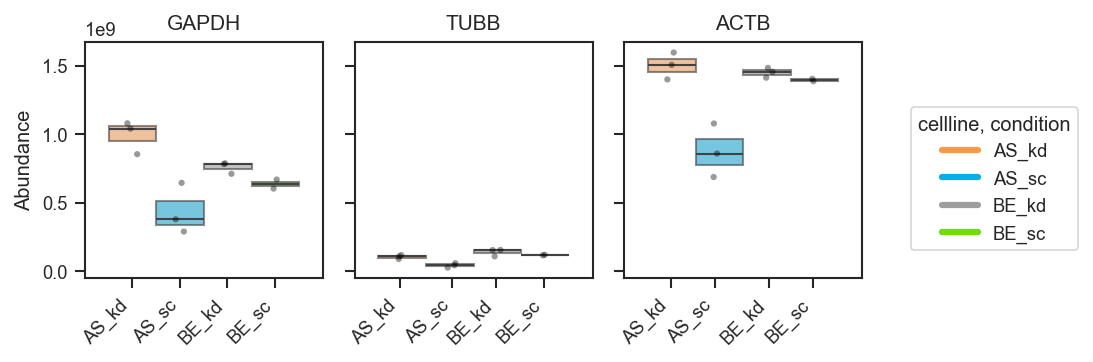
Plot abundance boxgrid

Bar plots with error bars:

fig, axes = pdata.plot_abundance_boxgrid(
    namelist=["GAPDH", "TUBB", "ACTB"],
    classes=["cellline", "condition"],
    plot_type="bar",
    bar_error="sd",  # "sd", "sem", None, or callable
    bar_kwargs={"width": 0.14},  # narrower bars when many groups dodge
    figsize=(2, 2.5),
)
plt.show()
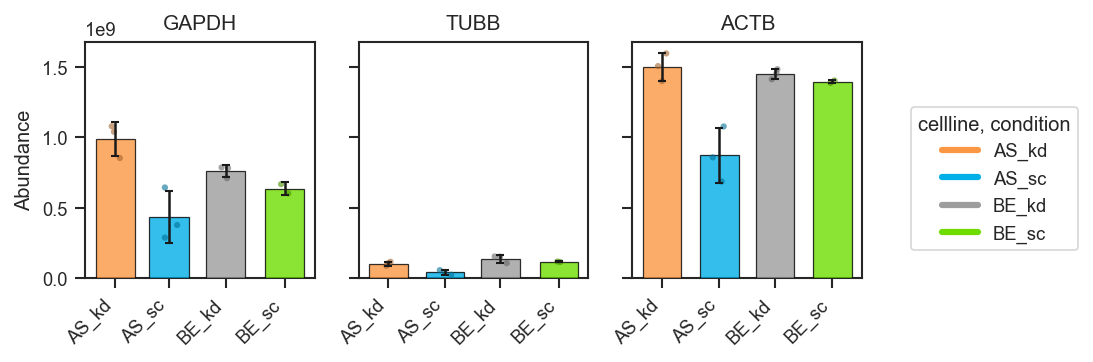
Plot abundance boxgrid bar

Mean-lines with count annotations:

fig, axes = pdata.plot_abundance_boxgrid(
    namelist=["GAPDH", "TUBB", "ACTB"],
    classes=["cellline", "condition"],
    plot_type="line",
    show_n=True,
    hline_kwargs={"half_width": 0.08},  # shorter segments when groups dodge
    figsize=(2, 2.5),
)
plt.show()
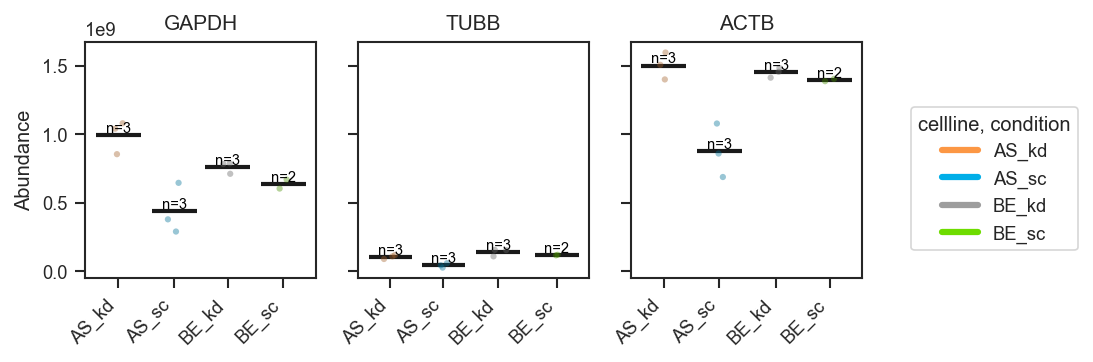
Plot abundance boxgrid line

Violin plots (distribution-focused):

fig, axes = pdata.plot_abundance_boxgrid(
    namelist=["GAPDH", "TUBB", "ACTB"],
    classes=["cellline", "condition"],
    plot_type="violin",
    figsize=(2, 2.5),
)
plt.show()
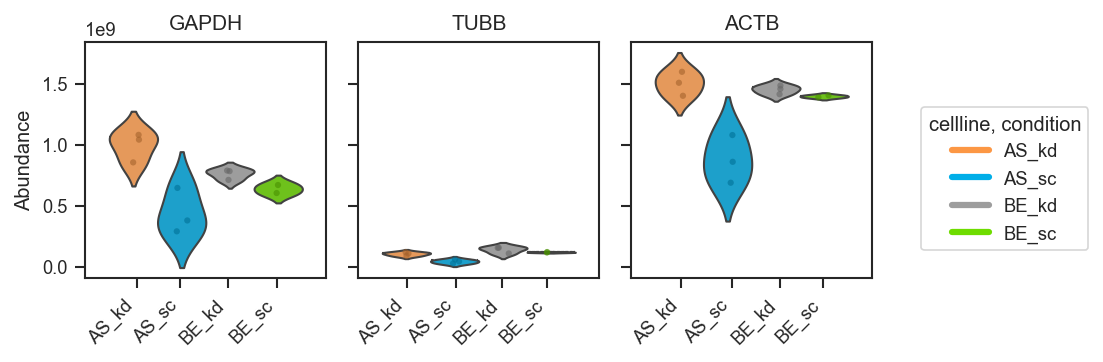
Plot abundance boxgrid violin

Customizing appearance (palette, order, and styling):

fig, axes = pdata.plot_abundance_boxgrid(
    namelist=["GAPDH", "TUBB", "ACTB"],
    classes=["cellline", "condition"],
    plot_type="box",
    box_kwargs={"boxprops": {"alpha": 0.45}, "linewidth": 1.2},
    strip_kwargs={"size": 4, "alpha": 0.6},
    figsize=(2, 2.5),
)
plt.show()
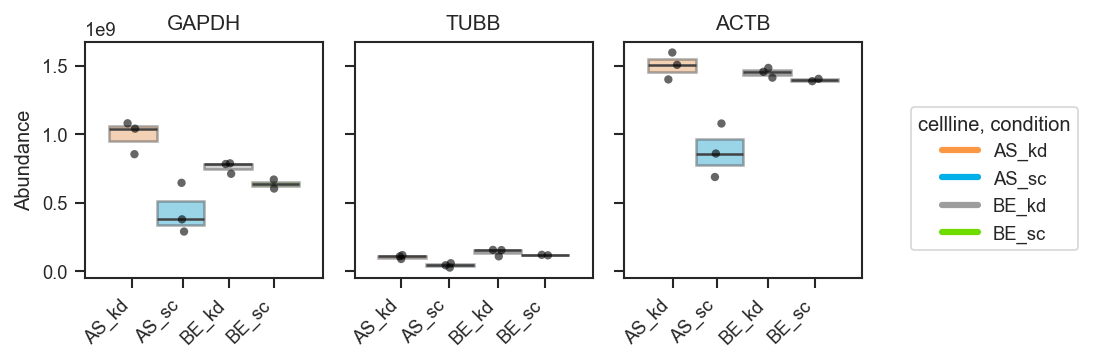
Plot abundance boxgrid custom

Return the plotting DataFrame for downstream checks:

fig, axes, df = pdata.plot_abundance_boxgrid(
    namelist=["GAPDH", "TUBB", "ACTB"],
    classes=["cellline", "condition"],
    plot_type="box",
    return_df=True,
)

display(df.head())
plt.show()

Plot abundance boxgrid

Source code in src/scpviz/plotting/abundance.py
 413
 414
 415
 416
 417
 418
 419
 420
 421
 422
 423
 424
 425
 426
 427
 428
 429
 430
 431
 432
 433
 434
 435
 436
 437
 438
 439
 440
 441
 442
 443
 444
 445
 446
 447
 448
 449
 450
 451
 452
 453
 454
 455
 456
 457
 458
 459
 460
 461
 462
 463
 464
 465
 466
 467
 468
 469
 470
 471
 472
 473
 474
 475
 476
 477
 478
 479
 480
 481
 482
 483
 484
 485
 486
 487
 488
 489
 490
 491
 492
 493
 494
 495
 496
 497
 498
 499
 500
 501
 502
 503
 504
 505
 506
 507
 508
 509
 510
 511
 512
 513
 514
 515
 516
 517
 518
 519
 520
 521
 522
 523
 524
 525
 526
 527
 528
 529
 530
 531
 532
 533
 534
 535
 536
 537
 538
 539
 540
 541
 542
 543
 544
 545
 546
 547
 548
 549
 550
 551
 552
 553
 554
 555
 556
 557
 558
 559
 560
 561
 562
 563
 564
 565
 566
 567
 568
 569
 570
 571
 572
 573
 574
 575
 576
 577
 578
 579
 580
 581
 582
 583
 584
 585
 586
 587
 588
 589
 590
 591
 592
 593
 594
 595
 596
 597
 598
 599
 600
 601
 602
 603
 604
 605
 606
 607
 608
 609
 610
 611
 612
 613
 614
 615
 616
 617
 618
 619
 620
 621
 622
 623
 624
 625
 626
 627
 628
 629
 630
 631
 632
 633
 634
 635
 636
 637
 638
 639
 640
 641
 642
 643
 644
 645
 646
 647
 648
 649
 650
 651
 652
 653
 654
 655
 656
 657
 658
 659
 660
 661
 662
 663
 664
 665
 666
 667
 668
 669
 670
 671
 672
 673
 674
 675
 676
 677
 678
 679
 680
 681
 682
 683
 684
 685
 686
 687
 688
 689
 690
 691
 692
 693
 694
 695
 696
 697
 698
 699
 700
 701
 702
 703
 704
 705
 706
 707
 708
 709
 710
 711
 712
 713
 714
 715
 716
 717
 718
 719
 720
 721
 722
 723
 724
 725
 726
 727
 728
 729
 730
 731
 732
 733
 734
 735
 736
 737
 738
 739
 740
 741
 742
 743
 744
 745
 746
 747
 748
 749
 750
 751
 752
 753
 754
 755
 756
 757
 758
 759
 760
 761
 762
 763
 764
 765
 766
 767
 768
 769
 770
 771
 772
 773
 774
 775
 776
 777
 778
 779
 780
 781
 782
 783
 784
 785
 786
 787
 788
 789
 790
 791
 792
 793
 794
 795
 796
 797
 798
 799
 800
 801
 802
 803
 804
 805
 806
 807
 808
 809
 810
 811
 812
 813
 814
 815
 816
 817
 818
 819
 820
 821
 822
 823
 824
 825
 826
 827
 828
 829
 830
 831
 832
 833
 834
 835
 836
 837
 838
 839
 840
 841
 842
 843
 844
 845
 846
 847
 848
 849
 850
 851
 852
 853
 854
 855
 856
 857
 858
 859
 860
 861
 862
 863
 864
 865
 866
 867
 868
 869
 870
 871
 872
 873
 874
 875
 876
 877
 878
 879
 880
 881
 882
 883
 884
 885
 886
 887
 888
 889
 890
 891
 892
 893
 894
 895
 896
 897
 898
 899
 900
 901
 902
 903
 904
 905
 906
 907
 908
 909
 910
 911
 912
 913
 914
 915
 916
 917
 918
 919
 920
 921
 922
 923
 924
 925
 926
 927
 928
 929
 930
 931
 932
 933
 934
 935
 936
 937
 938
 939
 940
 941
 942
 943
 944
 945
 946
 947
 948
 949
 950
 951
 952
 953
 954
 955
 956
 957
 958
 959
 960
 961
 962
 963
 964
 965
 966
 967
 968
 969
 970
 971
 972
 973
 974
 975
 976
 977
 978
 979
 980
 981
 982
 983
 984
 985
 986
 987
 988
 989
 990
 991
 992
 993
 994
 995
 996
 997
 998
 999
1000
1001
1002
1003
1004
1005
1006
1007
1008
1009
1010
1011
1012
1013
1014
1015
1016
1017
1018
1019
1020
1021
1022
1023
1024
1025
1026
1027
1028
1029
1030
1031
def plot_abundance_boxgrid(pdata: pAnnData, namelist: list[str] | None = None, ax: Any = None, layer: str = "X", on: str = "protein", classes: str | list[str] | None = None, return_df: bool = False,
    order=None, plot_type="box", log_scale=False, figsize=(2,2), palette=None, y_min=None, y_max=None, label_x=True, show_n=False,
    global_legend=True, box_kwargs=None, hline_kwargs=None, bar_kwargs=None, bar_error='sd', violin_kwargs=None, text_kwargs=None, strip_kwargs=None):
    """
    Plot abundance values in a one-row panel of boxplots, mean-lines, bars, or violins.

    This function generates a clean horizontal panel, with one subplot per gene,
    using ``plot_type`` to select boxplots (default), mean-lines, bar plots, or
    violin plots. If ``log_scale=True``, abundance values are visualized in
    log10 units (with zero or negative values clipped to 0 before transformation).
    The layout is optimized for compact manuscript figure panels and supports
    custom global legends, count annotations, and flexible formatting via keyword
    dictionaries.

    Args:
        pdata (pAnnData): Input pAnnData object.
        namelist (list of str, optional): List of accessions or gene names to plot.
            If None, all available features are considered.
        ax (matplotlib.axes.Axes): Axis to plot on. Generates a new axis if None.
        layer (str): Data layer to use for abundance values. Default is `'X'`.
        on (str): Data level to plot, either `'protein'` or `'peptide'`.
        return_df (bool): If True, returns the DataFrame of replicate and summary values.
        order (list of str): Ordered list to plot by. If None, plots by given dataframe order.
        classes (str): Column in `.obs` to use for grouping samples (default: None).
        plot_type (str): Type of plot, select from one of {"box", "line", "bar", "violin"}.
            Defaults to "box".
        log_scale (bool): If True, plot log10-transformed abundances on a linear axis.
            If False (default), plot raw abundance values on a linear axis.
        figsize (tuple): Figure size as (width, height) in inches.
        palette (dict or list, optional): Color palette for grouping categories.
            Defaults to ``scplt.get_color("colors", n_classes)``.
        y_min (float or None): Lower y-axis limit in plotting units. If ``log_scale=True``,
            this is in log10 units (e.g., 2 → 10²). If ``log_scale=False``, this is in
            raw abundance units. If None, inferred.
        y_max (float or None): Upper y-axis limit in plotting units. If ``log_scale=True``,
            this is in log10 units (e.g., 6 → 10⁶). If ``log_scale=False``, this is in
            raw abundance units. If None, inferred.
        label_x (bool): Whether to display x tick labels inside each subplot.
        show_n (bool): Whether to annotate each subplot with sample counts.
        global_legend (bool): Whether to display a single global legend.
        box_kwargs (dict, optional): Additional arguments passed to ``sns.boxplot``
            (used when ``plot_type="box"``).
        hline_kwargs (dict, optional): Styling for mean segments when ``plot_type="line"``.
            Recognized keys include Matplotlib ``hlines`` options plus ``half_width``
            (float, default 0.15): half the segment length in x-axis units; use a
            smaller value when dodged groups would otherwise overlap.
        bar_kwargs (dict, optional): Passed to ``Axes.bar`` when ``plot_type="bar"``
            (e.g. ``width`` in x-axis units; default here is 0.3—decrease when many
            hue levels overlap on one gene tick).
        bar_error (str, optional): Error bar for bar plot. Select from one of
            {"sd", "sem", None, <callable>}, where callable takes a 1D array and returns
            a scalar error. Defaults to "sd".
        violin_kwargs (dict, optional): Additional arguments passed to ``sns.violinplot``
            (used when ``plot_type="violin"``).
        text_kwargs (dict, optional): Keyword arguments for count labels
            (e.g., fontsize, offset).
        strip_kwargs (dict, optional): Keyword arguments for strip (raw points),
            e.g. ``{"darken_factor": 0.65}``.

    Returns:
        fig (matplotlib.figure.Figure): The generated figure.
        axes (list of matplotlib.axes.Axes): One axis per gene.
        df (pandas.DataFrame, optional): Returned if `return_df=True`.

    !!! note
        Default customizations for keyword dictionaries:

        Boxplot styling (used when ``plot_type="box"``):
        ```python
        box_kwargs = {
            "showcaps": False,
            "whiskerprops": {"visible": False},
            "showfliers": False,
            "boxprops": {"alpha": 0.6, "linewidth": 1},
            "linewidth": 1,
            "dodge": True,
        }
        ```

        Mean-line styling (used when ``plot_type="line"``):
        ```python
        hline_kwargs = {
            "color": "k",
            "linewidth": 2.0,
            "zorder": 5,
            "half_width": 0.15,
        }
        ```
        ``half_width`` is in x-axis units; lower it when several classes are dodged
        and mean segments would cross.

        Bar styling (used when ``plot_type="bar"``):
        ```python
        bar_kwargs = {
            "alpha": 0.8,
            "edgecolor": "black",
            "linewidth": 0.6,
            "width": 0.3,
            "capsize": 2,
            "zorder": 3,
        }
        ```
        ``width`` is passed to ``Axes.bar`` (x-axis units); use a smaller value when
        bars from neighboring hue levels overlap.

        Violin styling (used when ``plot_type="violin"``):
        ```python
        violin_kwargs = {
            "inner": "quartile",
            "dodge": True,
            "zorder": 5,
        }
        ```

        Strip styling (raw points; used for all plot types):
        ```python
        strip_kwargs = {
            "jitter": True,
            "alpha": 0.4,
            "size": 3,
            "zorder": 7,
            "darken_factor": 0.65,
        }
        ```

        Text annotation styling (used when ``show_n=True``):
        ```python
        text_kwargs = {
            "fontsize": 7,
            "color": "black",
            "ha": "center",
            "va": "bottom",
            "zorder": 10,
            "offset": 0.1,
        }
        ```

    !!! example
        Basic usage (grouped boxplots):
        ```python
        fig, axes = pdata.plot_abundance_boxgrid(
            namelist=["GAPDH", "TUBB", "ACTB"],
            classes=["cellline", "condition"],
            plot_type="box",
            figsize=(2, 2.5),
        )
        plt.show()
        ```

        ![Plot abundance boxgrid](../../assets/plots/plot_abundance_boxgrid.png)

        Bar plots with error bars:
        ```python
        fig, axes = pdata.plot_abundance_boxgrid(
            namelist=["GAPDH", "TUBB", "ACTB"],
            classes=["cellline", "condition"],
            plot_type="bar",
            bar_error="sd",  # "sd", "sem", None, or callable
            bar_kwargs={"width": 0.14},  # narrower bars when many groups dodge
            figsize=(2, 2.5),
        )
        plt.show()
        ```

        ![Plot abundance boxgrid bar](../../assets/plots/plot_abundance_boxgrid_bar.png)

        Mean-lines with count annotations:
        ```python
        fig, axes = pdata.plot_abundance_boxgrid(
            namelist=["GAPDH", "TUBB", "ACTB"],
            classes=["cellline", "condition"],
            plot_type="line",
            show_n=True,
            hline_kwargs={"half_width": 0.08},  # shorter segments when groups dodge
            figsize=(2, 2.5),
        )
        plt.show()
        ```

        ![Plot abundance boxgrid line](../../assets/plots/plot_abundance_boxgrid_line.png)

        Violin plots (distribution-focused):
        ```python
        fig, axes = pdata.plot_abundance_boxgrid(
            namelist=["GAPDH", "TUBB", "ACTB"],
            classes=["cellline", "condition"],
            plot_type="violin",
            figsize=(2, 2.5),
        )
        plt.show()
        ```

        ![Plot abundance boxgrid violin](../../assets/plots/plot_abundance_boxgrid_violin.png)

        Customizing appearance (palette, order, and styling):
        ```python
        fig, axes = pdata.plot_abundance_boxgrid(
            namelist=["GAPDH", "TUBB", "ACTB"],
            classes=["cellline", "condition"],
            plot_type="box",
            box_kwargs={"boxprops": {"alpha": 0.45}, "linewidth": 1.2},
            strip_kwargs={"size": 4, "alpha": 0.6},
            figsize=(2, 2.5),
        )
        plt.show()
        ```

        ![Plot abundance boxgrid custom](../../assets/plots/plot_abundance_boxgrid_custom.png)

        Return the plotting DataFrame for downstream checks:
        ```python
        fig, axes, df = pdata.plot_abundance_boxgrid(
            namelist=["GAPDH", "TUBB", "ACTB"],
            classes=["cellline", "condition"],
            plot_type="box",
            return_df=True,
        )

        display(df.head())
        plt.show()
        ```

        ![Plot abundance boxgrid](../../assets/plots/plot_abundance_boxgrid.png)
    """
    from matplotlib.colors import to_rgba

    if classes is None:
        df = pdata.get_abundance(
            namelist=namelist,
            on=on,
            layer=layer,
        )
    else:
        df = pdata.get_abundance(
            namelist=namelist,
            classes=classes,
            on=on,
            layer=layer,
        )

    df = df.copy()

    # --- normalize classes (list/tuple -> df["class"]) ---
    classes_label = classes  # keep original for legend title
    if isinstance(classes, (list, tuple)):
        if "class" not in df.columns:
            raise ValueError(
                "classes was a list/tuple, but get_abundance did not return a 'class' column."
            )
        classes = "class"
        classes_label = ", ".join(list(classes_label))
    elif isinstance(classes, str):
        if classes not in df.columns:
            raise ValueError(f"Column '{classes}' not found in abundance DataFrame.")
    elif classes is not None:
        raise TypeError("classes must be None, a string, or a list/tuple of strings.")

    # --- abundance transform ---
    if log_scale: # Create log10-transformed abundance, preserving zeros as 0
        df["plot_abundance"] = np.nan
        pos = df["abundance"] > 0
        df.loc[pos, "plot_abundance"] = np.log10(df.loc[pos, "abundance"])
        df.loc[~pos, "plot_abundance"] = 0.0
    else:
        df["plot_abundance"] = np.nan
        pos = df["abundance"] > 0
        df.loc[pos, "plot_abundance"] = df.loc[pos, "abundance"]
        df.loc[~pos, "plot_abundance"] = 0.0

    # Get gene list
    genes = df["gene"].unique()
    n = len(genes)

    # Determine unique_classes
    if classes is not None:
        unique_classes = list(df[classes].unique())  # DO NOT sort
    else:
        unique_classes = [None]  # placeholder for no grouping

    # Determine palette
    if classes is not None:
        n_classes = df[classes].nunique()
        if palette is None:
            palette = get_color("colors", n_classes)
    else:
        # no classes → everything is one group, no hue
        n_classes = 1
        if palette is None:
            palette = get_color("colors", 1)  # or any default single color

    # ---------- plot defaults ----------
    # setup kwargs defaults
    boxplot_defaults = dict(showcaps=False, whiskerprops={"visible": False}, showfliers=False, boxprops=dict(alpha=0.6, linewidth=1), linewidth=1, dodge=True)
    if box_kwargs is not None:
        boxplot_defaults.update(box_kwargs)
    if classes is None:
        boxplot_defaults["dodge"] = False

    hline_defaults = dict(color="k", linewidth=2.0, zorder=5, half_width=0.15)
    if hline_kwargs is not None:
        hline_defaults.update(hline_kwargs)

    bar_defaults = dict(alpha=0.8, edgecolor="black", linewidth=0.6, width=0.3, capsize=2, zorder=3)
    if bar_kwargs is not None:
        bar_defaults.update(bar_kwargs)

    violin_defaults = dict(inner="quartile", dodge = True, zorder=5)
    if violin_kwargs is not None:
        violin_defaults.update(violin_kwargs)
    if classes is None:
        violin_defaults["dodge"] = False

    text_defaults = dict(fontsize=7, color="black", ha="center", va="bottom", zorder=10,
        offset=0.1,             # vertical offset from anchor
    )
    if text_kwargs is not None:
        text_defaults.update(text_kwargs)

    strip_defaults = dict(x="gene", y="plot_abundance", jitter=True, alpha=0.4, size=3, legend=False, ax=ax, zorder=7, darken_factor=0.65)
    if plot_type in ("bar","violin"):
        strip_defaults["alpha"] = 0.6
    if strip_kwargs is not None:
        strip_defaults.update(strip_kwargs)

    def _get_err(vals, mode):
        vals = np.asarray(vals, dtype=float)
        vals = vals[~np.isnan(vals)]
        if vals.size == 0:
            return np.nan
        if mode is None:
            return 0.0
        if callable(mode):
            return float(mode(vals))
        if mode == "sd":
            return float(np.std(vals, ddof=1)) if vals.size > 1 else 0.0
        if mode == "sem":
            return float(np.std(vals, ddof=1) / np.sqrt(vals.size)) if vals.size > 1 else 0.0
        raise ValueError("bar_error must be 'sd', 'sem', None, or a callable")

    def _darken_color(color, factor=0.7):
        """
        Darken an RGB/hex color by multiplying RGB channels.
        factor < 1 darkens, factor > 1 lightens.
        """
        r, g, b, a = to_rgba(color)
        return (r * factor, g * factor, b * factor, a)

    # Create subplots
    fig_width = figsize[0]
    fig_height = figsize[1]

    if ax is None:
        fig, axes = plt.subplots(1, n, figsize=(fig_width * n, fig_height), sharey=True)
        if n == 1:
            axes = [axes]
    else:
        fig = ax.get_figure()
        axes = [ax]  # treat external ax as a single-panel layout

    for ax, gene in zip(axes, genes):
        sub = df[df["gene"] == gene]

        if classes is not None:
            if order is not None:
                # Use user-specified hue order, but only keep those present in this subset
                # unique_classes = [c for c in order if c in sub[classes].unique()]
                unique_classes = order
            else:
                unique_classes = list(sub[classes].unique())
        else:
            unique_classes = [None]     

        # Stripplot (raw points) on plot_abundance
        before_n = len(ax.collections)

        # Make per-panel strip kwargs (avoid cross-panel mutation)
        strip_kws = dict(strip_defaults)
        strip_kws["data"] = sub
        strip_kws["ax"] = ax 

        # pull darken_factor without deleting it from the shared defaults
        darken_factor = strip_kws.pop("darken_factor", 1)
        # Clear any prior hue/color/palette that may be present
        strip_kws.pop("hue", None)
        strip_kws.pop("hue_order", None)
        strip_kws.pop("palette", None)
        strip_kws.pop("color", None)

        if classes is None:
            # no hue, everything in one group
            strip_kws["color"] = "black"
            strip_kws["dodge"] = False
        else:
            strip_kws["hue"] = classes
            strip_kws["dodge"] = True
            strip_kws["hue_order"] = unique_classes
            if plot_type == "box":
                strip_kws["palette"] = ["black"] * len(unique_classes)  # keep hue/dodge, but all dots black
            else:
                if isinstance(palette, dict):
                    strip_kws["palette"] = {k: _darken_color(v, factor=darken_factor) for k, v in palette.items()}
                else:
                    strip_kws["palette"] = [_darken_color(c, factor=darken_factor) for c in palette]

        sns.stripplot(**strip_kws)

        after_n = len(ax.collections)
        strip_collections = ax.collections[before_n:after_n]

        x_centers = []
        if classes is not None:
            # one collection per hue level when dodge=True
            for coll in strip_collections:
                offs = coll.get_offsets()
                x_centers.append(np.nanmean(offs[:, 0]) if offs.size > 0 else np.nan)
        else:
            # ungrouped: there should be one collection
            if len(strip_collections) > 0:
                offs = strip_collections[0].get_offsets()
                x_centers = [np.nanmean(offs[:, 0]) if offs.size > 0 else np.nan]
            else:
                x_centers = []

        if plot_type == "box":
            # boxplot on plot abundance
            if classes is None:
                sns.boxplot(
                    data=sub, x="gene", y="plot_abundance",
                    color=palette[0], ax=ax, **boxplot_defaults,
                )
            else:
                sns.boxplot(
                    data=sub, x="gene", y="plot_abundance",
                    hue=classes, hue_order=unique_classes, palette=palette,
                    ax=ax, **boxplot_defaults,
                )

        elif plot_type == "line":
            if classes is None:
                # one mean over all non-zero abundances
                sub_pos = sub[sub["abundance"] > 0]
                mean_val = sub_pos["plot_abundance"].mean()
                x_center = x_centers[0]
                half_width = hline_defaults["half_width"]
                ax.hlines(
                    y=mean_val,
                    xmin=x_center - half_width, xmax=x_center + half_width,
                    color=hline_defaults["color"], linewidth=hline_defaults["linewidth"], zorder=hline_defaults["zorder"],
                )
            else:
                # compute means excluding zeros
                sub_pos = sub[sub["abundance"] > 0]
                group_means = (
                    sub_pos.groupby(classes)["plot_abundance"]
                    .mean()
                    .reindex(unique_classes)
                )

                for cls, x_center in zip(unique_classes, x_centers):
                    mean_val = group_means.loc[cls]
                    if np.isnan(mean_val):
                        continue
                    half_width = hline_defaults["half_width"]
                    ax.hlines(
                        y=mean_val,
                        xmin=x_center - half_width, xmax=x_center + half_width,
                        color=hline_defaults["color"], linewidth=hline_defaults["linewidth"], zorder=hline_defaults["zorder"],
                    )
        elif plot_type == "violin":
            if classes is None:
                sns.violinplot(
                    data=sub, x="gene", y="plot_abundance",
                    color=palette[0], ax=ax, **violin_defaults
                )
            else:
                sns.violinplot(
                    data=sub, x="gene", y="plot_abundance",
                    hue=classes, hue_order=unique_classes, palette=palette,
                    ax=ax, **violin_defaults
                )

        elif plot_type == "bar":
            if classes is None:
                sub_pos = sub # include 0s in calculation?
                vals = sub_pos["plot_abundance"].to_numpy()
                mean_val = np.nanmean(vals)
                err = _get_err(vals, bar_error)
                x_center = x_centers[0] if len(x_centers) else 0.0
                ax.bar(
                    [x_center], [mean_val],
                    color=palette[0], **bar_defaults
                )

                if bar_error is not None:
                    ax.errorbar([x_center],[mean_val],yerr=[err], fmt="none",ecolor='k', zorder=10, capsize=2)
            else:
                sub_pos = sub # include 0s in calculation?
                grp = sub_pos.groupby(classes)["plot_abundance"]
                means = grp.mean().reindex(unique_classes)
                errs = grp.apply(lambda v: _get_err(v.to_numpy(), bar_error)).reindex(unique_classes)

                colors = [palette[c] for c in unique_classes] if isinstance(palette, dict) else palette
                ax.bar(
                    x_centers, means.to_numpy(),
                    color=colors, **bar_defaults
                )

                if bar_error is not None:
                    ax.errorbar(x_centers, means.to_numpy(), yerr=errs.to_numpy(), fmt="none", ecolor='k',zorder=10, capsize=2)

        else:
            raise ValueError("plot_type must be one of: 'box', 'line', 'bar', 'violin'")

        # n = x annotation
        if show_n and classes is not None:
            # Count only non-zero abundances
            n_nonzero = (
                (sub["abundance"] > 0)
                .groupby(sub[classes])
                .sum()
                .reindex(unique_classes)
            )

            for cls, x_center in zip(unique_classes, x_centers):
                # choose y position
                if plot_type != "line":
                    # Q3 for this class
                    dat = sub.loc[sub[classes] == cls, "plot_abundance"]
                    anchor = np.nanpercentile(dat, 75)
                else:
                    # use mean line position
                    anchor = group_means.loc[cls]

                y_anchor = anchor + text_defaults["offset"]
                ax.text(
                    x_center,
                    y_anchor,
                    f"n={int(n_nonzero.loc[cls])}",
                    fontsize=text_defaults["fontsize"],
                    color=text_defaults["color"],
                    ha=text_defaults["ha"],
                    va=text_defaults["va"],
                    zorder=text_defaults["zorder"],
                )

        # Axis formatting (linear axis, log10 units)
        if (y_min is not None) or (y_max is not None):
            cur_ymin, cur_ymax = ax.get_ylim()
            ymin = y_min if y_min is not None else cur_ymin
            ymax = y_max if y_max is not None else cur_ymax
            ax.set_ylim(ymin, ymax)

        if log_scale:
            ymin, ymax = ax.get_ylim()
            ticks = np.arange(min(int(np.floor(ymin)), 0), int(np.ceil(ymax)) + 1)
            ax.set_yticks(ticks)
            ylabel = "log10(Abundance)"
        else:
            ylabel = "Abundance"

        if len(x_centers) == 0:
            # No dodge positions were created (e.g., only one class had data)
            # → Do NOT set xticks or xticklabels
            ax.set_xticks([])
            ax.set_xticklabels([])
        else:
            if label_x:
                if classes is not None:
                    ax.set_xticks(x_centers)
                    ax.set_xticklabels(unique_classes, rotation=45, ha="right")
                else:
                    ax.set_xticks([])
                    ax.set_xticklabels([])
            else:
                ax.set_xticks([])
                ax.set_xticklabels([])
                ax.tick_params(axis="x", bottom=False)

        ax.set_xlabel("") 
        ax.set_ylabel(ylabel if ax == axes[0] else "")

        # Remove subplot legends
        leg = ax.get_legend()
        if leg is not None:
            leg.remove()

        ax.set_title(gene, fontsize=10)

    # global legend
    if global_legend and classes is not None:
        # Build custom legend handles from palette
        legend_classes = unique_classes

        if isinstance(palette, dict):
            colors = [palette[c] for c in legend_classes]
        else:
            # palette is a list in class order
            colors = palette

        handles = [
            plt.Line2D([0], [0], color=colors[i], lw=3, label=legend_classes[i])
            for i in range(len(legend_classes))
        ]

        fig.legend(
            handles,
            legend_classes,
            title=classes_label,
            frameon=True,
            loc='center left',
            bbox_to_anchor=(1.02, 0.5),
        )

    plt.tight_layout()

    if return_df:
        return fig,axes,df
    else:
        return fig, axes

plot_abundance_housekeeping

plot_abundance_housekeeping(
    ax: "plt.Axes",
    pdata: pAnnData,
    classes: str | list[str] | None = None,
    loading_control: str = "all",
    **kwargs: Any
) -> Any

Plot abundance of housekeeping proteins.

This function visualizes the abundance of canonical housekeeping proteins as loading controls, grouped by sample-level metadata if specified. Different sets of proteins are supported depending on the chosen loading control type.

Parameters:

Name Type Description Default
ax matplotlib.axes.Axes or list of matplotlib.axes.Axes

Axis or list of axes to plot on. If loading_control='all', must provide a list of 3 axes.

required
pdata pAnnData

Input pAnnData object.

required
classes str or list of str

One or more .obs columns to use for grouping samples.

None
loading_control str

Type of housekeeping controls to plot. Options:

  • 'whole cell': GAPDH, TBCD (β-tubulin), ACTB (β-actin), VCL (vinculin), TBP (TATA-binding protein)

  • 'nuclear': COX (cytochrome c oxidase), LMNB1 (lamin B1), PCNA (proliferating cell nuclear antigen), HDAC1 (histone deacetylase 1)

  • 'mitochondrial': VDAC1 (voltage-dependent anion channel 1)

  • 'all': plots all three categories across separate subplots.

'all'
**kwargs Any

Additional keyword arguments passed to seaborn plotting functions.

{}

Returns:

Name Type Description
ax matplotlib.axes.Axes or list of matplotlib.axes.Axes

Axis or list of axes with the plotted protein abundances.

Note: This function assumes that the specified housekeeping proteins are annotated in .prot.var['Genes']. Missing proteins will be skipped during plotting and may result in empty or partially filled plots.

Example

Plot housekeeping protein abundance for whole cell controls:

from scpviz import plotting as scplt
fig, ax = plt.subplots(figsize=(6,4))
scplt.plot_abundance_housekeeping(ax, pdata, loading_control='whole cell', classes='condition')
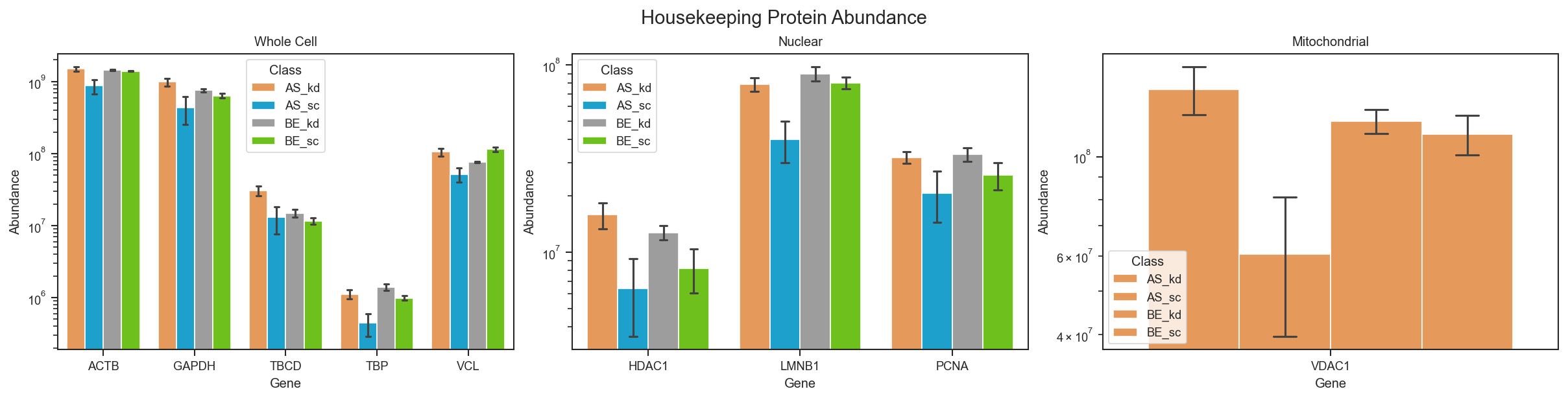
Plot abundance housekeeping

Source code in src/scpviz/plotting/abundance.py
def plot_abundance_housekeeping(ax: "plt.Axes", pdata: pAnnData, classes: str | list[str] | None = None, loading_control: str = "all", **kwargs: Any) -> Any:
    """
    Plot abundance of housekeeping proteins.

    This function visualizes the abundance of canonical housekeeping proteins
    as loading controls, grouped by sample-level metadata if specified.
    Different sets of proteins are supported depending on the chosen loading
    control type.

    Args:
        ax (matplotlib.axes.Axes or list of matplotlib.axes.Axes): Axis or list of axes to plot on.
            If `loading_control='all'`, must provide a list of 3 axes.
        pdata (pAnnData): Input pAnnData object.
        classes (str or list of str, optional): One or more `.obs` columns to use for grouping samples.
        loading_control (str): Type of housekeeping controls to plot. Options:

            - `'whole cell'`: GAPDH, TBCD (β-tubulin), ACTB (β-actin), VCL (vinculin), TBP (TATA-binding protein)

            - `'nuclear'`: COX (cytochrome c oxidase), LMNB1 (lamin B1), PCNA (proliferating cell nuclear antigen), HDAC1 (histone deacetylase 1)

            - `'mitochondrial'`: VDAC1 (voltage-dependent anion channel 1)

            - `'all'`: plots all three categories across separate subplots.

        **kwargs: Additional keyword arguments passed to seaborn plotting functions.

    Returns:
        ax (matplotlib.axes.Axes or list of matplotlib.axes.Axes):
            Axis or list of axes with the plotted protein abundances.
    Note:
        This function assumes that the specified housekeeping proteins are annotated in `.prot.var['Genes']`. Missing proteins will be skipped during plotting and may result in empty or partially filled plots.

    !!! example
        Plot housekeeping protein abundance for whole cell controls:
            ```python
            from scpviz import plotting as scplt
            fig, ax = plt.subplots(figsize=(6,4))
            scplt.plot_abundance_housekeeping(ax, pdata, loading_control='whole cell', classes='condition')
            ```

        ![Plot abundance housekeeping](../../assets/plots/plot_abundance_housekeeping.png)
    """

    loading_controls = {
        'whole cell': ['GAPDH', 'TBCD', 'ACTB', 'VCL', 'TBP'],
        'nuclear': ['COX', 'LMNB1', 'PCNA', 'HDAC1'],
        'mitochondrial': ['VDAC1'],
        'all': ['GAPDH', 'TBCD', 'ACTB', 'VCL', 'TBP', 'COX', 'LMNB1', 'PCNA', 'HDAC1', 'VDAC1']
    }

    # Check validity
    if loading_control not in loading_controls:
        raise ValueError(f"❌ Invalid loading control type: {loading_control}")

    # Plot all categories as subplots
    if loading_control == 'all':
        # Create 1x3 subplots
        fig, axes = plt.subplots(1, 3, figsize=(16, 4), constrained_layout=True)
        groups = ['whole cell', 'nuclear', 'mitochondrial']
        for ax_sub, group in zip(axes, groups):
            palette = get_color('colors', n=len(loading_controls[group]))
            plot_abundance(ax_sub, pdata, namelist=loading_controls[group], classes=classes, layer='X', palette=palette, **kwargs)
            ax_sub.set_title(group.title())
        fig.suptitle("Housekeeping Protein Abundance", fontsize=14)
        return fig, axes
    else:
        palette = get_color('colors', n=len(loading_controls[loading_control]))
        plot_abundance(ax, pdata, namelist=loading_controls[loading_control], classes=classes, layer='X', palette=palette, **kwargs)
        ax.set_title(loading_control.title())

plot_clustermap

plot_clustermap(
    ax: "plt.Axes",
    pdata: pAnnData,
    on: str = "prot",
    classes: str | list[str] | None = None,
    layer: str = "X",
    x_label: str = "accession",
    namelist: list[str] | None = None,
    lut: dict | None = None,
    log2: bool = True,
    cmap: str = "coolwarm",
    figsize: tuple[float, float] = (6, 10),
    force: bool = False,
    impute: str | None = None,
    order: dict | None = None,
    **kwargs: Any
) -> Any

Plot a clustered heatmap of proteins or peptides by samples.

This function creates a hierarchical clustered heatmap (features × samples) with optional column annotations from sample-level metadata. Supports custom annotation colors, log2 transformation, and missing value imputation.

Parameters:

Name Type Description Default
ax Axes

Unused; included for API compatibility.

required
pdata pAnnData

Input pAnnData object.

required
on str

Data level to plot, either "prot" or "pep". Default is "prot".

'prot'
classes str or list of str

One or more .obs columns to annotate samples in the heatmap.

None
layer str

Data layer to use. Defaults to "X".

'X'
x_label str

Row label mode, either "accession" or "gene". Used for mapping namelist.

'accession'
namelist list of str

Subset of accessions or gene names to plot. If None, all rows are included.

None
lut dict

Nested dictionary of {class_name: {label: color}} controlling annotation bar colors. Missing entries fall back to default palettes. See the note 'lut example' below.

None
log2 bool

Whether to log2-transform the abundance matrix. Default is True.

True
cmap str

Colormap for heatmap. Default is "coolwarm".

'coolwarm'
figsize tuple

Figure size in inches. Default is (6, 10).

(6, 10)
force bool

If True, imputes missing values instead of dropping rows with NaNs.

False
impute str

Imputation strategy used when force=True.

  • "row_min": fill NaNs with minimum value of that protein row.
  • "global_min": fill NaNs with global minimum value of the matrix.
None
order dict

Custom order for categorical annotations. Example: {"condition": ["kd", "sc"], "cellline": ["AS", "BE"]}.

None
**kwargs Any

Additional keyword arguments passed to seaborn.clustermap.

Common options include:

  • z_score (int): Normalize rows (0, features) or columns (1, samples).
  • standard_scale (int): Scale rows or columns to unit variance.
  • center (float): Value to center colormap on (e.g. 0 with z_score).
  • col_cluster (bool): Cluster columns (samples). Default is False.
  • row_cluster (bool): Cluster rows (features). Default is True.
  • linewidth (float): Grid line width between cells.
  • xticklabels / yticklabels (bool): Show axis tick labels.
  • colors_ratio (tuple): Proportion of space allocated to annotation bars.
{}

Returns:

Name Type Description
g ClusterGrid

The seaborn clustermap object.

Note

Function is currently under development, may not produce publication quality graphs yet. User discretion for formatting plots is encouraged.

lut example

Example of a custom lookup table for annotation colors:

lut = {
    "cellline": {
        "AS": "#e41a1c",
        "BE": "#377eb8"
    },
    "condition": {
        "kd": "#4daf4a",
        "sc": "#984ea3"
   }
}

Example

Clustered heatmap with sample annotations:

import matplotlib.pyplot as plt
from scpviz import plotting as scplt

fig, ax = plt.subplots(figsize=(1, 1))
g = scplt.plot_clustermap(
    ax,
    pdata_norm,
    on="prot",
    classes=["cellline", "condition"],
    force=True,
    impute="row_min",
    z_score=0,
    center=0,
    linewidth=0,
    figsize=(10, 6),
)
plt.show()
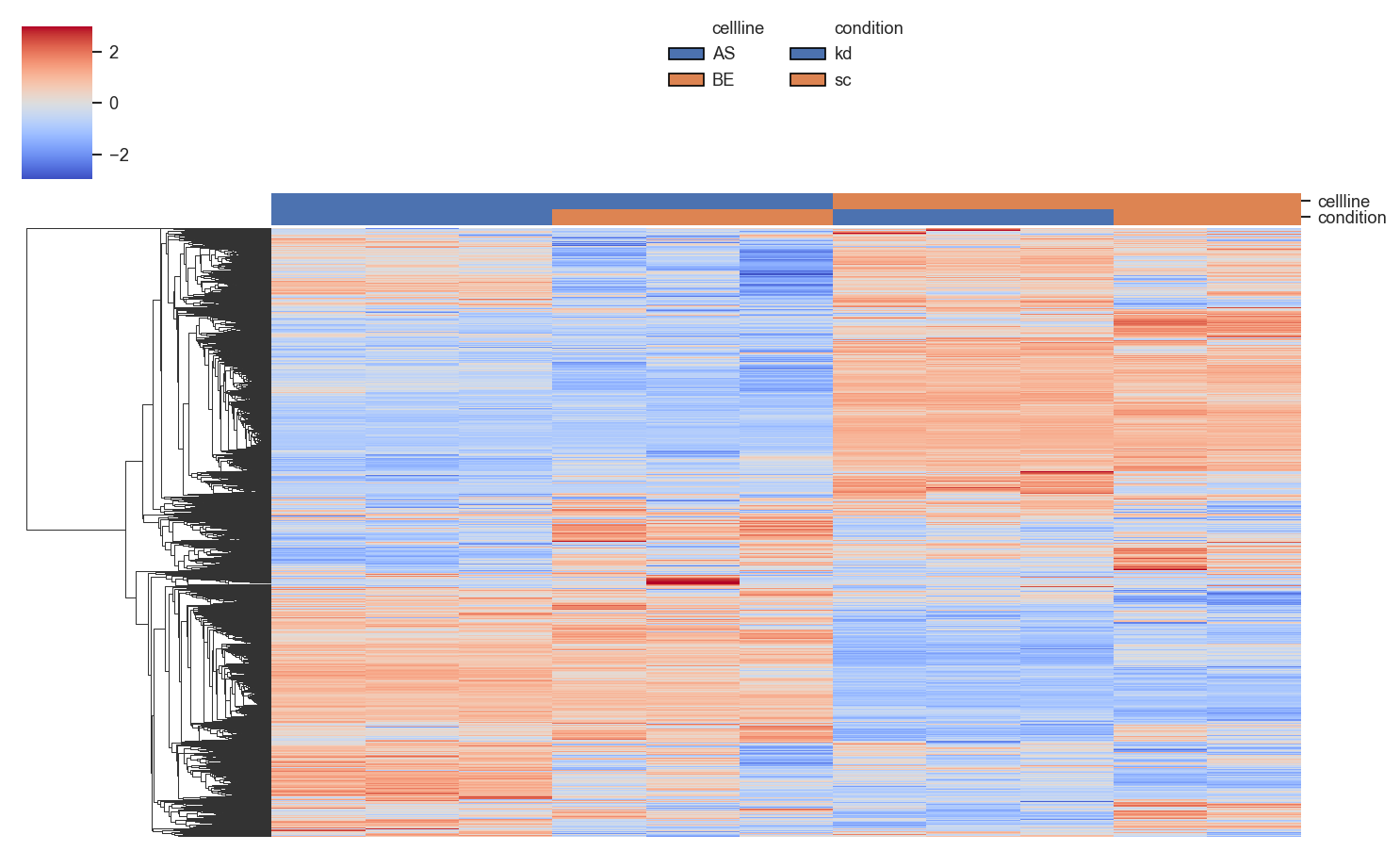
Plot clustermap

Provide a custom LUT for annotation colors:

import seaborn as sns

paired = sns.color_palette("Paired", 6)

lut = {
    "timepoint": {
        "1mo": paired[1],
        "3mo": paired[3],
        "6mo": paired[5],
    },
    "aggregate": {
        "aggN": "#4d4d4d",
        "aggY": "#bdbdbd",
    },
}

fig, ax = plt.subplots(figsize=(6, 4))
scplt.plot_clustermap(
    ax,
    pdata,
    classes=["timepoint", "aggregate"],
    force=True,
    impute="zero",
    z_score=0,
    center=0,
    lut=lut,
)

Source code in src/scpviz/plotting/correlation.py
def plot_clustermap(
    ax: "plt.Axes",
    pdata: pAnnData,
    on: str = "prot",
    classes: str | list[str] | None = None,
    layer: str = "X",
    x_label: str = "accession",
    namelist: list[str] | None = None,
    lut: dict | None = None,
    log2: bool = True,
    cmap: str = "coolwarm",
    figsize: tuple[float, float] = (6, 10),
    force: bool = False,
    impute: str | None = None,
    order: dict | None = None,
    **kwargs: Any,
) -> Any:
    """
    Plot a clustered heatmap of proteins or peptides by samples.

    This function creates a hierarchical clustered heatmap (features × samples)
    with optional column annotations from sample-level metadata. Supports
    custom annotation colors, log2 transformation, and missing value imputation.

    Args:
        ax (matplotlib.axes.Axes): Unused; included for API compatibility.
        pdata (pAnnData): Input pAnnData object.
        on (str): Data level to plot, either `"prot"` or `"pep"`. Default is `"prot"`.
        classes (str or list of str, optional): One or more `.obs` columns to
            annotate samples in the heatmap.
        layer (str): Data layer to use. Defaults to `"X"`.
        x_label (str): Row label mode, either `"accession"` or `"gene"`. Used
            for mapping `namelist`.
        namelist (list of str, optional): Subset of accessions or gene names to plot.
            If None, all rows are included.
        lut (dict, optional): Nested dictionary of `{class_name: {label: color}}`
            controlling annotation bar colors. Missing entries fall back to
            default palettes. See the note 'lut example' below.
        log2 (bool): Whether to log2-transform the abundance matrix. Default is True.
        cmap (str): Colormap for heatmap. Default is `"coolwarm"`.
        figsize (tuple): Figure size in inches. Default is `(6, 10)`.
        force (bool): If True, imputes missing values instead of dropping rows
            with NaNs.
        impute (str, optional): Imputation strategy used when `force=True`.

            - `"row_min"`: fill NaNs with minimum value of that protein row.
            - `"global_min"`: fill NaNs with global minimum value of the matrix.

        order (dict, optional): Custom order for categorical annotations.
            Example: `{"condition": ["kd", "sc"], "cellline": ["AS", "BE"]}`.
        **kwargs (Any): Additional keyword arguments passed to `seaborn.clustermap`.

            Common options include:

            - `z_score (int)`: Normalize rows (0, features) or columns (1, samples).
            - `standard_scale (int)`: Scale rows or columns to unit variance.
            - `center (float)`: Value to center colormap on (e.g. 0 with `z_score`).
            - `col_cluster (bool)`: Cluster columns (samples). Default is False.
            - `row_cluster (bool)`: Cluster rows (features). Default is True.
            - `linewidth (float)`: Grid line width between cells.
            - `xticklabels` / `yticklabels` (bool): Show axis tick labels.
            - `colors_ratio (tuple)`: Proportion of space allocated to annotation bars.

    Returns:
        g (seaborn.matrix.ClusterGrid): The seaborn clustermap object.

    !!! note
        Function is currently under development, may not produce publication quality graphs yet.
        User discretion for formatting plots is encouraged.

    !!! note "lut example"
        Example of a custom lookup table for annotation colors:
            ```python
            lut = {
                "cellline": {
                    "AS": "#e41a1c",
                    "BE": "#377eb8"
                },
                "condition": {
                    "kd": "#4daf4a",
                    "sc": "#984ea3"
               }
            }
            ```

    Example:
        Clustered heatmap with sample annotations:
            ```python
            import matplotlib.pyplot as plt
            from scpviz import plotting as scplt

            fig, ax = plt.subplots(figsize=(1, 1))
            g = scplt.plot_clustermap(
                ax,
                pdata_norm,
                on="prot",
                classes=["cellline", "condition"],
                force=True,
                impute="row_min",
                z_score=0,
                center=0,
                linewidth=0,
                figsize=(10, 6),
            )
            plt.show()
            ```

        ![Plot clustermap](../../assets/plots/plot_clustermap.png)

        Provide a custom LUT for annotation colors:
            ```python
            import seaborn as sns

            paired = sns.color_palette("Paired", 6)

            lut = {
                "timepoint": {
                    "1mo": paired[1],
                    "3mo": paired[3],
                    "6mo": paired[5],
                },
                "aggregate": {
                    "aggN": "#4d4d4d",
                    "aggY": "#bdbdbd",
                },
            }

            fig, ax = plt.subplots(figsize=(6, 4))
            scplt.plot_clustermap(
                ax,
                pdata,
                classes=["timepoint", "aggregate"],
                force=True,
                impute="zero",
                z_score=0,
                center=0,
                lut=lut,
            )
            ```
    """
    # --- Step 1: Extract data ---
    if on not in ("prot", "pep"):
        raise ValueError(f"`on` must be 'prot' or 'pep', got '{on}'")

    if namelist is not None:
        df_abund = utils.get_abundance(
        pdata, namelist=namelist, layer=layer, on=on,
        classes=classes, log=log2, x_label=x_label)

        pivot_col = "log2_abundance" if log2 else "abundance"
        row_index = "gene" if x_label == "gene" else "accession"
        df = df_abund.pivot(index=row_index, columns="cell", values=pivot_col)

    else:
        adata = pdata.prot if on == 'prot' else pdata.pep
        X = adata.layers[layer] if layer in adata.layers else adata.X
        data = X.toarray() if hasattr(X, "toarray") else np.asarray(X)
        df = pd.DataFrame(data.T, index=adata.var_names, columns=adata.obs_names)
        if log2:
            with np.errstate(divide='ignore', invalid='ignore'):
                df = np.log2(df)
                df[df == -np.inf] = np.nan

    # --- Handle missing values ---
    nan_rows = df.index[df.isna().any(axis=1)].tolist()
    if nan_rows:
        if not force:
            print(f"Warning: {len(nan_rows)} proteins contain missing values and will be excluded: {nan_rows}")
            print("To include them, rerun with force=True and impute='row_min' or 'global_min'.")
            df = df.drop(index=nan_rows)
        else:
            print(f"{len(nan_rows)} proteins contain missing values: {nan_rows}.\nImputing using strategy: '{impute}'")
            if impute == "row_min":
                global_min = df.min().min()
                df = df.apply(lambda row: row.fillna(row.min() if not np.isnan(row.min()) else global_min), axis=1)
            elif impute == "global_min":
                df = df.fillna(df.min().min())
            else:
                raise ValueError("`impute` must be either 'row_min' or 'global_min' when force=True.")

    # --- Step 2: Column annotations ---
    col_colors = None
    legend_handles, legend_labels = [], []

    if classes is not None:
        if isinstance(classes, str):
            sample_labels = utils.get_samplenames(adata, classes)
            annotations = pd.DataFrame({classes: sample_labels}, index=adata.obs_names)
        else:
            sample_labels = utils.get_samplenames(adata, classes)
            split_labels = [[part.strip() for part in s.split(",")] for s in sample_labels]
            annotations = pd.DataFrame(split_labels, index=adata.obs_names, columns=classes)

        # Optional: apply custom category order from `order` dict
        if order is not None and isinstance(order, dict):
            for col in classes:
                if col in annotations.columns and col in order:
                    cat_type = pd.api.types.CategoricalDtype(order[col], ordered=True)
                    annotations[col] = annotations[col].astype(cat_type)
            unused_keys = set(order) - set(classes)
            if unused_keys:
                print(f"⚠️ Unused keys in `order`: {unused_keys} (not present in `classes`)")

        # Sort columns (samples) by class hierarchy
        sort_order = annotations.sort_values(by=classes).index
        df = df[sort_order]
        annotations = annotations.loc[sort_order]

        if lut is None:
            lut = {}

        full_lut = {}
        for col in annotations.columns:
            unique_vals = sorted(annotations[col].dropna().unique())
            user_colors = lut.get(col, {})
            missing_vals = [v for v in unique_vals if v not in user_colors]
            fallback_palette = sns.color_palette(n_colors=len(missing_vals))
            fallback_colors = dict(zip(missing_vals, fallback_palette))
            full_lut[col] = {**user_colors, **fallback_colors}

            unmatched = set(user_colors) - set(unique_vals)
            if unmatched:
                print(f"Warning: The following labels in `lut['{col}']` are not found in the data: {sorted(unmatched)}")

        col_colors = annotations.apply(lambda col: col.map(full_lut[col.name]))

        # Legend handles
        for col in annotations.columns:
            legend_handles.append(mpatches.Patch(facecolor="none", edgecolor="none", label=col))  # header
            for label, color in full_lut[col].items():
                legend_handles.append(mpatches.Patch(facecolor=color, edgecolor="black", label=label))
            legend_labels.extend([col] + list(full_lut[col].keys()))

    # --- Step 3: Clustermap defaults (user-overridable) ---
    col_cluster = kwargs.pop("col_cluster", False)
    row_cluster = kwargs.pop("row_cluster", True)
    linewidth = kwargs.pop("linewidth", 0)
    yticklabels = kwargs.pop("yticklabels", False)
    xticklabels = kwargs.pop("xticklabels", False)
    colors_ratio = kwargs.pop("colors_ratio", (0.03, 0.02))
    if kwargs.get("z_score", None) == 0:
        zero_var_rows = df.var(axis=1) == 0
        if zero_var_rows.any():
            dropped = df.index[zero_var_rows].tolist()
            print(f"⚠️ {len(dropped)} proteins have zero variance and will be dropped due to z_score=0: {dropped}")
            df = df.drop(index=dropped)

    # --- Step 4: Plot clustermap ---
    try:
        g = sns.clustermap(df,
                        cmap=cmap,
                        col_cluster=col_cluster,
                        row_cluster=row_cluster,
                        col_colors=col_colors,
                        figsize=figsize,
                        xticklabels=xticklabels,
                        yticklabels=yticklabels,
                        linewidth=linewidth,
                        colors_ratio=colors_ratio,
                        **kwargs)
    except Exception as e:
        print(f"Error occurred while creating clustermap: {e}")
        return df

    # --- Step 5: Column annotation legend ---
    if classes is not None:
        g.ax_col_dendrogram.legend(legend_handles, legend_labels,
                                   title=None,
                                   bbox_to_anchor=(0.5, 1.15),
                                   loc="upper center",
                                   ncol=len(classes),
                                   handletextpad=0.5,
                                   columnspacing=1.5,
                                   frameon=False)

    # --- Step 6: Row label remapping ---
    if x_label == "gene" and xticklabels:
        _ , prot_map = pdata.get_gene_maps(on='protein' if on == 'prot' else 'peptide')
        row_labels = [prot_map.get(row, row) for row in g.data2d.index]
        g.ax_heatmap.set_yticklabels(row_labels, rotation=0)

    # --- Step 8: Store clustering results ---
    cluster_key  = f"{on}_{layer}_clustermap"
    row_order = list(g.data2d.index)
    row_indices = g.dendrogram_row.reordered_ind

    pdata.stats[cluster_key]  = {
        "row_order": row_order,
        "row_indices": row_indices,
        "row_labels": x_label,   # 'accession' or 'gene'
        "namelist_used": namelist if namelist is not None else "all_proteins",
        "col_order": list(g.data2d.columns),
        "col_indices": g.dendrogram_col.reordered_ind if g.dendrogram_col else None,
        "row_linkage": g.dendrogram_row.linkage,  # <--- NEW
        "col_linkage": g.dendrogram_col.linkage if g.dendrogram_col else None,
    }

    return g

plot_cv

plot_cv(
    ax: "plt.Axes",
    pdata: pAnnData,
    classes: str | list[str] | None = None,
    layer: str = "X",
    on: str = "protein",
    order: list[str] | None = None,
    palette: Any = None,
    return_df: bool = False,
    extra_cols: list[str] = ["Accession", "Genes"],
    **kwargs: Any
) -> Any

Generate a box-and-whisker plot for the coefficient of variation (CV).

This function computes CV values across proteins or peptides, grouped by sample-level classes, and visualizes their distribution as a box plot.

Parameters:

Name Type Description Default
ax Axes

Axis on which to plot.

required
pdata pAnnData

Input pAnnData object containing protein or peptide data.

required
classes str or list of str

One or more .obs columns to use for grouping samples in the plot. If None, no grouping is applied.

None
layer str

Data layer to use for CV calculation. Default is 'X'.

'X'
on str

Data level to compute CV on, either 'protein' or 'peptide'.

'protein'
order list

Custom order of classes for plotting. If None, defaults to alphabetical order.

None
palette dict or list

Custom color palette for class groups. If None, defaults to scviz package color palette.

None
return_df bool

If True, returns the underlying DataFrame used for plotting.

False
extra_cols list

Additional columns to include in returned dataframe.

['Accession', 'Genes']
**kwargs Any

Additional keyword arguments passed to seaborn plotting functions.

{}

Returns:

Name Type Description
ax Axes

The axis with the plotted CV distribution.

cv_df DataFrame

Optional, returned if return_df=True.

Example

CV distribution grouped by cell line and condition:

import matplotlib.pyplot as plt
from scpviz import plotting as scplt

fig, ax = plt.subplots(figsize=(4, 4))
scplt.plot_cv(ax, pdata, classes=["cellline", "condition"])
plt.show()
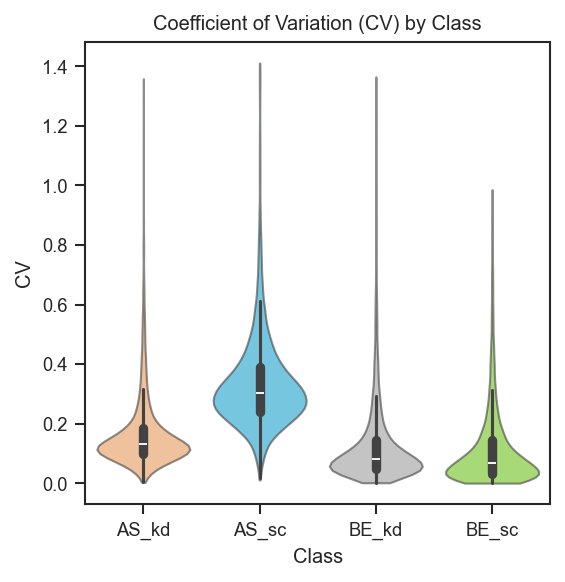
Plot cv

Extract cv_df and plot with your own seaborn/matplotlib code (e.g. horizontal violins, custom order and palette):

import matplotlib.pyplot as plt
import seaborn as sns
from scpviz import plotting as scplt

classes = ["cellline", "condition"]
fig, ax = plt.subplots(figsize=(4, 4))
cv_df = scplt.plot_cv(ax, pdata, classes=classes, return_df=True)
cv_df = cv_df.reset_index()
order = sorted(cv_df["Class"].unique())  # replace with your preferred order
colors = sns.color_palette("Blues", n_colors=len(order))
sns.violinplot(
    data=cv_df,
    y="Class",
    x="CV",
    orient="h",
    order=order,
    palette=colors,
    linewidth=1,
    inner="quartile",
    saturation=1,
    ax=ax,
)
plt.show()

Source code in src/scpviz/plotting/abundance.py
def plot_cv(
    ax: "plt.Axes",
    pdata: pAnnData,
    classes: str | list[str] | None = None,
    layer: str = "X",
    on: str = "protein",
    order: list[str] | None = None,
    palette: Any = None,
    return_df: bool = False,
    extra_cols: list[str] = ["Accession", "Genes"],
    **kwargs: Any,
) -> Any:
    """
    Generate a box-and-whisker plot for the coefficient of variation (CV).

    This function computes CV values across proteins or peptides, grouped by
    sample-level classes, and visualizes their distribution as a box plot.

    Args:
        ax (matplotlib.axes.Axes): Axis on which to plot.
        pdata (pAnnData): Input pAnnData object containing protein or peptide data.
        classes (str or list of str, optional): One or more `.obs` columns to use
            for grouping samples in the plot. If None, no grouping is applied.
        layer (str): Data layer to use for CV calculation. Default is `'X'`.
        on (str): Data level to compute CV on, either `'protein'` or `'peptide'`.
        order (list, optional): Custom order of classes for plotting.
            If None, defaults to alphabetical order.
        palette (dict or list, optional): Custom color palette for class groups.
            If None, defaults to `scviz` package color palette.
        return_df (bool): If True, returns the underlying DataFrame used for plotting.
        extra_cols (list): Additional columns to include in returned dataframe.
        **kwargs: Additional keyword arguments passed to seaborn plotting functions.

    Returns:
        ax (matplotlib.axes.Axes): The axis with the plotted CV distribution.
        cv_df (pandas.DataFrame): Optional, returned if `return_df=True`.

    Example:
        CV distribution grouped by cell line and condition:
            ```python
            import matplotlib.pyplot as plt
            from scpviz import plotting as scplt

            fig, ax = plt.subplots(figsize=(4, 4))
            scplt.plot_cv(ax, pdata, classes=["cellline", "condition"])
            plt.show()
            ```

        ![Plot cv](../../assets/plots/plot_cv.png)

        Extract ``cv_df`` and plot with your own seaborn/matplotlib code (e.g. horizontal violins, custom order and palette):
            ```python
            import matplotlib.pyplot as plt
            import seaborn as sns
            from scpviz import plotting as scplt

            classes = ["cellline", "condition"]
            fig, ax = plt.subplots(figsize=(4, 4))
            cv_df = scplt.plot_cv(ax, pdata, classes=classes, return_df=True)
            cv_df = cv_df.reset_index()
            order = sorted(cv_df["Class"].unique())  # replace with your preferred order
            colors = sns.color_palette("Blues", n_colors=len(order))
            sns.violinplot(
                data=cv_df,
                y="Class",
                x="CV",
                orient="h",
                order=order,
                palette=colors,
                linewidth=1,
                inner="quartile",
                saturation=1,
                ax=ax,
            )
            plt.show()
            ```
    """
    # Compute CVs for the selected layer
    pdata.cv(classes = classes, on = on, layer = layer)
    adata = utils.get_adata(pdata, on)    
    classes_list = utils.get_classlist(adata, classes = classes, order = order)

    ex_cols = [col for col in extra_cols if col in adata.var.columns]

    cv_data = []
    for class_value in classes_list:
        cv_col = f'CV: {class_value}'
        if cv_col in adata.var.columns:
            cv_values = adata.var[cv_col].values
            row = {'Class': class_value, 'CV': cv_values}
            for col in ex_cols:
                row[col] = adata.var[col].values
            cv_data.append(pd.DataFrame(row))

    if not cv_data:
        print(f"{utils.format_log_prefix('warn')} No valid CV subsets found — skipping plot.")
        return ax if ax is not None else None

    cv_df = pd.concat(cv_data, ignore_index=True)

    # return cv_df for user to plot themselves
    if return_df:
        return cv_df

    if palette is None:
        palette = get_color('palette')

    # Ensure consistent class ordering
    if order is not None:
        cat_type = pd.api.types.CategoricalDtype(order, ordered=True)
        cv_df['Class'] = cv_df['Class'].astype(cat_type)
    else:
        cv_df['Class'] = pd.Categorical(cv_df['Class'],
                                        categories=sorted(cv_df['Class'].unique()),
                                        ordered=True)    

    violin_kwargs = dict(inner="box", linewidth=1, cut=0, alpha=0.6, density_norm="width")
    violin_kwargs.update(kwargs)

    sns.violinplot(x='Class', y='CV', data=cv_df, ax=ax, palette=palette, **violin_kwargs)

    plt.title('Coefficient of Variation (CV) by Class')
    plt.xlabel('Class')
    plt.ylabel('CV')

    return ax

plot_enrichment_svg

plot_enrichment_svg(*args: Any, **kwargs: Any)

Plot STRING enrichment results as an SVG figure.

This is a wrapper that redirects to the implementation in enrichment.py for convenience and discoverability.

Parameters:

Name Type Description Default
*args Any

Positional arguments passed to scpviz.enrichment.plot_enrichment_svg.

()
**kwargs Any

Keyword arguments passed to scpviz.enrichment.plot_enrichment_svg.

{}

Returns:

Name Type Description
svg SVG

SVG figure object.

See Also

scpviz.enrichment.plot_enrichment_svg

Source code in src/scpviz/plotting/enrichment.py
def plot_enrichment_svg(*args: Any, **kwargs: Any):
    """
    Plot STRING enrichment results as an SVG figure.

    This is a wrapper that redirects to the implementation in `enrichment.py`
    for convenience and discoverability.

    Args:
        *args (Any): Positional arguments passed to `scpviz.enrichment.plot_enrichment_svg`.
        **kwargs (Any): Keyword arguments passed to `scpviz.enrichment.plot_enrichment_svg`.

    Returns:
        svg (SVG): SVG figure object.

    See Also:
        scpviz.enrichment.plot_enrichment_svg
    """
    from scpviz.enrichment import plot_enrichment_svg as actual_plot

    return actual_plot(*args, **kwargs)

plot_pairwise_correlation

plot_pairwise_correlation(
    pdata: pAnnData,
    classes: str | list[str],
    on: str = "protein",
    layer: str = "X",
    method: str = "pearson",
    order: list | None = None,
    show_samples: bool = False,
    cmap: str = "RdBu_r",
    vmin: float | None = None,
    vmax: float | None = None,
    annotation_cmap: str | dict | list = "default",
    figsize: tuple | None = None,
    text_size: int = 9,
    colorbar_label: str | None = None,
    annot: bool = False,
    annot_fmt: str = ".2f",
    annot_size: int = 7,
    title: str | None = None,
    force: bool = False,
    subset_mask: ndarray | Series | list | None = None,
    show_annotation_legend: bool = True,
    legend_anchor_x: float = 0.3,
    show_ticklabels: bool | None = None,
    ticklabels_auto_max_samples: int = 20,
) -> "tuple[Figure, plt.Axes]"

noqa: D401

Plot a pairwise protein/peptide abundance correlation heatmap across groups or samples in .obs.

Automatically runs :meth:~scpviz.pAnnData.pAnnData.pairwise_correlation if results are not already cached (or if force=True). The figure is created internally; no ax argument is needed.

Cached analysis results are reused when classes, method, layer, and subset_mask (via the same key as pairwise_correlation) match. If show_samples=True but the cache lacks a sample matrix, analysis is rerun with compute_sample_matrix=True. Group-level plots may reuse a cache that already includes a sample matrix (nothing is stripped). Display order is applied only when drawing and does not require recomputation.

Parameters:

Name Type Description Default
pdata pAnnData

Input pAnnData object.

required
classes str | list[str]

.obs column(s) defining groups — passed to pairwise_correlation.

required
on str

"protein" or "peptide" (default "protein").

'protein'
layer str

Data layer (default "X").

'X'
method str

"pearson", "spearman", or "euclidean".

'pearson'
order list | None

Optional row/column order. Must match the matrix being plotted:

  • show_samples=False: group labels — for a single classes column, values like "AS"; for classes=[...], combined strings exactly as produced by :func:~scpviz.utils.get_samplenames (e.g. "AS, kd" with the stored comma-space separator).

  • show_samples=True: observation names only — i.e. entries of adata.obs_names (however your object labels samples, e.g. PD import sample IDs), not combined group strings. To order samples by group, build a list of those obs names in the desired sequence (e.g. all samples of one group, then the next).

If None, uses storage order (group order from analysis, or sample order used when computing the sample matrix).

None
show_samples bool

If False (default), plot the group × group matrix. If True, plot the sample × sample matrix (requires compute_sample_matrix in cache or triggers a run that computes it).

False
cmap str

Matplotlib colormap for the heatmap.

'RdBu_r'
vmin float | None

Colormap lower limit; correlation methods default to -1 if None.

None
vmax float | None

Colormap upper limit; correlation methods default to 1 if None.

None
annotation_cmap str | dict | list

"default" (independent palette per obs column), or a single dict, list, or matplotlib cmap name shared across annotation bars.

'default'
figsize tuple | None

(width, height) in inches; if None, auto-estimated.

None
text_size int

Base font size for ticks, colorbar, and legends.

9
colorbar_label str | None

Override colorbar label.

None
annot bool

If True, write numeric values in each cell.

False
annot_fmt str

Format string for cell annotations (e.g. ".2f").

'.2f'
annot_size int

Font size for cell annotations.

7
title str | None

Optional figure suptitle.

None
force bool

If True, recompute pairwise_correlation even if cache matches.

False
subset_mask ndarray | Series | list | None

Boolean mask or boolean Series aligned to adata.obs (same semantics as :func:plot_pca). All-True is normalized to None for cache parity with full-data analysis.

None
show_annotation_legend bool

If True (default), draw one legend per annotation track in a dedicated GridSpec column right of the colorbar (obs column names also appear on the left vertical bar axes; top bars stay unlabeled).

True
legend_anchor_x float

Horizontal anchor for annotation legends inside the legend column, in axes coordinates (0 = left edge of that column, 1 = right). Larger values shift legends to the right, away from the colorbar, which helps if they overlap the colorbar. Typical values to try: about 0.15 to 0.45 (default 0.3). Ignored when show_annotation_legend is False.

0.3
show_ticklabels bool | None

When show_samples=True, controls sample names on the x-axis only (y-axis stays unlabeled to avoid clashing with annotation bars). None (default) shows ticks if n_samples <= ticklabels_auto_max_samples and otherwise hides them and prints an info line. True / False force on or off. Ignored when show_samples=False (group-level always shows x-axis group labels).

None
ticklabels_auto_max_samples int

When show_ticklabels is None and show_samples=True, sample names are shown only if the sample count is at most this value (default 20). Must be >= 1.

20

Returns:

Type Description
'tuple[Figure, plt.Axes]'

(fig, ax_heatmap).

Note

Heatmap row (y) tick labels are always omitted (symmetric matrix; x-axis labels carry sample or group names as applicable). tight_layout may warn on some backends; layout is non-fatal if it fails.

Raises:

Type Description
ValueError

If sample_matrix is missing when show_samples=True, or if ticklabels_auto_max_samples < 1.

Example

Sample × sample Pearson correlation on a per-protein z-score layer (X_pw_zscore):

import matplotlib.pyplot as plt
import numpy as np
from scpviz import plotting as scplt
from scpviz import utils as scu

adata = scu.get_adata(pdata_norm, "protein")
X = np.asarray(scu.get_adata_layer(adata, "X"), dtype=float)
mu = np.nanmean(X, axis=0, keepdims=True)
sig = np.nanstd(X, axis=0, keepdims=True)
sig = np.where(np.isfinite(sig) & (sig > 0), sig, 1.0)
adata.layers["X_pw_zscore"] = (X - mu) / sig

fig, ax = scplt.plot_pairwise_correlation(
    pdata_norm,
    classes=["cellline", "condition"],
    method="pearson",
    show_samples=True,
    layer="X_pw_zscore",
    force=True,
)
plt.show()
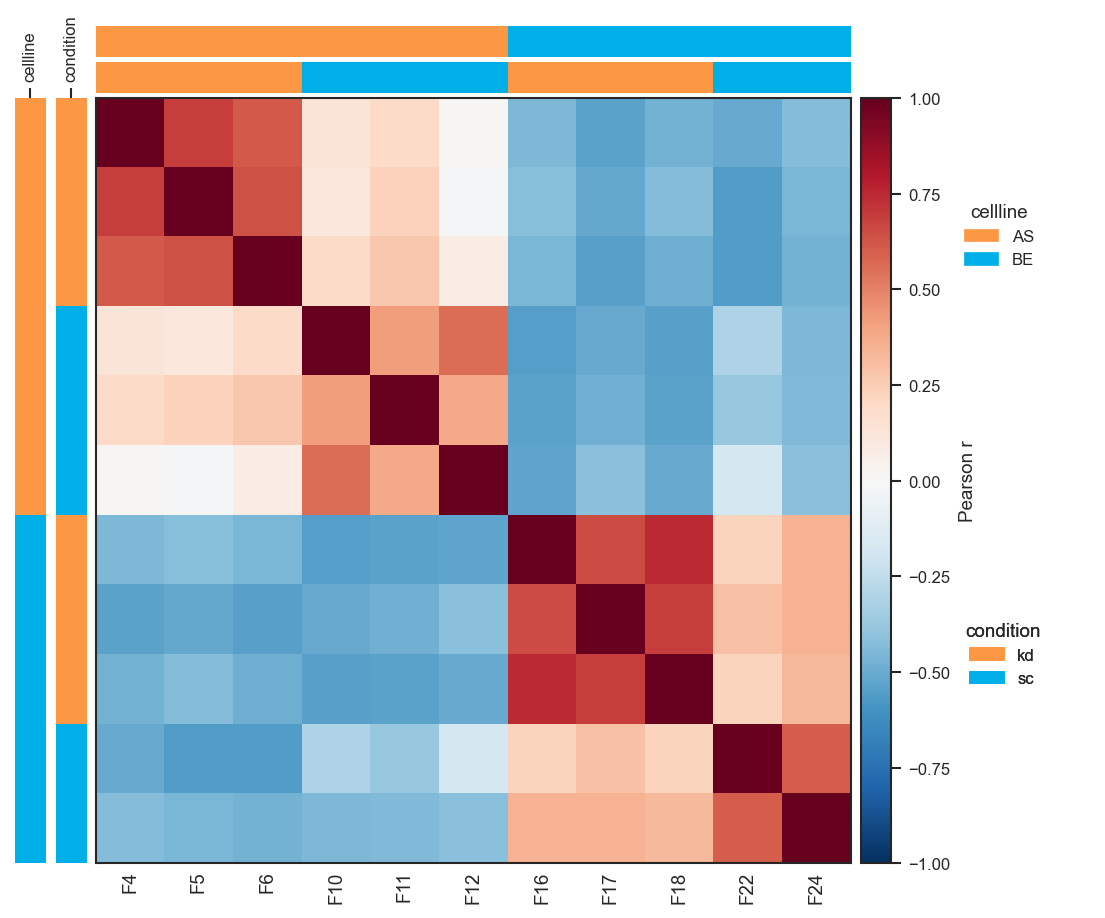
Plot pairwise correlation

Same approach on single-cell protein data (classes aligned with UMAP, e.g. region):

import matplotlib.pyplot as plt
import numpy as np
from scpviz import plotting as scplt
from scpviz import utils as scu

adata = scu.get_adata(pdata_sc, "protein")
X = np.asarray(scu.get_adata_layer(adata, "X"), dtype=float)
mu = np.nanmean(X, axis=0, keepdims=True)
sig = np.nanstd(X, axis=0, keepdims=True)
sig = np.where(np.isfinite(sig) & (sig > 0), sig, 1.0)
adata.layers["X_pw_zscore"] = (X - mu) / sig

fig, ax = scplt.plot_pairwise_correlation(
    pdata_sc,
    classes=["region"],
    method="pearson",
    show_samples=True,
    layer="X_pw_zscore",
    force=True,
)
plt.show()
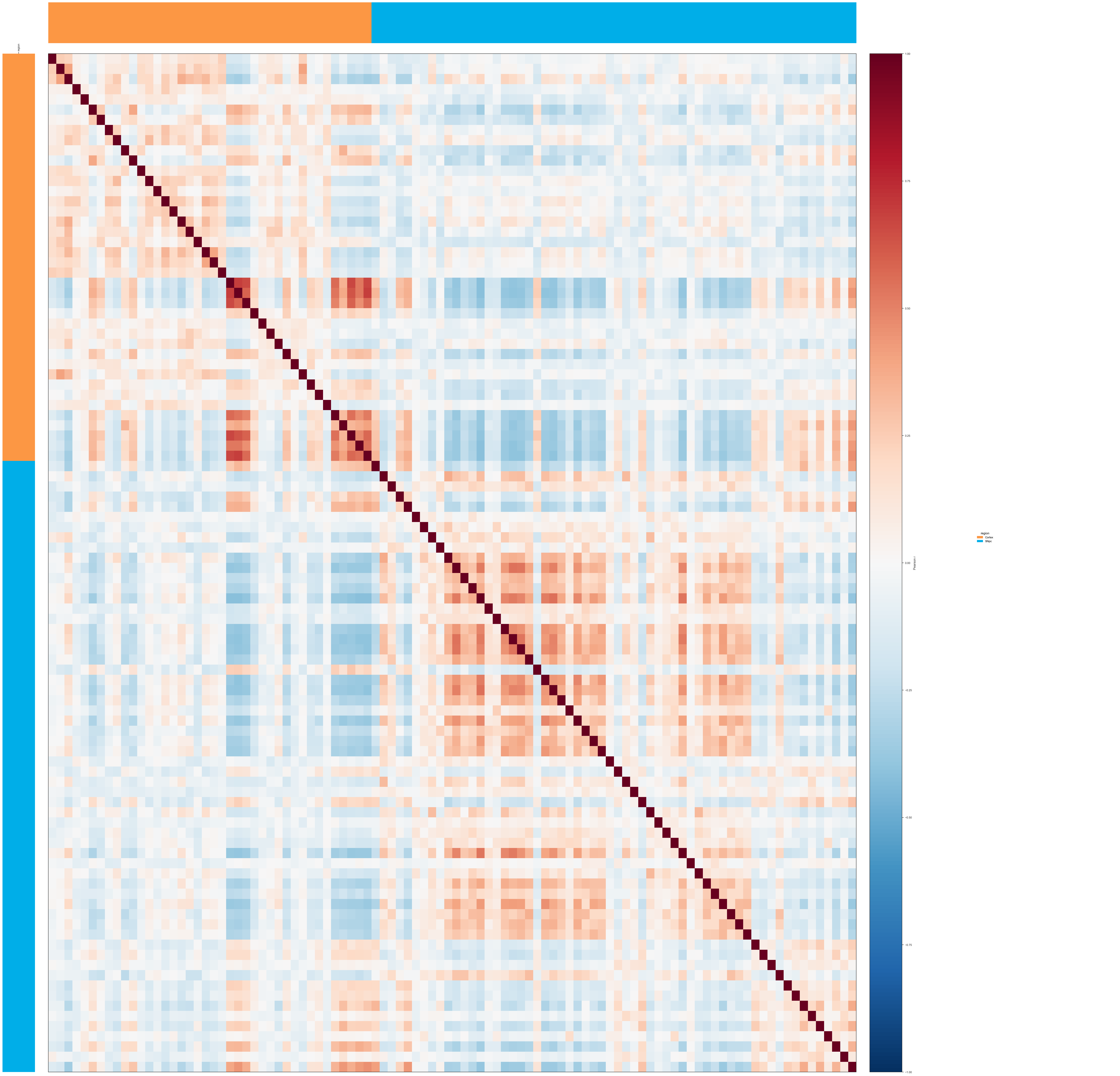
Plot pairwise correlation (single-cell)

Imports and group-level heatmap (show_samples=False, default). Uses cached pairwise_correlation results when parameters match; pass force=True to recompute after changing .X or normalization:

from scpviz import plotting as scplt

fig, ax = scplt.plot_pairwise_correlation(pdata, classes="cellline", method="pearson")

Sample × sample heatmap (show_samples=True). Triggers or reuses analysis with compute_sample_matrix=True. Euclidean distances use NaN-aware geometry on raw abundance rows; pick a sequential cmap (e.g. viridis) for distances:

fig, ax = scplt.plot_pairwise_correlation(
    pdata,
    classes=["cellline", "treatment"],
    show_samples=True,
    method="euclidean",
    cmap="viridis",
)

Force sample names on the x-axis when there are many samples (auto-hide uses ticklabels_auto_max_samples when show_ticklabels=None):

fig, ax = scplt.plot_pairwise_correlation(
    pdata,
    classes="cellline",
    show_samples=True,
    show_ticklabels=True,
)

annotation_cmap"default" (omit or pass explicitly): independent categorical palette per .obs column, built from sorted unique values:

fig, ax = scplt.plot_pairwise_correlation(
    pdata, classes=["cellline", "treatment"], annotation_cmap="default"
)

annotation_cmapdict mapping stringified .obs levels to colors; the same dict is reused for every annotation column (cover all levels that appear):

ann = {"AS": "#E41A1C", "BE": "#377EB8", "kd": "#4DAF4A", "sc": "#984EA3"}
fig, ax = scplt.plot_pairwise_correlation(
    pdata, classes=["cellline", "treatment"], annotation_cmap=ann
)

annotation_cmaplist of colors, assigned in sorted-level order within each obs column (cycles if there are more levels than colors):

fig, ax = scplt.plot_pairwise_correlation(
    pdata, classes="cellline", annotation_cmap=["#FC9744", "#00AEE8", "#9D9D9D"]
)

annotation_cmap — matplotlib colormap name: evenly spaced colors for each column's sorted uniques:

fig, ax = scplt.plot_pairwise_correlation(pdata, classes="cellline", annotation_cmap="tab10")

Custom row/column order without recomputing (labels must exist in the matrix). For group heatmaps, use combined strings when classes is a list (e.g. "AS, kd"):

fig, ax = scplt.plot_pairwise_correlation(
    pdata, classes=["cellline", "treatment"],
    order=["AS, kd", "BE, sc", "AS, sc", "BE, kd"],
)

For sample heatmaps, order must be observation names (same strings as pdata.prot.obs_names), not "AS, kd" group tokens — for example reverse or subset the index:

names = list(pdata.prot.obs_names)
fig, ax = scplt.plot_pairwise_correlation(
    pdata,
    classes=["cellline", "treatment"],
    show_samples=True,
    order=list(reversed(names)),
)

Subset of samples (boolean mask or Series aligned to adata.obs_names) and no annotation legends:

mask = pdata.prot.obs["cellline"].eq("AS").to_numpy()
fig, ax = scplt.plot_pairwise_correlation(
    pdata, classes="treatment", subset_mask=mask, show_annotation_legend=False
)

Small matrices — show numeric values in cells; adjust legend horizontal position if it overlaps the colorbar:

fig, ax = scplt.plot_pairwise_correlation(
    pdata, classes="cellline", annot=True, legend_anchor_x=0.45
)

Source code in src/scpviz/plotting/correlation.py
 36
 37
 38
 39
 40
 41
 42
 43
 44
 45
 46
 47
 48
 49
 50
 51
 52
 53
 54
 55
 56
 57
 58
 59
 60
 61
 62
 63
 64
 65
 66
 67
 68
 69
 70
 71
 72
 73
 74
 75
 76
 77
 78
 79
 80
 81
 82
 83
 84
 85
 86
 87
 88
 89
 90
 91
 92
 93
 94
 95
 96
 97
 98
 99
100
101
102
103
104
105
106
107
108
109
110
111
112
113
114
115
116
117
118
119
120
121
122
123
124
125
126
127
128
129
130
131
132
133
134
135
136
137
138
139
140
141
142
143
144
145
146
147
148
149
150
151
152
153
154
155
156
157
158
159
160
161
162
163
164
165
166
167
168
169
170
171
172
173
174
175
176
177
178
179
180
181
182
183
184
185
186
187
188
189
190
191
192
193
194
195
196
197
198
199
200
201
202
203
204
205
206
207
208
209
210
211
212
213
214
215
216
217
218
219
220
221
222
223
224
225
226
227
228
229
230
231
232
233
234
235
236
237
238
239
240
241
242
243
244
245
246
247
248
249
250
251
252
253
254
255
256
257
258
259
260
261
262
263
264
265
266
267
268
269
270
271
272
273
274
275
276
277
278
279
280
281
282
283
284
285
286
287
288
289
290
291
292
293
294
295
296
297
298
299
300
301
302
303
304
305
306
307
308
309
310
311
312
313
314
315
316
317
318
319
320
321
322
323
324
325
326
327
328
329
330
331
332
333
334
335
336
337
338
339
340
341
342
343
344
345
346
347
348
349
350
351
352
353
354
355
356
357
358
359
360
361
362
363
364
365
366
367
368
369
370
371
372
373
374
375
376
377
378
379
380
381
382
383
384
385
386
387
388
389
390
391
392
393
394
395
396
397
398
399
400
401
402
403
404
405
406
407
408
409
410
411
412
413
414
415
416
417
418
419
420
421
422
423
424
425
426
427
428
429
430
431
432
433
434
435
436
437
438
439
440
441
442
443
444
445
446
447
448
449
450
451
452
453
454
455
456
457
458
459
460
461
462
463
464
465
466
467
468
469
470
471
472
473
474
475
476
477
478
479
480
481
482
483
484
485
486
487
488
489
490
491
492
493
494
495
496
497
498
499
500
501
502
503
504
505
506
507
508
509
510
511
512
513
514
515
516
517
518
519
520
521
522
523
524
525
526
527
528
529
530
531
532
533
534
535
536
537
538
539
540
541
542
543
544
545
546
547
548
549
550
551
552
553
554
555
556
557
558
559
560
561
562
563
564
565
566
567
568
569
570
571
572
573
574
575
576
577
578
579
580
581
582
583
584
585
586
587
588
589
590
591
592
593
594
595
596
597
598
599
600
601
602
603
604
605
606
607
608
609
610
611
612
613
614
615
616
617
618
619
620
621
622
623
624
625
626
def plot_pairwise_correlation(
    pdata: pAnnData,
    classes: str | list[str],
    on: str = "protein",
    layer: str = "X",
    method: str = "pearson",
    order: list | None = None,
    show_samples: bool = False,
    cmap: str = "RdBu_r",
    vmin: float | None = None,
    vmax: float | None = None,
    annotation_cmap: str | dict | list = "default",
    figsize: tuple | None = None,
    text_size: int = 9,
    colorbar_label: str | None = None,
    annot: bool = False,
    annot_fmt: str = ".2f",
    annot_size: int = 7,
    title: str | None = None,
    force: bool = False,
    subset_mask: np.ndarray | pd.Series | list | None = None,
    show_annotation_legend: bool = True,
    legend_anchor_x: float = 0.3,
    show_ticklabels: bool | None = None,
    ticklabels_auto_max_samples: int = 20,
) -> "tuple[Figure, plt.Axes]":
    """  # noqa: D401
    Plot a pairwise protein/peptide abundance correlation heatmap across groups or samples in `.obs`.

    Automatically runs :meth:`~scpviz.pAnnData.pAnnData.pairwise_correlation` if
    results are not already cached (or if ``force=True``). The figure is created
    internally; no ``ax`` argument is needed.

    Cached analysis results are reused when ``classes``, ``method``, ``layer``, and
    ``subset_mask`` (via the same key as ``pairwise_correlation``) match. If
    ``show_samples=True`` but the cache lacks a sample matrix, analysis is rerun with
    ``compute_sample_matrix=True``. Group-level plots may reuse a cache that already
    includes a sample matrix (nothing is stripped). Display ``order`` is applied only
    when drawing and does not require recomputation.

    Args:
        pdata: Input pAnnData object.
        classes: `.obs` column(s) defining groups — passed to ``pairwise_correlation``.
        on: ``"protein"`` or ``"peptide"`` (default ``"protein"``).
        layer: Data layer (default ``"X"``).
        method: ``"pearson"``, ``"spearman"``, or ``"euclidean"``.
        order: Optional row/column order. Must match the matrix being plotted:

            - ``show_samples=False``: group labels — for a single ``classes`` column,
              values like ``"AS"``; for ``classes=[...]``, combined strings exactly as
              produced by :func:`~scpviz.utils.get_samplenames` (e.g. ``"AS, kd"`` with
              the stored comma-space separator).

            - ``show_samples=True``: **observation names** only — i.e. entries of
              ``adata.obs_names`` (however your object labels samples, e.g. PD import
              sample IDs), **not** combined group strings. To order samples by group,
              build a list of those obs names in the desired sequence (e.g. all
              samples of one group, then the next).

            If ``None``, uses storage order (group order from analysis, or sample order
            used when computing the sample matrix).
        show_samples: If False (default), plot the group × group matrix. If True,
            plot the sample × sample matrix (requires ``compute_sample_matrix`` in cache
            or triggers a run that computes it).
        cmap: Matplotlib colormap for the heatmap.
        vmin: Colormap lower limit; correlation methods default to ``-1`` if ``None``.
        vmax: Colormap upper limit; correlation methods default to ``1`` if ``None``.
        annotation_cmap: ``"default"`` (independent palette per obs column), or a
            single ``dict``, ``list``, or matplotlib cmap name shared across annotation bars.
        figsize: ``(width, height)`` in inches; if ``None``, auto-estimated.
        text_size: Base font size for ticks, colorbar, and legends.
        colorbar_label: Override colorbar label.
        annot: If True, write numeric values in each cell.
        annot_fmt: Format string for cell annotations (e.g. ``".2f"``).
        annot_size: Font size for cell annotations.
        title: Optional figure suptitle.
        force: If True, recompute ``pairwise_correlation`` even if cache matches.
        subset_mask: Boolean mask or boolean ``Series`` aligned to ``adata.obs``
            (same semantics as :func:`plot_pca`). All-True is normalized to
            ``None`` for cache parity with full-data analysis.
        show_annotation_legend: If True (default), draw one legend per annotation
            track in a dedicated GridSpec column right of the colorbar (obs column
            names also appear on the left vertical bar axes; top bars stay unlabeled).
        legend_anchor_x: Horizontal anchor for annotation legends inside the legend
            column, in axes coordinates (``0`` = left edge of that column, ``1`` = right).
            Larger values shift legends to the **right**, away from the colorbar, which
            helps if they overlap the colorbar. Typical values to try: about ``0.15`` to
            ``0.45`` (default ``0.3``). Ignored when ``show_annotation_legend`` is False.
        show_ticklabels: When ``show_samples=True``, controls sample names on the
            **x-axis** only (y-axis stays unlabeled to avoid clashing with annotation
            bars). ``None`` (default) shows ticks if ``n_samples <= ticklabels_auto_max_samples``
            and otherwise hides them and prints an info line. ``True`` / ``False`` force
            on or off. Ignored when ``show_samples=False`` (group-level always shows
            x-axis group labels).
        ticklabels_auto_max_samples: When ``show_ticklabels is None`` and
            ``show_samples=True``, sample names are shown only if the sample count is
            at most this value (default ``20``). Must be >= 1.

    Returns:
        ``(fig, ax_heatmap)``.

    Note:
        Heatmap row (y) tick labels are always omitted (symmetric matrix; x-axis labels
        carry sample or group names as applicable).
        ``tight_layout`` may warn on some backends; layout is non-fatal if it fails.

    Raises:
        ValueError: If ``sample_matrix`` is missing when ``show_samples=True``, or if
            ``ticklabels_auto_max_samples`` < 1.

    Example:
        Sample × sample Pearson correlation on a per-protein z-score layer (``X_pw_zscore``):
            ```python
            import matplotlib.pyplot as plt
            import numpy as np
            from scpviz import plotting as scplt
            from scpviz import utils as scu

            adata = scu.get_adata(pdata_norm, "protein")
            X = np.asarray(scu.get_adata_layer(adata, "X"), dtype=float)
            mu = np.nanmean(X, axis=0, keepdims=True)
            sig = np.nanstd(X, axis=0, keepdims=True)
            sig = np.where(np.isfinite(sig) & (sig > 0), sig, 1.0)
            adata.layers["X_pw_zscore"] = (X - mu) / sig

            fig, ax = scplt.plot_pairwise_correlation(
                pdata_norm,
                classes=["cellline", "condition"],
                method="pearson",
                show_samples=True,
                layer="X_pw_zscore",
                force=True,
            )
            plt.show()
            ```

        ![Plot pairwise correlation](../../assets/plots/plot_pairwise_correlation.png)

        Same approach on single-cell protein data (``classes`` aligned with UMAP, e.g. ``region``):
            ```python
            import matplotlib.pyplot as plt
            import numpy as np
            from scpviz import plotting as scplt
            from scpviz import utils as scu

            adata = scu.get_adata(pdata_sc, "protein")
            X = np.asarray(scu.get_adata_layer(adata, "X"), dtype=float)
            mu = np.nanmean(X, axis=0, keepdims=True)
            sig = np.nanstd(X, axis=0, keepdims=True)
            sig = np.where(np.isfinite(sig) & (sig > 0), sig, 1.0)
            adata.layers["X_pw_zscore"] = (X - mu) / sig

            fig, ax = scplt.plot_pairwise_correlation(
                pdata_sc,
                classes=["region"],
                method="pearson",
                show_samples=True,
                layer="X_pw_zscore",
                force=True,
            )
            plt.show()
            ```

        ![Plot pairwise correlation (single-cell)](../../assets/plots/plot_pairwise_correlation_sc.png)

        Imports and group-level heatmap (``show_samples=False``, default). Uses cached
        ``pairwise_correlation`` results when parameters match; pass ``force=True`` to
        recompute after changing ``.X`` or normalization:
            ```python
            from scpviz import plotting as scplt

            fig, ax = scplt.plot_pairwise_correlation(pdata, classes="cellline", method="pearson")
            ```

        Sample × sample heatmap (``show_samples=True``). Triggers or reuses analysis with
        ``compute_sample_matrix=True``. Euclidean distances use NaN-aware geometry on raw
        abundance rows; pick a sequential ``cmap`` (e.g. ``viridis``) for distances:
            ```python
            fig, ax = scplt.plot_pairwise_correlation(
                pdata,
                classes=["cellline", "treatment"],
                show_samples=True,
                method="euclidean",
                cmap="viridis",
            )
            ```

        Force sample names on the x-axis when there are many samples (auto-hide uses
        ``ticklabels_auto_max_samples`` when ``show_ticklabels=None``):
            ```python
            fig, ax = scplt.plot_pairwise_correlation(
                pdata,
                classes="cellline",
                show_samples=True,
                show_ticklabels=True,
            )
            ```

        **annotation_cmap** — ``"default"`` (omit or pass explicitly): independent
        categorical palette per ``.obs`` column, built from sorted unique values:
            ```python
            fig, ax = scplt.plot_pairwise_correlation(
                pdata, classes=["cellline", "treatment"], annotation_cmap="default"
            )
            ```

        **annotation_cmap** — ``dict`` mapping stringified ``.obs`` levels to colors; the
        same dict is reused for every annotation column (cover all levels that appear):
            ```python
            ann = {"AS": "#E41A1C", "BE": "#377EB8", "kd": "#4DAF4A", "sc": "#984EA3"}
            fig, ax = scplt.plot_pairwise_correlation(
                pdata, classes=["cellline", "treatment"], annotation_cmap=ann
            )
            ```

        **annotation_cmap** — ``list`` of colors, assigned in sorted-level order **within
        each** obs column (cycles if there are more levels than colors):
            ```python
            fig, ax = scplt.plot_pairwise_correlation(
                pdata, classes="cellline", annotation_cmap=["#FC9744", "#00AEE8", "#9D9D9D"]
            )
            ```

        **annotation_cmap** — matplotlib colormap **name**: evenly spaced colors for each
        column's sorted uniques:
            ```python
            fig, ax = scplt.plot_pairwise_correlation(pdata, classes="cellline", annotation_cmap="tab10")
            ```

        Custom row/column order without recomputing (labels must exist in the matrix).
        For **group** heatmaps, use combined strings when ``classes`` is a list (e.g.
        ``"AS, kd"``):
            ```python
            fig, ax = scplt.plot_pairwise_correlation(
                pdata, classes=["cellline", "treatment"],
                order=["AS, kd", "BE, sc", "AS, sc", "BE, kd"],
            )
            ```

        For **sample** heatmaps, ``order`` must be **observation names** (same strings as
        ``pdata.prot.obs_names``), not ``"AS, kd"`` group tokens — for example reverse
        or subset the index:
            ```python
            names = list(pdata.prot.obs_names)
            fig, ax = scplt.plot_pairwise_correlation(
                pdata,
                classes=["cellline", "treatment"],
                show_samples=True,
                order=list(reversed(names)),
            )
            ```

        Subset of samples (boolean mask or ``Series`` aligned to ``adata.obs_names``) and
        no annotation legends:
            ```python
            mask = pdata.prot.obs["cellline"].eq("AS").to_numpy()
            fig, ax = scplt.plot_pairwise_correlation(
                pdata, classes="treatment", subset_mask=mask, show_annotation_legend=False
            )
            ```

        Small matrices — show numeric values in cells; adjust legend horizontal position if
        it overlaps the colorbar:
            ```python
            fig, ax = scplt.plot_pairwise_correlation(
                pdata, classes="cellline", annot=True, legend_anchor_x=0.45
            )
            ```
    """
    if ticklabels_auto_max_samples < 1:
        raise ValueError(
            f"{utils.format_log_prefix('error')} ticklabels_auto_max_samples must be >= 1, "
            f"got {ticklabels_auto_max_samples}."
        )

    adata = utils.get_adata(pdata, on)
    mask = _resolve_subset_mask(adata, subset_mask)
    subset_indices_key = _pairwise_corr_subset_cache_key(mask)
    subset_for_pc = None if subset_indices_key is None else mask

    prev = adata.uns.get("pairwise_corr")
    if isinstance(prev, dict):
        needs_sample_matrix = show_samples and not prev.get("compute_sample_matrix", False)
    else:
        needs_sample_matrix = bool(show_samples)

    needs_recompute = (
        force
        or not isinstance(prev, dict)
        or prev.get("classes") != classes
        or prev.get("method") != method
        or prev.get("layer") != layer
        or prev.get("subset_indices") != subset_indices_key
        or needs_sample_matrix
    )

    if needs_recompute:
        pdata.pairwise_correlation(
            classes=classes,
            on=on,
            layer=layer,
            method=method,
            order=None,
            compute_sample_matrix=show_samples,
            subset_mask=subset_for_pc,
            force=force,
        )
    else:
        print(
            f"{utils.format_log_prefix('info')} Using cached pairwise_corr results. "
            "Pass force=True to recompute."
        )

    result = adata.uns["pairwise_corr"]
    classes_list = result["classes_list"]
    separator = result["separator"]
    method_used = result["method"]

    if show_samples:
        if result.get("sample_matrix") is None:
            raise ValueError(
                f"{utils.format_log_prefix('error')} sample_matrix is None — "
                "rerun pairwise_correlation with compute_sample_matrix=True or call "
                "plot_pairwise_correlation with show_samples=True (which requests it)."
            )
        matrix_df = result["sample_matrix"].copy()
    else:
        matrix_df = result["group_matrix"].copy()

    _mat_kind = "sample" if show_samples else "group"
    if order is not None:
        if len(order) != len(set(order)):
            raise ValueError(
                f"{utils.format_log_prefix('error')} order contains duplicate {_mat_kind} labels."
            )
        missing = [x for x in order if x not in matrix_df.index]
        if missing:
            extra = ""
            if show_samples:
                extra = (
                    " For sample-level plots, order must list observation names "
                    "(prot/pep `.obs_names`), not combined group labels like 'AS, kd'. "
                    "Use show_samples=False if you want to reorder by group label."
                )
            raise ValueError(
                f"{utils.format_log_prefix('error')} order contains labels not in the "
                f"{_mat_kind} matrix: {missing}.{extra}"
            )
        matrix_df = matrix_df.reindex(index=order, columns=order)
        order_used = list(order)
    else:
        order_used = list(matrix_df.index)

    n_groups = len(order_used)
    n_ann = len(classes_list)

    if show_samples:
        if show_ticklabels is None:
            _show_ticks = n_groups <= ticklabels_auto_max_samples
            if not _show_ticks:
                print(
                    f"{utils.format_log_prefix('info')} {n_groups} samples — tick labels "
                    f"hidden by default (threshold={ticklabels_auto_max_samples}). "
                    "Pass show_ticklabels=True to force them on."
                )
        else:
            _show_ticks = bool(show_ticklabels)
    else:
        _show_ticks = True

    if figsize is None:
        side = max(5.0, n_groups * 0.55)
        ann_width = n_ann * 0.3
        cbar_width = 0.5
        legend_width = 1.5 if show_annotation_legend else 0.0
        fig_w = side + ann_width * 2 + cbar_width + legend_width
        fig_h = side + ann_width * 2
        figsize = (fig_w, fig_h)
        print(
            f"{utils.format_log_prefix('info')} Auto-computed figsize={figsize}. "
            "Pass figsize=(w, h) to override."
        )

    fig = plt.figure(figsize=figsize)
    height_ratios = [0.04] * n_ann + [1.0]
    if show_annotation_legend:
        legend_col_ratio = 0.25
        width_ratios = [0.04] * n_ann + [1.0, 0.04, legend_col_ratio]
        ncols_gs = n_ann + 3
    else:
        width_ratios = [0.04] * n_ann + [1.0, 0.04]
        ncols_gs = n_ann + 2
    gs = GridSpec(
        nrows=n_ann + 1,
        ncols=ncols_gs,
        figure=fig,
        height_ratios=height_ratios,
        width_ratios=width_ratios,
        hspace=0.02,
        wspace=0.05 if show_annotation_legend else 0.02,
    )
    ax_heatmap = fig.add_subplot(gs[n_ann, n_ann])
    ax_cbar = fig.add_subplot(gs[n_ann, n_ann + 1])
    ax_top = [fig.add_subplot(gs[i, n_ann]) for i in range(n_ann)]
    ax_left = [fig.add_subplot(gs[n_ann, i]) for i in range(n_ann)]
    if show_annotation_legend:
        # One axis spanning the full legend column (plan's per-row 0.04-height cells would crush legends)
        ax_leg_col = fig.add_subplot(gs[0 : n_ann + 1, n_ann + 2])
        ax_leg_col.set_axis_off()
    else:
        ax_leg_col = None

    _grey = "#bfbfbf"

    def _ann_colors_for_column(col: str) -> dict:
        unique_vals = sorted(adata.obs[col].astype(str).unique().tolist())
        n_uv = len(unique_vals)
        if annotation_cmap == "default":
            pal = get_color("colors", n=n_uv)
            return {v: pal[i] for i, v in enumerate(unique_vals)}
        if isinstance(annotation_cmap, dict):
            out: dict = {}
            for v in unique_vals:
                if v not in annotation_cmap:
                    warnings.warn(
                        f"annotation_cmap missing key {v!r} for column {col!r}; using grey.",
                        UserWarning,
                        stacklevel=2,
                    )
                    out[v] = _grey
                else:
                    out[v] = annotation_cmap[v]
            return out
        if isinstance(annotation_cmap, list):
            if not annotation_cmap:
                raise ValueError("annotation_cmap list must be non-empty.")
            return {
                v: annotation_cmap[i % len(annotation_cmap)]
                for i, v in enumerate(unique_vals)
            }
        if isinstance(annotation_cmap, str):
            cmap_obj = cm.get_cmap(annotation_cmap)
            if n_uv == 0:
                return {}
            rgba = cmap_obj(np.linspace(0.0, 1.0, n_uv))
            return {v: rgba[i] for i, v in enumerate(unique_vals)}
        raise TypeError(
            "annotation_cmap must be 'default', dict, non-empty list, or str (cmap name)."
        )

    ann_color_dicts = [_ann_colors_for_column(c) for c in classes_list]

    n_parts = len(classes_list)
    group_parts: list[list[str]] = []
    if not show_samples:
        if separator is not None:
            for combined_label in order_used:
                parts = str(combined_label).split(
                    separator, maxsplit=max(0, n_parts - 1)
                )
                if len(parts) < n_parts:
                    raise ValueError(
                        f"{utils.format_log_prefix('error')} Cannot split combined label "
                        f"{combined_label!r} into {n_parts} parts with separator {separator!r}."
                    )
                group_parts.append(parts)
        else:
            group_parts = [[str(g)] for g in order_used]

    for i, col in enumerate(classes_list):
        if show_samples:
            group_col_labels = [
                str(adata.obs.loc[sample_name, col]) for sample_name in order_used
            ]
        else:
            col_idx = i
            if separator is None:
                group_col_labels = [str(g) for g in order_used]
            else:
                group_col_labels = [row[col_idx] for row in group_parts]

        colors_for_bar = [ann_color_dicts[i][str(lbl)] for lbl in group_col_labels]
        color_row = np.array([mcolors.to_rgba(c) for c in colors_for_bar])[np.newaxis, :, :]
        ax_top[i].imshow(color_row, aspect="auto", interpolation="nearest")
        ax_top[i].set_xticks([])
        ax_top[i].set_yticks([])
        for spine in ax_top[i].spines.values():
            spine.set_visible(False)

        color_col = np.array([mcolors.to_rgba(c) for c in colors_for_bar])[:, np.newaxis, :]
        ax_left[i].imshow(color_col, aspect="auto", interpolation="nearest")
        ax_left[i].set_xticks([0])
        ax_left[i].set_xticklabels([col], fontsize=text_size - 1, rotation=90)
        ax_left[i].xaxis.set_label_position("top")
        ax_left[i].xaxis.tick_top()
        ax_left[i].set_yticks([])
        for spine in ax_left[i].spines.values():
            spine.set_visible(False)

    mat = np.asarray(matrix_df.values, dtype=float)
    if not np.any(np.isfinite(mat)):
        raise ValueError(
            f"{utils.format_log_prefix('error')} Heatmap matrix has no finite values "
            "(often caused by NaNs in sample–sample distances or correlations)."
        )
    if vmin is None:
        vmin = -1.0 if method_used in ("pearson", "spearman") else float(np.nanmin(mat))
    if vmax is None:
        vmax = 1.0 if method_used in ("pearson", "spearman") else float(np.nanmax(mat))

    _cmap_base = cm.get_cmap(cmap)
    try:
        cmap_obj = _cmap_base.copy()
    except AttributeError:
        cmap_obj = copy.copy(_cmap_base)
    cmap_obj.set_bad(color=(0.82, 0.82, 0.82, 1.0))
    mat_show = np.ma.masked_invalid(mat)

    im = ax_heatmap.imshow(
        mat_show,
        aspect="auto",
        cmap=cmap_obj,
        vmin=vmin,
        vmax=vmax,
        interpolation="nearest",
    )
    if _show_ticks:
        ax_heatmap.set_xticks(range(n_groups))
        ax_heatmap.set_xticklabels(order_used, rotation=90, fontsize=text_size)
    else:
        ax_heatmap.set_xticks([])
    ax_heatmap.set_yticks([])
    ax_heatmap.tick_params(axis="x", which="both", length=0)

    default_cbar_labels = {
        "pearson": "Pearson r",
        "spearman": "Spearman r",
        "euclidean": "Euclidean distance",
    }
    clab = colorbar_label or default_cbar_labels.get(method_used, method_used)
    cb = fig.colorbar(im, cax=ax_cbar)
    cb.set_label(clab, fontsize=text_size)
    cb.ax.tick_params(labelsize=text_size - 1)

    if annot:
        for row in range(n_groups):
            for col_j in range(n_groups):
                val = mat[row, col_j]
                if not np.isfinite(val):
                    continue
                norm_val = (val - vmin) / (vmax - vmin + 1e-9)
                tcol = "white" if norm_val < 0.5 else "black"
                ax_heatmap.text(
                    col_j,
                    row,
                    format(val, annot_fmt),
                    ha="center",
                    va="center",
                    fontsize=annot_size,
                    color=tcol,
                )

    if title:
        fig.suptitle(title, fontsize=text_size + 1, y=1.01)

    if show_annotation_legend and ax_leg_col is not None:
        n_leg = len(classes_list)
        for i, col in enumerate(classes_list):
            handles = [
                mpatches.Patch(color=ann_color_dicts[i][v], label=v)
                for v in sorted(ann_color_dicts[i], key=lambda x: str(x))
            ]
            y_frac = 1.0 - (i + 0.5) / max(n_leg, 1)
            leg = ax_leg_col.legend(
                handles=handles,
                title=col,
                loc="center left",
                bbox_to_anchor=(legend_anchor_x, y_frac),
                bbox_transform=ax_leg_col.transAxes,
                borderaxespad=0.0,
                fontsize=text_size - 1,
                title_fontsize=text_size,
                frameon=False,
            )
            ax_leg_col.add_artist(leg)

    try:
        fig.tight_layout(rect=[0, 0, 1, 0.97] if title else [0, 0, 1, 1])
    except Exception:
        pass
    return fig, ax_heatmap

plot_pca

plot_pca(
    ax: "plt.Axes",
    pdata: pAnnData,
    color=None,
    edge_color=None,
    marker_shape=None,
    classes=None,
    layer="X",
    on="protein",
    cmap="default",
    edge_cmap="default",
    shape_cmap="default",
    edge_lw=0.8,
    s=20,
    alpha=0.8,
    plot_pc=[1, 2],
    pca_params=None,
    subset_mask=None,
    force=False,
    basis="X_pca",
    text_size=9,
    show_labels=False,
    label_column=None,
    add_ellipses=False,
    ellipse_group=None,
    ellipse_cmap="default",
    ellipse_kwargs=None,
    return_fit=False,
    mapping_keys=None,
    mapping=None,
    mapping_on_missing: str = "warn",
    **kwargs: Any
) -> "plt.Axes | tuple[plt.Axes, dict[str, Any]]"

Plot principal component analysis (PCA) of protein or peptide abundance.

Computes (or reuses) PCA coordinates and plots samples in 2D or 3D, with flexible styling via face color (color), edge color (edge_color), marker shapes (marker_shape), labels, and optional confidence ellipses.

Parameters:

Name Type Description Default
ax Axes

Axis to plot on. Must be 3D if plotting 3 PCs.

required
pdata pAnnData

Input pAnnData object with .prot, .pep, and .summary.

required
color str or list of str or None

Face coloring for points.

  • None: grey face color for all points.
  • str: an .obs key (categorical or continuous) OR a gene/protein identifier (continuous abundance coloring).
  • list of str: combine multiple .obs keys into a single categorical label (e.g., ["cellline", "treatment"]).
None
edge_color str or list of str or None

Edge coloring for points (categorical only).

  • None: no edge coloring (edges disabled).
  • str: an .obs key (categorical).
  • list of str: combine multiple .obs keys into a single categorical label.
None
marker_shape str or list of str or None

Marker shapes for points (categorical only).

  • None: use a single marker ("o").
  • str: an .obs key (categorical).
  • list of str: combine multiple .obs keys into a single categorical label.
None
classes str or list of str or None

Deprecated alias for color.

  • If classes is provided and color is None, classes is used as color.
  • If both are provided, color is used and classes is ignored.
None
layer str

Data layer to use (default: "X").

'X'
on str

Data level to plot, either "protein" or "peptide" (default: "protein").

'protein'
cmap str, list, or dict

Palette/colormap for face coloring (color).

  • "default": uses internal get_color() scheme for categorical coloring and defaults to a standard continuous colormap for abundance coloring.
  • list: list of colors assigned to class labels in sorted order (categorical).
  • dict: {label: color} mapping (categorical).
  • str / colormap: continuous colormap name/object (abundance).
'default'
edge_cmap str, list, or dict

Palette for edge coloring (edge_color, categorical only).

  • "default": internal categorical palette via get_color().
  • list: colors assigned to sorted class labels.
  • dict: {label: color} mapping.
'default'
shape_cmap str, list, or dict

Marker mapping for marker_shape (categorical only).

  • "default": cycles markers in this order: ["o", "s", "^", "D", "v", "P", "X", "<", ">", "h", "*"]
  • list: markers assigned to sorted class labels.
  • dict: {label: marker} mapping.
'default'
edge_lw float

Edge linewidth when edge_color is used (default: 0.8).

0.8
s float

Marker size (default: 20).

20
alpha float

Marker opacity (default: 0.8).

0.8
plot_pc list of int

Principal components to plot, e.g. [1, 2] or [1, 2, 3].

[1, 2]
pca_params dict

Additional parameters for the PCA computation.

None
subset_mask array - like or Series

Boolean mask to subset samples. If a Series is provided, it will be aligned to adata.obs.index.

None
force bool

If True, recompute PCA even if cached.

False
basis str

PCA basis in adata.obsm (default: "X_pca"). Alternative bases (e.g., "X_pca_harmony") may be available after running Harmony or other methods.

'X_pca'
text_size int

Font size for axis labels and legends (default: 9).

9
show_labels bool or list

Whether to label points.

  • False: no labels.
  • True: label all samples.
  • list: label only specified samples.
False
label_column str

Column in pdata.summary to use for labels when show_labels=True. If not provided, sample names are used.

None
add_ellipses bool

If True, overlay confidence ellipses per group (2D only).

False
ellipse_group str or list of str

Explicit .obs key(s) to group ellipses. If None, grouping is chosen by priority:

  1. categorical color
  2. edge_color
  3. marker_shape
  4. otherwise raises ValueError
None
ellipse_cmap str, list, or dict

Ellipse color mapping.

  • "default": if grouping uses categorical color or edge_color, ellipses reuse those colors; if grouping uses marker_shape, ellipses use get_color().
  • list: colors assigned to sorted group labels.
  • dict: {label: color} mapping.
  • str: matplotlib colormap name (used to generate a palette across groups).
'default'
ellipse_kwargs dict

Extra keyword arguments passed to the ellipse patch (e.g., {"alpha": 0.12, "lw": 1.5}).

None
mapping_keys list of str

.obs columns whose tuple of levels keys mapping. Must be provided together with mapping.

None
mapping dict

Keys are tuples matching observed metadata combinations; values are dicts with optional color (literal or abundance feature), edge_color (literal only), and marker. Cannot be combined with edge_color / edge_cmap. When color= is an abundance feature, mapping entries must not include color.

None
mapping_on_missing str

"warn" (default) prints a log-prefixed message and uses grey face with no edge for missing combinations (abundance color=: missing combo keeps abundance face, edges off). "raise" raises if any observed combination is absent from mapping.

'warn'
return_fit bool

If True, also return the fitted PCA object.

False
**kwargs Any

Extra keyword arguments passed to ax.scatter().

{}

Returns:

Name Type Description
ax Axes

Axis containing the PCA scatter plot.

pca PCA

The fitted PCA object (only if return_fit=True).

Raises:

Type Description
AssertionError

If 3 PCs are requested and ax is not 3D.

ValueError

If edge_color is continuous (use color= for abundance instead).

ValueError

If marker_shape is not a categorical .obs key.

ValueError

If add_ellipses=True but no categorical grouping is available.

Note
  • edge_color and marker_shape are categorical only.
  • If color is continuous (abundance), a colorbar is shown automatically.
  • Use classes= only for backwards compatibility; prefer color=.
  • PCA results are cached in pdata.uns["pca"] and reused across plotting calls.
  • To force recalculation (e.g., after filtering or normalization), set force=True.
Example

PCA on normalized protein data with ellipses, grouped by cell line and condition:

import matplotlib.pyplot as plt
from scpviz import plotting as scplt

fig, ax = plt.subplots(figsize=(4, 4))
pdata_norm.pca(on="protein")
scplt.plot_pca(ax, pdata_norm, classes=["cellline", "condition"], add_ellipses=True)
plt.show()
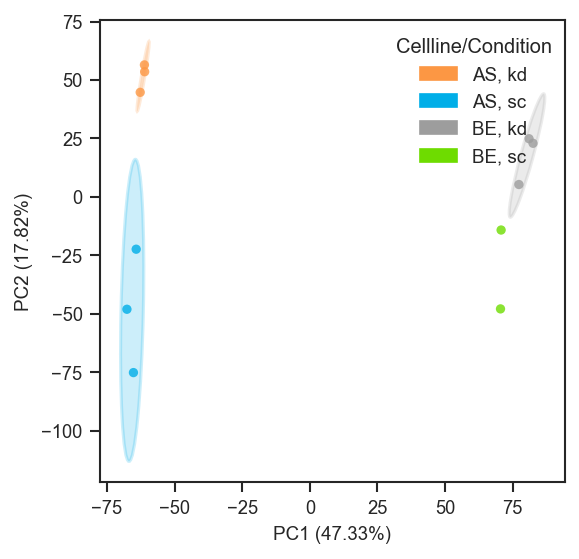
Plot PCA

PCA on single-cell protein data after directlfq (example uses region; use condition or other .obs columns as in your object):

import matplotlib.pyplot as plt
from scpviz import plotting as scplt

fig, ax = plt.subplots(figsize=(4, 4))
pdata_sc.pca(on="protein")
scplt.plot_pca(
    ax,
    pdata_sc,
    color=["region"],
    cmap={"Cortex": "#D19DCB", "SNpc": "#85BE9E"},
    add_ellipses=True,
)
plt.show()
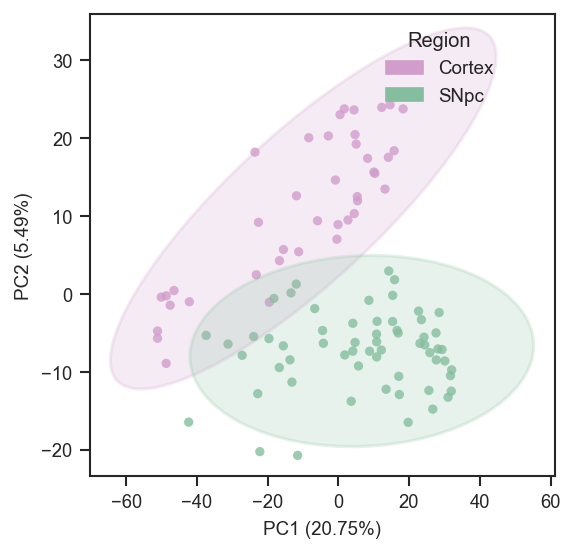
Plot PCA (single-cell)

Basic usage in grey:

plot_pca(ax, pdata)

Face color by a categorical .obs key:

plot_pca(ax, pdata, color="treatment")

Combine multiple .obs keys into one categorical label:

plot_pca(ax, pdata, color=["cellline", "treatment"])

Face color by gene/protein abundance (continuous) with a matplotlib colormap:

plot_pca(ax, pdata, color="UBE4B", cmap="plasma")

Face color and edge color by different categorical keys with a custom palette:

edge_palette = {"A": "#3627E0", "B": "#F61B0F"}
plot_pca(ax, pdata, color="condition", edge_color="group", edge_cmap=edge_palette, edge_lw=1.5)

Marker shapes by a categorical key:

shape_map = {"WT": "o", "MUT": "s"}
plot_pca(ax, pdata, color="treatment", marker_shape="genotype", shape_cmap=shape_map)

Add ellipses (auto-grouping by categorical color):

plot_pca(ax, pdata, color="treatment", add_ellipses=True)

Add ellipses grouped explicitly (and force ellipse colors):

ellipse_colors = {"WT": "#000000", "MUT": "#377EB8"}
plot_pca(
    ax, pdata,
    color="UBE4B", cmap="viridis",
    marker_shape="genotype",
    add_ellipses=True,
    ellipse_group="genotype",
    ellipse_cmap=ellipse_colors,
    ellipse_kwargs={"alpha": 0.10, "lw": 1.5},
)

Label all samples (using a custom label column if present):

plot_pca(ax, pdata, color="treatment", show_labels=True, label_column="short_name")

Tuple-key mapping (literal face + edge per combination of .obs columns):

mapping_keys = ["cellline", "condition"]
mapping = {
    ("A", "ctrl"): {"color": "white", "edge_color": "black"},
    ("A", "treat"): {"color": "white", "edge_color": "blue"},
    ("B", "ctrl"): {"color": "lightgrey", "edge_color": "black"},
    ("B", "treat"): {"color": "lightgrey", "edge_color": "blue"},
}
plot_pca(ax, pdata, mapping_keys=mapping_keys, mapping=mapping, force=True)

Global abundance face color with per-combination edges (mapping must not set color):

mapping_keys = ["cellline", "condition"]
mapping = {
    ("A", "ctrl"): {"edge_color": "black"},
    ("A", "treat"): {"edge_color": "steelblue"},
    ("B", "ctrl"): {"edge_color": "black"},
    ("B", "treat"): {"edge_color": "steelblue"},
}
plot_pca(ax, pdata, color="UBE4B", cmap="plasma", mapping_keys=mapping_keys, mapping=mapping)

Sequential overlays on the same axes (same embedding, using different subset_mask; order matters). Replace column names and palettes with your metadata:

line = "LineA"
cell_line_color = {"LineA": "#4C72B0", "LineB": "#DD8452"}
cell_line_color_6h = {"LineA": "#9fb8d9", "LineB": "#e8b896"}

mask_dark = (
    (pdata.summary["treatment"] == "Drug")
    & (pdata.summary["cell_line"] == line)
    & (pdata.summary["duration"] == "24hr")
)
mask_light = (
    (pdata.summary["treatment"] == "Drug")
    & (pdata.summary["cell_line"] == line)
    & (pdata.summary["duration"] == "6hr")
)
mask_ctrl = (
    (pdata.summary["treatment"] == "Vehicle")
    & (pdata.summary["cell_line"] == line)
)

fig = plt.figure(figsize=(4, 4))
ax = fig.add_subplot(111, projection="3d")

ax, _ = plot_pca(
    ax,
    pdata,
    color="cell_line",
    cmap=cell_line_color,
    edge_color="duration",
    edge_cmap={"6hr": "grey", "24hr": "black"},
    plot_pc=[1, 2, 3],
    subset_mask=mask_dark,
    return_fit=True,
    force=True,
)
ax, _ = plot_pca(
    ax,
    pdata,
    color="cell_line",
    cmap=cell_line_color_6h,
    edge_color="duration",
    edge_cmap={"6hr": "grey", "24hr": "black"},
    plot_pc=[1, 2, 3],
    subset_mask=mask_light,
    return_fit=True,
)
plot_pca(
    ax,
    pdata,
    color="cell_line",
    cmap={k: "white" for k in cell_line_color},
    plot_pc=[1, 2, 3],
    edge_color="cell_line",
    edge_cmap=cell_line_color,
    edge_lw=1.2,
    subset_mask=mask_ctrl,
    force=False,
)

Source code in src/scpviz/plotting/dimreduc.py
 46
 47
 48
 49
 50
 51
 52
 53
 54
 55
 56
 57
 58
 59
 60
 61
 62
 63
 64
 65
 66
 67
 68
 69
 70
 71
 72
 73
 74
 75
 76
 77
 78
 79
 80
 81
 82
 83
 84
 85
 86
 87
 88
 89
 90
 91
 92
 93
 94
 95
 96
 97
 98
 99
100
101
102
103
104
105
106
107
108
109
110
111
112
113
114
115
116
117
118
119
120
121
122
123
124
125
126
127
128
129
130
131
132
133
134
135
136
137
138
139
140
141
142
143
144
145
146
147
148
149
150
151
152
153
154
155
156
157
158
159
160
161
162
163
164
165
166
167
168
169
170
171
172
173
174
175
176
177
178
179
180
181
182
183
184
185
186
187
188
189
190
191
192
193
194
195
196
197
198
199
200
201
202
203
204
205
206
207
208
209
210
211
212
213
214
215
216
217
218
219
220
221
222
223
224
225
226
227
228
229
230
231
232
233
234
235
236
237
238
239
240
241
242
243
244
245
246
247
248
249
250
251
252
253
254
255
256
257
258
259
260
261
262
263
264
265
266
267
268
269
270
271
272
273
274
275
276
277
278
279
280
281
282
283
284
285
286
287
288
289
290
291
292
293
294
295
296
297
298
299
300
301
302
303
304
305
306
307
308
309
310
311
312
313
314
315
316
317
318
319
320
321
322
323
324
325
326
327
328
329
330
331
332
333
334
335
336
337
338
339
340
341
342
343
344
345
346
347
348
349
350
351
352
353
354
355
356
357
358
359
360
361
362
363
364
365
366
367
368
369
370
371
372
373
374
375
376
377
378
379
380
381
382
383
384
385
386
387
388
389
390
391
392
393
394
395
396
397
398
399
400
401
402
403
404
405
406
407
408
409
410
411
412
413
414
415
416
417
418
419
420
421
422
423
424
425
426
427
428
429
430
431
432
433
434
435
436
437
438
439
def plot_pca(ax: "plt.Axes", pdata: pAnnData, color=None, edge_color=None, marker_shape=None, classes=None, 
             layer="X", on='protein', cmap='default', edge_cmap="default", shape_cmap="default", edge_lw=0.8,
             s=20, alpha=.8, plot_pc=[1, 2], pca_params=None, subset_mask=None,
             force=False, basis='X_pca', text_size=9, show_labels=False, label_column=None,
             add_ellipses=False, ellipse_group=None, ellipse_cmap='default', ellipse_kwargs=None, 
             return_fit=False, mapping_keys=None, mapping=None, mapping_on_missing: str = "warn",
             **kwargs: Any) -> "plt.Axes | tuple[plt.Axes, dict[str, Any]]":
    """
    Plot principal component analysis (PCA) of protein or peptide abundance.

    Computes (or reuses) PCA coordinates and plots samples in 2D or 3D, with
    flexible styling via face color (`color`), edge color (`edge_color`), marker
    shapes (`marker_shape`), labels, and optional confidence ellipses.

    Args:
        ax (matplotlib.axes.Axes): Axis to plot on. Must be 3D if plotting 3 PCs.
        pdata (pAnnData): Input pAnnData object with `.prot`, `.pep`, and `.summary`.

        color (str or list of str or None): Face coloring for points.

            - None: grey face color for all points.
            - str: an `.obs` key (categorical or continuous) OR a gene/protein identifier
              (continuous abundance coloring).
            - list of str: combine multiple `.obs` keys into a single categorical label
              (e.g., `["cellline", "treatment"]`).

        edge_color (str or list of str or None): Edge coloring for points (categorical only).

            - None: no edge coloring (edges disabled).
            - str: an `.obs` key (categorical).
            - list of str: combine multiple `.obs` keys into a single categorical label.

        marker_shape (str or list of str or None): Marker shapes for points (categorical only).

            - None: use a single marker (`"o"`).
            - str: an `.obs` key (categorical).
            - list of str: combine multiple `.obs` keys into a single categorical label.

        classes (str or list of str or None): Deprecated alias for `color`.

            - If `classes` is provided and `color` is None, `classes` is used as `color`.
            - If both are provided, `color` is used and `classes` is ignored.

        layer (str): Data layer to use (default: `"X"`).
        on (str): Data level to plot, either `"protein"` or `"peptide"` (default: `"protein"`).

        cmap (str, list, or dict): Palette/colormap for face coloring (`color`).

            - `"default"`: uses internal `get_color()` scheme for categorical coloring and
              defaults to a standard continuous colormap for abundance coloring.
            - list: list of colors assigned to class labels in sorted order (categorical).
            - dict: `{label: color}` mapping (categorical).
            - str / colormap: continuous colormap name/object (abundance).

        edge_cmap (str, list, or dict): Palette for edge coloring (`edge_color`, categorical only).

            - `"default"`: internal categorical palette via `get_color()`.
            - list: colors assigned to sorted class labels.
            - dict: `{label: color}` mapping.

        shape_cmap (str, list, or dict): Marker mapping for `marker_shape` (categorical only).

            - `"default"`: cycles markers in this order:
              `["o", "s", "^", "D", "v", "P", "X", "<", ">", "h", "*"]`
            - list: markers assigned to sorted class labels.
            - dict: `{label: marker}` mapping.

        edge_lw (float): Edge linewidth when `edge_color` is used (default: 0.8).
        s (float): Marker size (default: 20).
        alpha (float): Marker opacity (default: 0.8).

        plot_pc (list of int): Principal components to plot, e.g. `[1, 2]` or `[1, 2, 3]`.
        pca_params (dict, optional): Additional parameters for the PCA computation.
        subset_mask (array-like or pandas.Series, optional): Boolean mask to subset samples.
            If a Series is provided, it will be aligned to `adata.obs.index`.
        force (bool): If True, recompute PCA even if cached.
        basis (str): PCA basis in `adata.obsm` (default: `"X_pca"`). Alternative bases
            (e.g., `"X_pca_harmony"`) may be available after running Harmony or other methods.

        text_size (int): Font size for axis labels and legends (default: 9).
        show_labels (bool or list): Whether to label points.

            - False: no labels.
            - True: label all samples.
            - list: label only specified samples.

        label_column (str, optional): Column in `pdata.summary` to use for labels when
            `show_labels=True`. If not provided, sample names are used.

        add_ellipses (bool): If True, overlay confidence ellipses per group (2D only).
        ellipse_group (str or list of str, optional): Explicit `.obs` key(s) to group ellipses.
            If None, grouping is chosen by priority:

            1. categorical `color`
            2. `edge_color`
            3. `marker_shape`
            4. otherwise raises ValueError

        ellipse_cmap (str, list, or dict): Ellipse color mapping.

            - `"default"`: if grouping uses categorical `color` or `edge_color`, ellipses reuse
              those colors; if grouping uses `marker_shape`, ellipses use `get_color()`.
            - list: colors assigned to sorted group labels.
            - dict: `{label: color}` mapping.
            - str: matplotlib colormap name (used to generate a palette across groups).

        ellipse_kwargs (dict, optional): Extra keyword arguments passed to the ellipse patch
            (e.g., `{"alpha": 0.12, "lw": 1.5}`).

        mapping_keys (list of str, optional): `.obs` columns whose tuple of levels keys `mapping`.
            Must be provided together with ``mapping``.

        mapping (dict, optional): Keys are tuples matching observed metadata combinations; values
            are dicts with optional ``color`` (literal or abundance feature), ``edge_color`` (literal
            only), and ``marker``. Cannot be combined with ``edge_color`` / ``edge_cmap``. When
            ``color=`` is an abundance feature, mapping entries must not include ``color``.

        mapping_on_missing (str): ``"warn"`` (default) prints a log-prefixed message and uses grey
            face with no edge for missing combinations (abundance ``color=``: missing combo keeps
            abundance face, edges off). ``"raise"`` raises if any observed combination is absent from ``mapping``.

        return_fit (bool): If True, also return the fitted PCA object.
        **kwargs (Any): Extra keyword arguments passed to `ax.scatter()`.

    Returns:
        ax (matplotlib.axes.Axes): Axis containing the PCA scatter plot.
        pca (sklearn.decomposition.PCA): The fitted PCA object (only if `return_fit=True`).

    Raises:
        AssertionError: If 3 PCs are requested and `ax` is not 3D.
        ValueError: If `edge_color` is continuous (use `color=` for abundance instead).
        ValueError: If `marker_shape` is not a categorical `.obs` key.
        ValueError: If `add_ellipses=True` but no categorical grouping is available.

    Note:
        - `edge_color` and `marker_shape` are categorical only.
        - If `color` is continuous (abundance), a colorbar is shown automatically.
        - Use `classes=` only for backwards compatibility; prefer `color=`.
        - PCA results are cached in `pdata.uns["pca"]` and reused across plotting calls.
        - To force recalculation (e.g., after filtering or normalization), set `force=True`.

    Example:
        PCA on normalized protein data with ellipses, grouped by cell line and condition:
            ```python
            import matplotlib.pyplot as plt
            from scpviz import plotting as scplt

            fig, ax = plt.subplots(figsize=(4, 4))
            pdata_norm.pca(on="protein")
            scplt.plot_pca(ax, pdata_norm, classes=["cellline", "condition"], add_ellipses=True)
            plt.show()
            ```

        ![Plot PCA](../../assets/plots/plot_pca.png)

        PCA on single-cell protein data after ``directlfq`` (example uses ``region``; use ``condition`` or other ``.obs`` columns as in your object):
            ```python
            import matplotlib.pyplot as plt
            from scpviz import plotting as scplt

            fig, ax = plt.subplots(figsize=(4, 4))
            pdata_sc.pca(on="protein")
            scplt.plot_pca(
                ax,
                pdata_sc,
                color=["region"],
                cmap={"Cortex": "#D19DCB", "SNpc": "#85BE9E"},
                add_ellipses=True,
            )
            plt.show()
            ```

        ![Plot PCA (single-cell)](../../assets/plots/plot_pca_sc.png)

        Basic usage in grey:
            ```python
            plot_pca(ax, pdata)
            ```

        Face color by a categorical `.obs` key:
            ```python
            plot_pca(ax, pdata, color="treatment")
            ```

        Combine multiple `.obs` keys into one categorical label:
            ```python
            plot_pca(ax, pdata, color=["cellline", "treatment"])
            ```

        Face color by gene/protein abundance (continuous) with a matplotlib colormap:
            ```python
            plot_pca(ax, pdata, color="UBE4B", cmap="plasma")
            ```

        Face color and edge color by different categorical keys with a custom palette:
            ```python
            edge_palette = {"A": "#3627E0", "B": "#F61B0F"}
            plot_pca(ax, pdata, color="condition", edge_color="group", edge_cmap=edge_palette, edge_lw=1.5)
            ```

        Marker shapes by a categorical key:
            ```python
            shape_map = {"WT": "o", "MUT": "s"}
            plot_pca(ax, pdata, color="treatment", marker_shape="genotype", shape_cmap=shape_map)
            ```

        Add ellipses (auto-grouping by categorical `color`):
            ```python
            plot_pca(ax, pdata, color="treatment", add_ellipses=True)
            ```

        Add ellipses grouped explicitly (and force ellipse colors):
            ```python
            ellipse_colors = {"WT": "#000000", "MUT": "#377EB8"}
            plot_pca(
                ax, pdata,
                color="UBE4B", cmap="viridis",
                marker_shape="genotype",
                add_ellipses=True,
                ellipse_group="genotype",
                ellipse_cmap=ellipse_colors,
                ellipse_kwargs={"alpha": 0.10, "lw": 1.5},
            )
            ```

        Label all samples (using a custom label column if present):
            ```python
            plot_pca(ax, pdata, color="treatment", show_labels=True, label_column="short_name")
            ```

        Tuple-key ``mapping`` (literal face + edge per combination of ``.obs`` columns):
            ```python
            mapping_keys = ["cellline", "condition"]
            mapping = {
                ("A", "ctrl"): {"color": "white", "edge_color": "black"},
                ("A", "treat"): {"color": "white", "edge_color": "blue"},
                ("B", "ctrl"): {"color": "lightgrey", "edge_color": "black"},
                ("B", "treat"): {"color": "lightgrey", "edge_color": "blue"},
            }
            plot_pca(ax, pdata, mapping_keys=mapping_keys, mapping=mapping, force=True)
            ```

        Global abundance face color with per-combination edges (``mapping`` must not set ``color``):
            ```python
            mapping_keys = ["cellline", "condition"]
            mapping = {
                ("A", "ctrl"): {"edge_color": "black"},
                ("A", "treat"): {"edge_color": "steelblue"},
                ("B", "ctrl"): {"edge_color": "black"},
                ("B", "treat"): {"edge_color": "steelblue"},
            }
            plot_pca(ax, pdata, color="UBE4B", cmap="plasma", mapping_keys=mapping_keys, mapping=mapping)
            ```

        Sequential overlays on the same axes (same embedding, using different ``subset_mask``; order matters).
        Replace column names and palettes with your metadata:
            ```python
            line = "LineA"
            cell_line_color = {"LineA": "#4C72B0", "LineB": "#DD8452"}
            cell_line_color_6h = {"LineA": "#9fb8d9", "LineB": "#e8b896"}

            mask_dark = (
                (pdata.summary["treatment"] == "Drug")
                & (pdata.summary["cell_line"] == line)
                & (pdata.summary["duration"] == "24hr")
            )
            mask_light = (
                (pdata.summary["treatment"] == "Drug")
                & (pdata.summary["cell_line"] == line)
                & (pdata.summary["duration"] == "6hr")
            )
            mask_ctrl = (
                (pdata.summary["treatment"] == "Vehicle")
                & (pdata.summary["cell_line"] == line)
            )

            fig = plt.figure(figsize=(4, 4))
            ax = fig.add_subplot(111, projection="3d")

            ax, _ = plot_pca(
                ax,
                pdata,
                color="cell_line",
                cmap=cell_line_color,
                edge_color="duration",
                edge_cmap={"6hr": "grey", "24hr": "black"},
                plot_pc=[1, 2, 3],
                subset_mask=mask_dark,
                return_fit=True,
                force=True,
            )
            ax, _ = plot_pca(
                ax,
                pdata,
                color="cell_line",
                cmap=cell_line_color_6h,
                edge_color="duration",
                edge_cmap={"6hr": "grey", "24hr": "black"},
                plot_pc=[1, 2, 3],
                subset_mask=mask_light,
                return_fit=True,
            )
            plot_pca(
                ax,
                pdata,
                color="cell_line",
                cmap={k: "white" for k in cell_line_color},
                plot_pc=[1, 2, 3],
                edge_color="cell_line",
                edge_cmap=cell_line_color,
                edge_lw=1.2,
                subset_mask=mask_ctrl,
                force=False,
            )
            ```
    """

    # Validate PCA dimensions
    assert isinstance(plot_pc, list) and len(plot_pc) in [2, 3], "plot_pc must be a list of 2 or 3 PCs."
    if len(plot_pc) == 3:
        assert ax.name == '3d', "3 PCs requested — ax must be a 3D projection"

    pc_x, pc_y = plot_pc[0] - 1, plot_pc[1] - 1
    pc_z = plot_pc[2] - 1 if len(plot_pc) == 3 else None

    # check deprecated classes argument
    if classes is not None and color is None:
        print(f"{utils.format_log_prefix('warn')} `classes` is deprecated; use `color=` instead.")
        color = classes
    elif classes is not None and color is not None:
        print(f"{utils.format_log_prefix('warn')} Both `classes` and `color` were provided; using `color` and ignoring `classes`.")

    adata = utils.get_adata(pdata, on)

    default_pca_params = {'n_comps': min(len(adata.obs_names), len(adata.var_names)) - 1, 'random_state': 42}
    user_params = dict(pca_params or {})

    # accept n_components OR n_comps
    if "n_components" in user_params and "n_comps" not in user_params:
        user_params["n_comps"] = user_params.pop("n_components")
    else:
        user_params.pop("n_components", None) 
    pca_param = {**default_pca_params, **user_params}

    if basis != "X_pca":
        # User-specified alternative basis (e.g. Harmony, ICA)
        if basis not in adata.obsm:
            raise KeyError(f"{utils.format_log_prefix('error',2)} Custom PCA basis '{basis}' not found in adata.obsm.")
    else:
        # Standard PCA case
        if "X_pca" not in adata.obsm or force:
            print(f"{utils.format_log_prefix('info')} Computing PCA (force={force})...")
            pdata.pca(on=on, layer=layer, **pca_param)
        else:
            print(f"{utils.format_log_prefix('info')} Using existing PCA embedding.")

    # --- Select PCA basis for plotting ---
    X_pca = adata.obsm[basis] if basis in adata.obsm else adata.obsm["X_pca"]
    pca = adata.uns["pca"]

    # subset if requested
    mask = _resolve_subset_mask(adata, subset_mask)
    obs_names_plot = adata.obs_names[mask]
    pc_idx = [pc_x, pc_y] if len(plot_pc) == 2 else [pc_x, pc_y, pc_z]

    # build PCA-specific axis labels with variance %
    var = pca["variance_ratio"]
    dim_labels = [
        f"PC{pc_x+1} ({var[pc_x]*100:.2f}%)",
        f"PC{pc_y+1} ({var[pc_y]*100:.2f}%)",
    ]
    if len(pc_idx) == 3:
        dim_labels.append(f"PC{pc_z+1} ({var[pc_z]*100:.2f}%)")

    # label series for show_labels
    if label_column and label_column in pdata.summary.columns:
        label_series = pdata.summary.loc[obs_names_plot, label_column]
    else:
        label_series = obs_names_plot

    ax = _plot_embedding_scatter(ax=ax, adata=adata, Xt=X_pca, mask=mask, obs_names_plot=obs_names_plot,
        color=color, edge_color=edge_color, marker_shape=marker_shape, layer=layer,
        cmap=cmap, edge_cmap=edge_cmap, shape_cmap=shape_cmap, edge_lw=edge_lw, s=s, alpha=alpha, text_size=text_size,
        axis_prefix="PC", dim_labels=dim_labels, pc_idx=pc_idx, 
        show_labels=show_labels, label_series=label_series, add_ellipses=add_ellipses, ellipse_kwargs=ellipse_kwargs, ellipse_group=ellipse_group, ellipse_cmap=ellipse_cmap,
        plot_confidence_ellipse=_plot_confidence_ellipse,
        mapping_keys=mapping_keys, mapping=mapping, mapping_on_missing=mapping_on_missing,
        **kwargs,
    )

    if return_fit:
        return ax, pca
    else:
        return ax

plot_pca_gsea_bubble

plot_pca_gsea_bubble(
    ax,
    pdata: pAnnData,
    on="protein",
    key_added="pca_gsea",
    pcs=None,
    top_n=20,
    fdr_cutoff=0.1,
    size_scale=120.0,
    cmap="coolwarm",
    title_case_labels=True,
    force=False,
    gsea_kwargs=None,
    top_n_mode="balanced",
    include_pathways=None,
    exclude_pathways=None,
    return_df=False,
) -> Any

Plot PCA-GSEA results as a bubble chart (principal component versus pathway).

Bubble color encodes NES; bubble area reflects significance (-log10(FDR)). Rows and columns are ordered by pathway and PC. If pcs is omitted, all PCs present in stored results are used.

Parameters:

Name Type Description Default
ax Axes

Target axis.

required
pdata pAnnData

Input object.

required
on str

Data level, "protein" or "peptide".

'protein'
key_added str

adata.uns key for PCA-GSEA results (default "pca_gsea").

'pca_gsea'
pcs list of int or None

1-based PCs to include; None uses every PC in stored results.

None
top_n int

Cap on distinct pathways after ranking; must be >= 1 (required).

20
fdr_cutoff float or None

Same meaning as in plot_pca_gsea_pathway_vectors (default 0.1): eligibility on at least one PC plus top_n ranking gate. None disables both.

0.1
size_scale float

Multiplier for bubble area from -log10(FDR).

120.0
cmap str or Colormap

Colormap for NES-centered coloring.

'coolwarm'
title_case_labels bool

If True, format pathway tick labels for display.

True
force bool

If True, re-run pca_gsea for the PCs being shown.

False
gsea_kwargs dict or None

Forwarded to pca_gsea when auto-computing results.

None
top_n_mode str

"balanced" or "max_score" (see plot_pca_gsea_pathway_vectors).

'balanced'
include_pathways str, iterable, or None

Keep only pathways matching these names.

None
exclude_pathways str, iterable, or None

Remove pathways matching these names.

None
return_df bool

If True, return (ax, bubble_df) with plot coordinates and sizes.

False

Returns:

Type Description
Any

matplotlib.axes.Axes, or (ax, pandas.DataFrame) if return_df=True.

Example

Bubble chart for the first three PCs, top 25 pathways by ranking, and return the table used for the plot:

import matplotlib.pyplot as plt
from scpviz import plotting as scplt

fig, ax = plt.subplots(figsize=(6, 8))
ax, df = scplt.plot_pca_gsea_bubble(
    ax,
    pdata,
    pcs=[1, 2, 3],
    top_n=25,
    return_df=True,
)

Stricter FDR cutoff (0.05) and title-case pathway labels on the y-axis:

fig, ax = plt.subplots(figsize=(5, 9))
scplt.plot_pca_gsea_bubble(
    ax,
    pdata,
    pcs=[1, 2],
    top_n=30,
    fdr_cutoff=0.05,
    title_case_labels=True,
)

Source code in src/scpviz/plotting/dimreduc.py
def plot_pca_gsea_bubble(
    ax,
    pdata: pAnnData,
    on="protein",
    key_added="pca_gsea",
    pcs=None,
    top_n=20,
    fdr_cutoff=0.1,
    size_scale=120.0,
    cmap="coolwarm",
    title_case_labels=True,
    force=False,
    gsea_kwargs=None,
    top_n_mode="balanced",
    include_pathways=None,
    exclude_pathways=None,
    return_df=False,
) -> Any:
    """
    Plot PCA-GSEA results as a bubble chart (principal component versus pathway).

    Bubble color encodes NES; bubble area reflects significance (``-log10(FDR)``). Rows and columns
    are ordered by pathway and PC. If ``pcs`` is omitted, all PCs present in stored results are used.

    Args:
        ax (matplotlib.axes.Axes): Target axis.
        pdata (pAnnData): Input object.
        on (str): Data level, ``"protein"`` or ``"peptide"``.
        key_added (str): ``adata.uns`` key for PCA-GSEA results (default ``"pca_gsea"``).
        pcs (list of int or None): 1-based PCs to include; ``None`` uses every PC in stored results.
        top_n (int): Cap on distinct pathways after ranking; must be >= 1 (required).
        fdr_cutoff (float or None): Same meaning as in ``plot_pca_gsea_pathway_vectors`` (default ``0.1``):
            eligibility on at least one PC plus ``top_n`` ranking gate. ``None`` disables both.
        size_scale (float): Multiplier for bubble area from ``-log10(FDR)``.
        cmap (str or Colormap): Colormap for NES-centered coloring.
        title_case_labels (bool): If True, format pathway tick labels for display.
        force (bool): If True, re-run ``pca_gsea`` for the PCs being shown.
        gsea_kwargs (dict or None): Forwarded to ``pca_gsea`` when auto-computing results.
        top_n_mode (str): ``"balanced"`` or ``"max_score"`` (see ``plot_pca_gsea_pathway_vectors``).
        include_pathways (str, iterable, or None): Keep only pathways matching these names.
        exclude_pathways (str, iterable, or None): Remove pathways matching these names.
        return_df (bool): If True, return ``(ax, bubble_df)`` with plot coordinates and sizes.

    Returns:
        matplotlib.axes.Axes, or ``(ax, pandas.DataFrame)`` if ``return_df=True``.

    Example:
        Bubble chart for the first three PCs, top 25 pathways by ranking, and return the table used for the plot:
            ```python
            import matplotlib.pyplot as plt
            from scpviz import plotting as scplt

            fig, ax = plt.subplots(figsize=(6, 8))
            ax, df = scplt.plot_pca_gsea_bubble(
                ax,
                pdata,
                pcs=[1, 2, 3],
                top_n=25,
                return_df=True,
            )
            ```

        Stricter FDR cutoff (0.05) and title-case pathway labels on the y-axis:
            ```python
            fig, ax = plt.subplots(figsize=(5, 9))
            scplt.plot_pca_gsea_bubble(
                ax,
                pdata,
                pcs=[1, 2],
                top_n=30,
                fdr_cutoff=0.05,
                title_case_labels=True,
            )
            ```
    """
    top_n = _validate_plot_top_n(top_n, what="pathways")
    requested_pcs = pcs
    if requested_pcs is None:
        adata = utils.get_adata(pdata, on)
        if key_added in adata.uns and "results" in adata.uns[key_added]:
            requested_pcs = [int(str(k).replace("PC", "")) for k in adata.uns[key_added]["results"].keys()]
    _, payload = _ensure_pca_gsea_payload(
        pdata=pdata,
        on=on,
        key_added=key_added,
        requested_pcs=requested_pcs,
        force=force,
        gsea_kwargs=gsea_kwargs,
    )
    long_df, matrix_df, fdr_df, missing_pc_keys = _build_pca_gsea_tables(payload=payload, pcs=pcs)
    if missing_pc_keys:
        print(
            f"{utils.format_log_prefix('warn')} Requested PCs missing from existing pca_gsea results: {missing_pc_keys}. "
            f"Showing NaN columns for unrun PCs. Rerun pca_gsea on these PCs (or set force=True)."
        )

    long_df, matrix_df, fdr_df = _apply_pathway_name_filters(
        long_df=long_df,
        matrix_df=matrix_df,
        fdr_df=fdr_df,
        include_pathways=include_pathways,
        exclude_pathways=exclude_pathways,
    )
    if fdr_cutoff is not None:
        _keep_mask = (fdr_df <= float(fdr_cutoff)).any(axis=1)
        matrix_df = matrix_df.loc[_keep_mask]
    if matrix_df.empty:
        raise ValueError("No pathways available after filtering for bubble plot.")
    sel_pathways = matrix_df.index.tolist()
    long_df = long_df[long_df["pathway_raw"].isin(sel_pathways)].copy()

    score_df = _compute_pc_score_df(
        matrix_df=matrix_df,
        fdr_df=fdr_df.reindex(index=matrix_df.index, columns=matrix_df.columns),
        fdr_cutoff=fdr_cutoff,
    )
    sel = _select_top_pathways(score_df=score_df, top_n=top_n, top_n_mode=top_n_mode)
    long_df = long_df[long_df["pathway_raw"].isin(sel)].copy()

    pathway_order = (
        long_df.assign(abs_nes=long_df["NES"].abs())
        .groupby("pathway_raw")["abs_nes"]
        .max()
        .sort_values(ascending=False)
        .index.tolist()
    )
    pc_order = sorted(long_df["pc"].unique(), key=lambda x: int(str(x).replace("PC", "")))
    long_df["pc_i"] = long_df["pc"].map({pc: i for i, pc in enumerate(pc_order)})
    long_df["pathway_i"] = long_df["pathway_raw"].map({p: i for i, p in enumerate(pathway_order)})

    fdr_safe = long_df["FDR q-val"].fillna(1.0).clip(lower=1e-300, upper=1.0)
    bubble_size = (-np.log10(fdr_safe)) * float(size_scale)
    norm = mcolors.TwoSlopeNorm(vcenter=0)
    scatter = ax.scatter(
        long_df["pc_i"],
        long_df["pathway_i"],
        s=bubble_size,
        c=long_df["NES"],
        cmap=cmap,
        norm=norm,
        alpha=0.85,
        edgecolors="black",
        linewidths=0.3,
    )

    ax.set_xticks(np.arange(len(pc_order)))
    ax.set_xticklabels(pc_order)
    ax.set_yticks(np.arange(len(pathway_order)))
    if title_case_labels:
        ax.set_yticklabels([_format_pathway_label(x) for x in pathway_order])
    else:
        ax.set_yticklabels([str(x).split("__", 1)[1] if "__" in str(x) else str(x) for x in pathway_order])
    ax.set_xlabel("Principal Component")
    ax.set_ylabel("Pathway")
    ax.set_title("PCA-GSEA bubble plot")
    plt.colorbar(scatter, ax=ax, label="NES")

    # Bubble size legend for -log10(FDR q-val)
    fdr_reference = np.array([0.1, 0.05, 0.01])
    legend_sizes = (-np.log10(fdr_reference.clip(min=1e-300))) * float(size_scale)
    handles = [
        ax.scatter([], [], s=s, facecolors="none", edgecolors="black", linewidths=0.6, label=f"-log10(FDR)={-np.log10(f):.1f}")
        for s, f in zip(legend_sizes, fdr_reference)
    ]
    ax.legend(handles=handles, title="Bubble size", loc="upper left", bbox_to_anchor=(1.02, 1.0), frameon=True)

    bubble_df = long_df.copy()
    if title_case_labels:
        bubble_df["pathway"] = bubble_df["pathway"].map(_format_pathway_label)
    bubble_df["neg_log10_fdr"] = -np.log10(fdr_safe.values)
    bubble_df["bubble_size"] = bubble_size.values
    bubble_df = bubble_df[
        ["pathway", "pathway_raw", "library", "pc", "NES", "FDR q-val", "neg_log10_fdr", "bubble_size", "pc_i", "pathway_i"]
    ].rename(columns={"pc": "PC"})
    if return_df:
        return ax, bubble_df
    return ax

plot_pca_gsea_heatmap

plot_pca_gsea_heatmap(
    ax,
    pdata: pAnnData,
    on="protein",
    key_added="pca_gsea",
    pcs=None,
    top_n=30,
    fdr_cutoff=0.1,
    cmap="coolwarm",
    title_case_labels=True,
    force=False,
    gsea_kwargs=None,
    top_n_mode="balanced",
    include_pathways=None,
    exclude_pathways=None,
    return_df=False,
) -> Any

Plot a pathway-by-principal-component heatmap of PCA-GSEA NES values.

Cell color is NES; optional top_n trimming uses the same FDR-aware scoring as the bubble plot. Missing PCs in stored results produce NaN columns and a warning.

Parameters:

Name Type Description Default
ax Axes

Target axis.

required
pdata pAnnData

Input object.

required
on str

Data level, "protein" or "peptide".

'protein'
key_added str

adata.uns key for PCA-GSEA results (default "pca_gsea").

'pca_gsea'
pcs list of int or None

1-based PCs as columns; None uses all PCs in stored results.

None
top_n int

Maximum pathways to retain after ranking; must be >= 1 (required).

30
fdr_cutoff float or None

Same meaning as in plot_pca_gsea_pathway_vectors (default 0.1).

0.1
cmap str or Colormap

Heatmap colormap (diverging around zero is typical).

'coolwarm'
title_case_labels bool

If True, format pathway labels on the axis.

True
force bool

If True, re-run pca_gsea for the PCs being shown.

False
gsea_kwargs dict or None

Forwarded to pca_gsea when auto-computing results.

None
top_n_mode str

"balanced" or "max_score".

'balanced'
include_pathways str, iterable, or None

Keep only pathways matching these names.

None
exclude_pathways str, iterable, or None

Remove pathways matching these names.

None
return_df bool

If True, return (ax, heatmap_df) with the NES matrix used for plotting (pathway index may be formatted when title_case_labels=True).

False

Returns:

Type Description
Any

matplotlib.axes.Axes, or (ax, pandas.DataFrame) if return_df=True.

Example

Heatmap of NES for four PCs and the 40 top-ranked pathways:

import matplotlib.pyplot as plt
from scpviz import plotting as scplt

fig, ax = plt.subplots(figsize=(5, 10))
scplt.plot_pca_gsea_heatmap(ax, pdata, pcs=[1, 2, 3, 4], top_n=40)

Diverging colormap with formatted pathway names on rows:

fig, ax = plt.subplots(figsize=(4, 12))
scplt.plot_pca_gsea_heatmap(
    ax,
    pdata,
    pcs=[1, 2, 3],
    top_n=50,
    cmap="RdBu_r",
    title_case_labels=True,
)

Source code in src/scpviz/plotting/dimreduc.py
def plot_pca_gsea_heatmap(
    ax,
    pdata: pAnnData,
    on="protein",
    key_added="pca_gsea",
    pcs=None,
    top_n=30,
    fdr_cutoff=0.1,
    cmap="coolwarm",
    title_case_labels=True,
    force=False,
    gsea_kwargs=None,
    top_n_mode="balanced",
    include_pathways=None,
    exclude_pathways=None,
    return_df=False,
) -> Any:
    """
    Plot a pathway-by-principal-component heatmap of PCA-GSEA NES values.

    Cell color is NES; optional ``top_n`` trimming uses the same FDR-aware scoring as the bubble plot.
    Missing PCs in stored results produce NaN columns and a warning.

    Args:
        ax (matplotlib.axes.Axes): Target axis.
        pdata (pAnnData): Input object.
        on (str): Data level, ``"protein"`` or ``"peptide"``.
        key_added (str): ``adata.uns`` key for PCA-GSEA results (default ``"pca_gsea"``).
        pcs (list of int or None): 1-based PCs as columns; ``None`` uses all PCs in stored results.
        top_n (int): Maximum pathways to retain after ranking; must be >= 1 (required).
        fdr_cutoff (float or None): Same meaning as in ``plot_pca_gsea_pathway_vectors`` (default ``0.1``).
        cmap (str or Colormap): Heatmap colormap (diverging around zero is typical).
        title_case_labels (bool): If True, format pathway labels on the axis.
        force (bool): If True, re-run ``pca_gsea`` for the PCs being shown.
        gsea_kwargs (dict or None): Forwarded to ``pca_gsea`` when auto-computing results.
        top_n_mode (str): ``"balanced"`` or ``"max_score"``.
        include_pathways (str, iterable, or None): Keep only pathways matching these names.
        exclude_pathways (str, iterable, or None): Remove pathways matching these names.
        return_df (bool): If True, return ``(ax, heatmap_df)`` with the NES matrix used for plotting
            (pathway index may be formatted when ``title_case_labels=True``).

    Returns:
        matplotlib.axes.Axes, or ``(ax, pandas.DataFrame)`` if ``return_df=True``.

    Example:
        Heatmap of NES for four PCs and the 40 top-ranked pathways:
            ```python
            import matplotlib.pyplot as plt
            from scpviz import plotting as scplt

            fig, ax = plt.subplots(figsize=(5, 10))
            scplt.plot_pca_gsea_heatmap(ax, pdata, pcs=[1, 2, 3, 4], top_n=40)
            ```

        Diverging colormap with formatted pathway names on rows:
            ```python
            fig, ax = plt.subplots(figsize=(4, 12))
            scplt.plot_pca_gsea_heatmap(
                ax,
                pdata,
                pcs=[1, 2, 3],
                top_n=50,
                cmap="RdBu_r",
                title_case_labels=True,
            )
            ```
    """
    top_n = _validate_plot_top_n(top_n, what="pathways")
    requested_pcs = pcs
    if requested_pcs is None:
        adata = utils.get_adata(pdata, on)
        if key_added in adata.uns and "results" in adata.uns[key_added]:
            requested_pcs = [int(str(k).replace("PC", "")) for k in adata.uns[key_added]["results"].keys()]
    _, payload = _ensure_pca_gsea_payload(
        pdata=pdata,
        on=on,
        key_added=key_added,
        requested_pcs=requested_pcs,
        force=force,
        gsea_kwargs=gsea_kwargs,
    )
    long_df, matrix_df, fdr_df, missing_pc_keys = _build_pca_gsea_tables(payload=payload, pcs=pcs)
    if missing_pc_keys:
        print(
            f"{utils.format_log_prefix('warn')} Requested PCs missing from existing pca_gsea results: {missing_pc_keys}. "
            f"Showing NaN columns for unrun PCs. Rerun pca_gsea on these PCs (or set force=True)."
        )

    long_df, matrix_df, fdr_df = _apply_pathway_name_filters(
        long_df=long_df,
        matrix_df=matrix_df,
        fdr_df=fdr_df,
        include_pathways=include_pathways,
        exclude_pathways=exclude_pathways,
    )
    if fdr_cutoff is not None:
        _keep_mask = (fdr_df <= float(fdr_cutoff)).any(axis=1)
        matrix_df = matrix_df.loc[_keep_mask]
    matrix_df = matrix_df.dropna(how="all")
    if matrix_df.empty:
        raise ValueError("No pathways available after filtering for heatmap.")

    score_df = _compute_pc_score_df(
        matrix_df=matrix_df,
        fdr_df=fdr_df.reindex(index=matrix_df.index, columns=matrix_df.columns),
        fdr_cutoff=fdr_cutoff,
    )
    selected = _select_top_pathways(score_df=score_df, top_n=top_n, top_n_mode=top_n_mode)
    matrix_df = matrix_df.loc[selected]

    if title_case_labels:
        matrix_plot = matrix_df.copy()
        matrix_plot.index = [_format_pathway_label(x) for x in matrix_plot.index]
    else:
        matrix_plot = matrix_df

    payload["pathway_loadings"] = {"matrix": matrix_df.copy(), "fdr_qval": fdr_df.copy(), "long": long_df.copy()}
    sns.heatmap(matrix_plot, ax=ax, cmap=cmap, center=0, linewidths=0.2, cbar_kws={"label": "NES"})
    ax.set_xlabel("Principal Component")
    ax.set_ylabel("Pathway")
    ax.set_title("PCA-GSEA pathway x PC heatmap")
    if return_df:
        return ax, matrix_plot.copy()
    return ax

plot_pca_gsea_pathway_vectors

plot_pca_gsea_pathway_vectors(
    ax,
    pdata: pAnnData,
    on="protein",
    key_added="pca_gsea",
    plot_pc=[1, 2],
    n_vectors=N_VECTORS_UNSET,
    fdr_cutoff=0.1,
    arrow_scale=0.25,
    pca_kwargs=None,
    show_samples=True,
    title_case_labels=True,
    force=False,
    gsea_kwargs=None,
    adjust_labels=True,
    adjust_text_kwargs=None,
    text_positions=None,
    lock_text_positions=False,
    top_n_mode="balanced",
    exclude_pathways=None,
    namelist=None,
    cmap=None,
    xlim=None,
    ylim=None,
    return_df=False,
) -> Any

Overlay PCA-GSEA pathways as arrows in a two-dimensional PCA sample space.

Each arrow encodes normalized enrichment scores (NES) on two principal components taken from adata.uns[key_added]['results'] (from pca_gsea). Arrow endpoints are rescaled using the current axis limits so pathways remain visible; they are not plotted in the same numeric units as sample coordinates. When show_samples is True, the sample PCA scatter is drawn first via plot_pca.

Parameters:

Name Type Description Default
ax Axes

Target axis (2D).

required
pdata pAnnData

Input object.

required
on str

Data level, "protein" or "peptide".

'protein'
key_added str

adata.uns key for PCA-GSEA results (default "pca_gsea").

'pca_gsea'
plot_pc list of int

Exactly two 1-based PCs, e.g. [1, 2].

[1, 2]
n_vectors int, sequence, ``None``, or unset

Caps auto-selected pathways (after namelist rows). Default when namelist is None is 12; when namelist is set, default is no extra top-N unless you pass n_vectors explicitly. If an int (>= 1), uses top_n_mode on rows not already chosen by namelist. If [nx, ny], split-axis top union on that remainder. Pass n_vectors=None with namelist to plot only listed pathways; pass n_vectors and leave namelist unset for ranking-only.

N_VECTORS_UNSET
fdr_cutoff float or None

For auto-selected rows: pathway-level FDR filtering (keep if any plotted PC has FDR ≤ cutoff) and score gating in _compute_pc_score_df. Namelist pathways skip the row FDR filter; a warning is printed per named pathway when fdr_cutoff is not None and no plotted PC passes FDR.

0.1
arrow_scale float

Scale factor for arrow length relative to axis span.

0.25
pca_kwargs dict or None

Additional arguments passed to plot_pca when show_samples=True.

None
show_samples bool

If True, plot samples first; if False, draw only axes, grid lines, and arrows.

True
title_case_labels bool

If True, format pathway labels for display (e.g. title case).

True
force bool

If True, re-run pca_gsea for plot_pc.

False
gsea_kwargs dict or None

Forwarded to pca_gsea when results are auto-computed.

None
adjust_labels bool

If True, run adjust_text to reduce label overlap.

True
adjust_text_kwargs dict or None

Extra keyword arguments for adjust_text.

None
text_positions dict or None

Optional manual label positions; keys are pathway raw or display strings, values are (x, y) data coordinates.

None
lock_text_positions bool

If True, labels with entries in text_positions are not moved by adjust_text.

False
top_n_mode str

"balanced" or "max_score". Used only when n_vectors is an int.

'balanced'
exclude_pathways str, iterable, or None

Remove pathways matching these names (raw Term, short pathway, or library), same as before.

None
namelist list of str or None

Pathways to always include first (matches Term / pathway_raw or short pathway name only, not library). Shown even if they fail FDR; exclude_pathways still applies first. Combined with n_vectors on the remaining rows (namelist first, then auto).

None
cmap dict or None

Per-pathway colors; lookup raw Term, formatted label, then case-insensitive keys.

None
xlim tuple or None

Applied after scatter / empty axes, before arrow scaling (with ax.set_aspect("auto")).

None
ylim tuple or None

Same as xlim.

None
return_df bool

If True, also return a DataFrame with NES, FDR, and label positions.

False

Returns:

Type Description
Any

matplotlib.axes.Axes, or (ax, pandas.DataFrame) if return_df=True.

Note

May attach payload["pathway_loadings"] for reuse in the same session.

TODO

Add explicit FDR visual encoding on vector arrows (e.g., color or alpha by FDR).

Example

Default overlay on PC1 vs PC2 with label de-cluttering and return coordinates for a second pass:

import matplotlib.pyplot as plt
from scpviz import plotting as scplt

fig, ax = plt.subplots()
ax, vec_df = scplt.plot_pca_gsea_pathway_vectors(
    ax,
    pdata,
    plot_pc=[1, 2],
    adjust_text_kwargs={"expand": (1.3, 1.3)},
    return_df=True,
)

Reuse label positions from a previous run (e.g. after editing coordinates in vec_df):

manual = {
    row["pathway_raw"]: (row["text_x"], row["text_y"])
    for _, row in vec_df.iterrows()
}
ax = scplt.plot_pca_gsea_pathway_vectors(
    ax,
    pdata,
    plot_pc=[1, 2],
    text_positions=manual,
    lock_text_positions=True,
)

Source code in src/scpviz/plotting/dimreduc.py
1880
1881
1882
1883
1884
1885
1886
1887
1888
1889
1890
1891
1892
1893
1894
1895
1896
1897
1898
1899
1900
1901
1902
1903
1904
1905
1906
1907
1908
1909
1910
1911
1912
1913
1914
1915
1916
1917
1918
1919
1920
1921
1922
1923
1924
1925
1926
1927
1928
1929
1930
1931
1932
1933
1934
1935
1936
1937
1938
1939
1940
1941
1942
1943
1944
1945
1946
1947
1948
1949
1950
1951
1952
1953
1954
1955
1956
1957
1958
1959
1960
1961
1962
1963
1964
1965
1966
1967
1968
1969
1970
1971
1972
1973
1974
1975
1976
1977
1978
1979
1980
1981
1982
1983
1984
1985
1986
1987
1988
1989
1990
1991
1992
1993
1994
1995
1996
1997
1998
1999
2000
2001
2002
2003
2004
2005
2006
2007
2008
2009
2010
2011
2012
2013
2014
2015
2016
2017
2018
2019
2020
2021
2022
2023
2024
2025
2026
2027
2028
2029
2030
2031
2032
2033
2034
2035
2036
2037
2038
2039
2040
2041
2042
2043
2044
2045
2046
2047
2048
2049
2050
2051
2052
2053
2054
2055
2056
2057
2058
2059
2060
2061
2062
2063
2064
2065
2066
2067
2068
2069
2070
2071
2072
2073
2074
2075
2076
2077
2078
2079
2080
2081
2082
2083
2084
2085
2086
2087
2088
2089
2090
2091
2092
2093
2094
2095
2096
2097
2098
2099
2100
2101
2102
2103
2104
2105
2106
2107
2108
2109
2110
2111
2112
2113
2114
2115
2116
2117
2118
2119
2120
2121
2122
2123
2124
2125
2126
2127
2128
2129
2130
2131
2132
2133
2134
2135
2136
2137
2138
2139
2140
2141
2142
2143
2144
2145
2146
2147
2148
2149
2150
2151
2152
2153
2154
2155
2156
2157
2158
2159
2160
2161
2162
2163
2164
2165
2166
2167
2168
2169
2170
2171
2172
2173
2174
2175
2176
2177
2178
2179
2180
2181
2182
2183
2184
2185
2186
2187
2188
2189
2190
2191
2192
2193
2194
2195
2196
2197
2198
2199
2200
2201
2202
2203
2204
2205
2206
2207
2208
2209
2210
2211
2212
2213
2214
2215
2216
2217
2218
2219
2220
2221
2222
2223
def plot_pca_gsea_pathway_vectors(
    ax,
    pdata: pAnnData,
    on="protein",
    key_added="pca_gsea",
    plot_pc=[1, 2],
    n_vectors=N_VECTORS_UNSET,
    fdr_cutoff=0.1,
    arrow_scale=0.25,
    pca_kwargs=None,
    show_samples=True,
    title_case_labels=True,
    force=False,
    gsea_kwargs=None,
    adjust_labels=True,
    adjust_text_kwargs=None,
    text_positions=None,
    lock_text_positions=False,
    top_n_mode="balanced",
    exclude_pathways=None,
    namelist=None,
    cmap=None,
    xlim=None,
    ylim=None,
    return_df=False,
) -> Any:
    """
    Overlay PCA-GSEA pathways as arrows in a two-dimensional PCA sample space.

    Each arrow encodes normalized enrichment scores (NES) on two principal components taken from
    ``adata.uns[key_added]['results']`` (from ``pca_gsea``). Arrow endpoints are rescaled using the
    current axis limits so pathways remain visible; they are not plotted in the same numeric units as
    sample coordinates. When ``show_samples`` is True, the sample PCA scatter is drawn first via
    ``plot_pca``.

    Args:
        ax (matplotlib.axes.Axes): Target axis (2D).
        pdata (pAnnData): Input object.
        on (str): Data level, ``"protein"`` or ``"peptide"``.
        key_added (str): ``adata.uns`` key for PCA-GSEA results (default ``"pca_gsea"``).
        plot_pc (list of int): Exactly two 1-based PCs, e.g. ``[1, 2]``.
        n_vectors (int, sequence, ``None``, or unset): Caps auto-selected pathways (after ``namelist`` rows).
            Default when ``namelist`` is ``None`` is ``12``; when ``namelist`` is set, default is no extra
            top-N unless you pass ``n_vectors`` explicitly. If an int (>= 1), uses ``top_n_mode`` on rows not
            already chosen by ``namelist``. If ``[nx, ny]``, split-axis top union on that remainder.
            Pass ``n_vectors=None`` with ``namelist`` to plot only listed pathways; pass ``n_vectors`` and
            leave ``namelist`` unset for ranking-only.
        fdr_cutoff (float or None): For **auto-selected** rows: pathway-level FDR filtering (keep if any plotted
            PC has FDR ≤ cutoff) and score gating in ``_compute_pc_score_df``. **Namelist** pathways skip the row
            FDR filter; a **warning** is printed
            per named pathway when ``fdr_cutoff`` is not ``None`` and no plotted PC passes FDR.
        arrow_scale (float): Scale factor for arrow length relative to axis span.
        pca_kwargs (dict or None): Additional arguments passed to ``plot_pca`` when ``show_samples=True``.
        show_samples (bool): If True, plot samples first; if False, draw only axes, grid lines, and arrows.
        title_case_labels (bool): If True, format pathway labels for display (e.g. title case).
        force (bool): If True, re-run ``pca_gsea`` for ``plot_pc``.
        gsea_kwargs (dict or None): Forwarded to ``pca_gsea`` when results are auto-computed.
        adjust_labels (bool): If True, run ``adjust_text`` to reduce label overlap.
        adjust_text_kwargs (dict or None): Extra keyword arguments for ``adjust_text``.
        text_positions (dict or None): Optional manual label positions; keys are pathway raw or display
            strings, values are ``(x, y)`` data coordinates.
        lock_text_positions (bool): If True, labels with entries in ``text_positions`` are not moved by
            ``adjust_text``.
        top_n_mode (str): ``"balanced"`` or ``"max_score"``. Used only when ``n_vectors`` is an int.
        exclude_pathways (str, iterable, or None): Remove pathways matching these names (raw Term, short
            pathway, or library), same as before.
        namelist (list of str or None): Pathways to always include first (matches ``Term`` / pathway_raw or short
            pathway name only, **not** library). Shown even if they fail FDR; ``exclude_pathways`` still applies
            first. Combined with ``n_vectors`` on the remaining rows (namelist first, then auto).
        cmap (dict or None): Per-pathway colors; lookup raw ``Term``, formatted label, then case-insensitive keys.
        xlim (tuple or None): Applied after scatter / empty axes, before arrow scaling (with ``ax.set_aspect("auto")``).
        ylim (tuple or None): Same as ``xlim``.
        return_df (bool): If True, also return a DataFrame with NES, FDR, and label positions.

    Returns:
        matplotlib.axes.Axes, or ``(ax, pandas.DataFrame)`` if ``return_df=True``.

    Note:
        May attach ``payload["pathway_loadings"]`` for reuse in the same session.

    TODO:
        Add explicit FDR visual encoding on vector arrows (e.g., color or alpha by FDR).

    Example:
        Default overlay on PC1 vs PC2 with label de-cluttering and return coordinates for a second pass:
            ```python
            import matplotlib.pyplot as plt
            from scpviz import plotting as scplt

            fig, ax = plt.subplots()
            ax, vec_df = scplt.plot_pca_gsea_pathway_vectors(
                ax,
                pdata,
                plot_pc=[1, 2],
                adjust_text_kwargs={"expand": (1.3, 1.3)},
                return_df=True,
            )
            ```

        Reuse label positions from a previous run (e.g. after editing coordinates in ``vec_df``):
            ```python
            manual = {
                row["pathway_raw"]: (row["text_x"], row["text_y"])
                for _, row in vec_df.iterrows()
            }
            ax = scplt.plot_pca_gsea_pathway_vectors(
                ax,
                pdata,
                plot_pc=[1, 2],
                text_positions=manual,
                lock_text_positions=True,
            )
            ```
    """
    plot_pc = list(plot_pc)
    if len(plot_pc) != 2:
        raise ValueError("`plot_pc` must contain exactly two PCs for pathway vectors.")

    _, payload = _ensure_pca_gsea_payload(
        pdata=pdata,
        on=on,
        key_added=key_added,
        requested_pcs=plot_pc,
        force=force,
        gsea_kwargs=gsea_kwargs,
    )
    long_df, matrix_df, fdr_df, missing_pc_keys = _build_pca_gsea_tables(payload=payload, pcs=plot_pc)
    pcx, pcy = f"PC{int(plot_pc[0])}", f"PC{int(plot_pc[1])}"
    if missing_pc_keys:
        raise ValueError(
            f"Requested PCs missing from pca_gsea results: {missing_pc_keys}. "
            f"Please run pca_gsea on these PCs (or set force=True)."
        )

    long_df, matrix_df, fdr_df = _apply_pathway_name_filters(
        long_df=long_df,
        matrix_df=matrix_df,
        fdr_df=fdr_df,
        include_pathways=None,
        exclude_pathways=exclude_pathways,
    )

    if n_vectors is N_VECTORS_UNSET:
        n_vectors = None if namelist is not None else 12
    if namelist is None and n_vectors is None:
        raise ValueError("No pathways to plot: provide `n_vectors`, `namelist`, or both.")

    named_resolver_order = []
    named_resolver_set = set()
    if namelist is not None:
        named_resolver_order = _resolve_pca_gsea_namelist_pathways(matrix_df, long_df, namelist)
        named_resolver_set = set(named_resolver_order)

    named_plot_order = [
        i
        for i in named_resolver_order
        if i in matrix_df.index and matrix_df.loc[i, [pcx, pcy]].notna().any()
    ]

    auto_order = []
    if n_vectors is not None:
        remainder = matrix_df.loc[~matrix_df.index.isin(named_resolver_set)]
        remainder = remainder[[pcx, pcy]]
        if fdr_cutoff is not None:
            _fdr_sub = fdr_df.reindex(remainder.index)[[pcx, pcy]]
            _keep_mask = (_fdr_sub <= float(fdr_cutoff)).any(axis=1)
            remainder = remainder.loc[_keep_mask]
        remainder = remainder.dropna(subset=[pcx, pcy], how="all")
        if not remainder.empty:
            mode, nv = _validate_plot_n_vectors(n_vectors, what="pathways")
            score_df = _compute_pc_score_df(
                matrix_df=remainder[[pcx, pcy]],
                fdr_df=fdr_df.reindex(remainder.index)[[pcx, pcy]],
                fdr_cutoff=fdr_cutoff,
            )
            if mode == "single":
                selected = _select_top_pathways(score_df=score_df, top_n=nv, top_n_mode=top_n_mode)
            else:
                nx, ny = nv
                selected = _select_pca_protein_vectors_split(score_df, pcx, pcy, nx, ny)
            auto_order = [r for r in selected if r not in set(named_plot_order)]

    final_order = []
    seen_f = set()
    for i in named_plot_order:
        if i not in seen_f:
            final_order.append(i)
            seen_f.add(i)
    for i in auto_order:
        if i not in seen_f:
            final_order.append(i)
            seen_f.add(i)

    if not final_order:
        raise ValueError("No pathways to plot: provide `n_vectors`, `namelist`, or both.")

    if fdr_cutoff is not None and named_plot_order:
        fc = float(fdr_cutoff)
        for pr in named_plot_order:
            fx = fdr_df.loc[pr, pcx]
            fy = fdr_df.loc[pr, pcy]
            passes = any(pd.notna(v) and float(v) <= fc for v in (fx, fy))
            if not passes:
                print(
                    f"{utils.format_log_prefix('warn')} Pathway {str(pr)!r}: FDR on {pcx}={fx}, {pcy}={fy}; "
                    f"cutoff={fdr_cutoff}. Showing anyway because `namelist` is explicit."
                )

    matrix_df = matrix_df.loc[final_order]
    fdr_df = fdr_df.reindex(matrix_df.index)
    long_df = long_df[long_df["pathway_raw"].isin(matrix_df.index)].copy()

    meta_pw = long_df.drop_duplicates("pathway_raw").set_index("pathway_raw")
    short_by_raw = meta_pw["pathway"]
    lib_by_raw = meta_pw["library"]

    def _pathway_display_name(pathway_raw_key):
        short = short_by_raw.get(pathway_raw_key, np.nan)
        if pd.isna(short):
            raw_s = str(pathway_raw_key)
            short = raw_s.split("__", 1)[1] if "__" in raw_s else raw_s
        return str(short)

    # Cache derived pathway loading tables for downstream reuse.
    payload["pathway_loadings"] = {"matrix": matrix_df.copy(), "fdr_qval": fdr_df.copy(), "long": long_df.copy()}

    if show_samples:
        if pca_kwargs is None:
            pca_kwargs = {}
        plot_pca(ax=ax, pdata=pdata, on=on, plot_pc=plot_pc, **pca_kwargs)
    else:
        adata = utils.get_adata(pdata, on)
        if "pca" not in adata.uns or "variance_ratio" not in adata.uns["pca"]:
            raise ValueError("PCA metadata not found. Run `.pca()` before plotting pathway vectors with `show_samples=False`.")
        var = adata.uns["pca"]["variance_ratio"]
        ax.set_xlabel(f"PC{plot_pc[0]} ({var[int(plot_pc[0]) - 1] * 100:.2f}%)")
        ax.set_ylabel(f"PC{plot_pc[1]} ({var[int(plot_pc[1]) - 1] * 100:.2f}%)")
        ax.axhline(0, color="lightgray", linewidth=0.8, zorder=0)
        ax.axvline(0, color="lightgray", linewidth=0.8, zorder=0)
        ax.set_aspect("equal", adjustable="datalim")

    if xlim is not None or ylim is not None:
        ax.set_aspect("auto")
        if xlim is not None:
            ax.set_xlim(xlim)
        if ylim is not None:
            ax.set_ylim(ylim)

    xl = ax.get_xlim()
    yl = ax.get_ylim()
    xspan = xl[1] - xl[0]
    yspan = yl[1] - yl[0]

    coords = matrix_df[[pcx, pcy]].fillna(0.0).values
    denom = np.max(np.abs(coords))
    if denom == 0:
        denom = 1.0
    x_scale = float(arrow_scale) * xspan / denom
    y_scale = float(arrow_scale) * yspan / denom

    texts = []
    text_rows = []
    text_positions = text_positions or {}
    for pathway, (vx, vy) in matrix_df[[pcx, pcy]].fillna(0.0).iterrows():
        vx, vy = float(vx), float(vy)
        x_end = vx * x_scale
        y_end = vy * y_scale
        label_txt = _format_pathway_label(pathway) if title_case_labels else str(pathway)
        pos = text_positions.get(str(pathway), text_positions.get(label_txt, None))
        text_x, text_y = (x_end, y_end) if pos is None else (float(pos[0]), float(pos[1]))
        color = _vector_color_from_cmap(cmap, str(pathway), label_txt)
        ax.annotate(
            "",
            xy=(x_end, y_end),
            xytext=(0, 0),
            arrowprops=dict(
                arrowstyle="-|>",
                color=color,
                alpha=0.7,
                lw=1.5,
                mutation_scale=10,
            ),
        )
        ax.update_datalim([(x_end, y_end), (0, 0)])
        txt = ax.text(text_x, text_y, label_txt, fontsize=8, ha="left", va="bottom", color=color)
        if not (lock_text_positions and pos is not None):
            texts.append(txt)
        text_rows.append({
            "pathway_raw": str(pathway),
            "pathway": label_txt,
            "arrow_x": x_end,
            "arrow_y": y_end,
            "text_obj": txt,
        })

    ax.autoscale_view()

    if adjust_labels and len(texts) > 0:
        # By default, do not draw connector lines from text to arrow tips.
        adjust_cfg = {"expand": (1.6, 1.6), "arrowprops": None}
        if adjust_text_kwargs:
            adjust_cfg.update(adjust_text_kwargs)
        adjust_text(texts, ax=ax, **adjust_cfg)

    vector_df = matrix_df[[pcx, pcy]].copy().rename(columns={pcx: "nes_x", pcy: "nes_y"})
    vector_df["pc_x"] = pcx
    vector_df["pc_y"] = pcy
    vector_df["fdr_x"] = fdr_df.reindex(vector_df.index)[pcx].values
    vector_df["fdr_y"] = fdr_df.reindex(vector_df.index)[pcy].values
    vector_df["vector_norm"] = np.sqrt(vector_df["nes_x"] ** 2 + vector_df["nes_y"] ** 2)
    vector_df["pathway_raw"] = vector_df.index.astype(str)
    vector_df["library"] = vector_df["pathway_raw"].map(lib_by_raw)
    miss_lib = vector_df["library"].isna()
    if miss_lib.any():
        vector_df.loc[miss_lib, "library"] = vector_df.loc[miss_lib, "pathway_raw"].map(
            lambda x: x.split("__", 1)[0] if "__" in str(x) else ""
        )
    disp_series = vector_df["pathway_raw"].map(_pathway_display_name)
    if title_case_labels:
        vector_df["pathway"] = disp_series.map(_format_pathway_label)
    else:
        vector_df["pathway"] = disp_series
    vector_df = vector_df.reset_index(drop=True)[
        ["pathway", "pathway_raw", "library", "pc_x", "pc_y", "nes_x", "nes_y", "fdr_x", "fdr_y", "vector_norm"]
    ]
    text_pos_df = pd.DataFrame(
        [
            {
                "pathway_raw": row["pathway_raw"],
                "pathway": row["pathway"],
                "arrow_x": row["arrow_x"],
                "arrow_y": row["arrow_y"],
                "text_x": row["text_obj"].get_position()[0],
                "text_y": row["text_obj"].get_position()[1],
            }
            for row in text_rows
        ]
    )
    vector_df = vector_df.merge(text_pos_df, on=["pathway", "pathway_raw"], how="left")

    ax.set_title(f"PCA pathway vectors ({pcx} vs {pcy})")
    if return_df:
        return ax, vector_df
    return ax

plot_pca_protein_vectors

plot_pca_protein_vectors(
    ax,
    pdata: pAnnData,
    on="protein",
    plot_pc=(1, 2),
    gene_col="Genes",
    n_vectors=N_VECTORS_UNSET,
    arrow_scale=0.25,
    pca_kwargs=None,
    show_samples=True,
    title_case_labels=False,
    adjust_labels=True,
    adjust_text_kwargs=None,
    text_positions=None,
    lock_text_positions=False,
    min_abs_loading_for_top_n=None,
    top_n_mode="balanced",
    exclude_genes=None,
    namelist=None,
    cmap=None,
    xlim=None,
    ylim=None,
    return_df=False,
) -> Any

Overlay protein PCA loadings as arrows in a two-dimensional sample PCA space.

Arrows use feature loadings from adata.uns['pca']['PCs'] (from pAnnData.pca), not GSEA NES. Geometry matches plot_pca_gsea_pathway_vectors: each arrow runs from the origin in the direction (loading_on_PCx, loading_on_PCy), with length rescaled from the current axis limits for visibility. Labels default to the gene_col column in .var when present, otherwise .var_names.

Parameters:

Name Type Description Default
ax Axes

Target axis (2D).

required
pdata pAnnData

Input object.

required
on str

Data level, "protein" or "peptide".

'protein'
plot_pc tuple or list of int

Exactly two 1-based PCs.

(1, 2)
gene_col str

Column in .var for display labels; missing column falls back to .var_names.

'Genes'
n_vectors int, sequence, ``None``, or unset

Caps auto-selected proteins (rows not already taken by namelist). Default when namelist is None is 20; when namelist is set, default is no extra top-N unless you pass n_vectors explicitly. If an int (>= 1), uses top_n_mode. If [nx, ny], split-axis top union on that remainder. min_abs_loading_for_top_n gates scores on the remainder the same way in int and split modes.

N_VECTORS_UNSET
arrow_scale float

Scale factor for arrow length relative to axis span.

0.25
pca_kwargs dict or None

Forwarded to plot_pca when show_samples=True.

None
show_samples bool

If True, draw the sample PCA scatter first; if False, only axes and arrows.

True
title_case_labels bool

If True, lightly format gene text (underscores to spaces, title case).

False
adjust_labels bool

If True, run adjust_text to reduce overlap.

True
adjust_text_kwargs dict or None

Extra keyword arguments for adjust_text.

None
text_positions dict or None

Manual label positions keyed by gene or formatted label.

None
lock_text_positions bool

If True, manual positions are excluded from adjust_text motion.

False
min_abs_loading_for_top_n float or None

If set, ranking scores on a PC are zero when |loading| is below this threshold on that PC.

None
top_n_mode str

"balanced" or "max_score" (same selection logic as pathway vectors, using absolute loadings instead of NES/FDR scores). Used only when n_vectors is an int.

'balanced'
exclude_genes str, iterable, or None

Remove genes/features matching these strings (gene label or .var_names feature id).

None
namelist list of str or None

Gene labels (matrix row index, exact str match) to include first. Duplicates in namelist are ignored for matching order. Combined with n_vectors on the remaining rows (namelist first, then auto). Genes also listed in exclude_genes are dropped.

None
cmap dict or None

Map gene label (as in matrix or after title_case_labels formatting) to a matplotlib color; lookup tries raw name, formatted label, then case-insensitive keys. Default None draws arrows and labels in black.

None
xlim tuple or None

If set, applied with ax.set_xlim(xlim) immediately after the PCA scatter (or empty axes) and before arrow length scaling, so arrow_scale matches the visible range. When either xlim or ylim is set, ax.set_aspect("auto") is called first so a fixed data aspect from plot_pca (or show_samples=False) does not block the limits.

None
ylim tuple or None

If set, ax.set_ylim(ylim) at the same stage as xlim (same note).

None
return_df bool

If True, return (ax, vector_df) with loadings and arrow/text coordinates.

False

Returns:

Type Description
Any

matplotlib.axes.Axes, or (ax, pandas.DataFrame) if return_df=True.

Example

Show top protein loadings on PC1 vs PC2 on sample PCA scatter:

import matplotlib.pyplot as plt
from scpviz import plotting as scplt

fig, ax = plt.subplots(figsize=(4, 4))
pdata_norm.pca(on="protein")
scplt.plot_pca_protein_vectors(ax, pdata_norm, n_vectors=10)
plt.show()
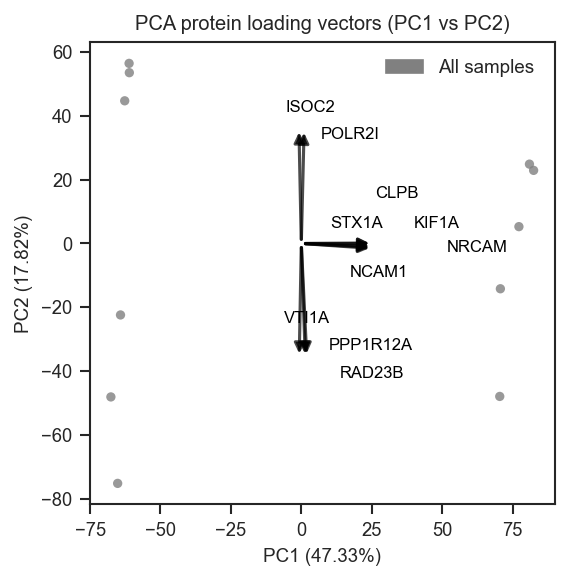
Plot PCA protein vectors

Top-loading genes on PC1 vs PC2 over the sample PCA scatter, returning arrow and text coordinates:

import matplotlib.pyplot as plt
from scpviz import plotting as scplt

fig, ax = plt.subplots()
ax, vec = scplt.plot_pca_protein_vectors(
    ax,
    pdata,
    plot_pc=[1, 2],
    n_vectors=25,
    return_df=True,
)

Split-axis selection: top loadings on PC1 and PC3 separately, then union:

fig, ax = plt.subplots()
scplt.plot_pca_protein_vectors(
    ax,
    pdata,
    plot_pc=[1, 3],
    n_vectors=[5, 3],
    adjust_labels=False,
)

Explicit genes with colors and axis limits:

fig, ax = plt.subplots()
scplt.plot_pca_protein_vectors(
    ax,
    pdata,
    plot_pc=[1, 2],
    namelist=["TP53", "EGFR"],
    cmap={"TP53": "crimson", "egfr": "steelblue"},
    xlim=(-6, 6),
    ylim=(-5, 5),
)

Loading arrows only (no sample points) for a compact biplot-style panel:

fig, ax = plt.subplots()
scplt.plot_pca_protein_vectors(
    ax,
    pdata,
    plot_pc=[1, 2],
    n_vectors=20,
    show_samples=False,
    adjust_labels=False,
)

Source code in src/scpviz/plotting/dimreduc.py
2225
2226
2227
2228
2229
2230
2231
2232
2233
2234
2235
2236
2237
2238
2239
2240
2241
2242
2243
2244
2245
2246
2247
2248
2249
2250
2251
2252
2253
2254
2255
2256
2257
2258
2259
2260
2261
2262
2263
2264
2265
2266
2267
2268
2269
2270
2271
2272
2273
2274
2275
2276
2277
2278
2279
2280
2281
2282
2283
2284
2285
2286
2287
2288
2289
2290
2291
2292
2293
2294
2295
2296
2297
2298
2299
2300
2301
2302
2303
2304
2305
2306
2307
2308
2309
2310
2311
2312
2313
2314
2315
2316
2317
2318
2319
2320
2321
2322
2323
2324
2325
2326
2327
2328
2329
2330
2331
2332
2333
2334
2335
2336
2337
2338
2339
2340
2341
2342
2343
2344
2345
2346
2347
2348
2349
2350
2351
2352
2353
2354
2355
2356
2357
2358
2359
2360
2361
2362
2363
2364
2365
2366
2367
2368
2369
2370
2371
2372
2373
2374
2375
2376
2377
2378
2379
2380
2381
2382
2383
2384
2385
2386
2387
2388
2389
2390
2391
2392
2393
2394
2395
2396
2397
2398
2399
2400
2401
2402
2403
2404
2405
2406
2407
2408
2409
2410
2411
2412
2413
2414
2415
2416
2417
2418
2419
2420
2421
2422
2423
2424
2425
2426
2427
2428
2429
2430
2431
2432
2433
2434
2435
2436
2437
2438
2439
2440
2441
2442
2443
2444
2445
2446
2447
2448
2449
2450
2451
2452
2453
2454
2455
2456
2457
2458
2459
2460
2461
2462
2463
2464
2465
2466
2467
2468
2469
2470
2471
2472
2473
2474
2475
2476
2477
2478
2479
2480
2481
2482
2483
2484
2485
2486
2487
2488
2489
2490
2491
2492
2493
2494
2495
2496
2497
2498
2499
2500
2501
2502
2503
2504
2505
2506
2507
2508
2509
2510
2511
2512
2513
2514
2515
2516
2517
2518
2519
2520
2521
2522
2523
2524
2525
2526
2527
2528
2529
2530
2531
2532
2533
2534
2535
2536
2537
2538
2539
2540
2541
2542
2543
2544
2545
2546
2547
2548
2549
2550
2551
2552
2553
2554
2555
2556
2557
2558
2559
2560
2561
2562
2563
2564
2565
2566
2567
2568
2569
2570
2571
2572
2573
2574
2575
2576
2577
2578
2579
2580
2581
2582
2583
2584
2585
2586
2587
2588
2589
2590
2591
2592
2593
2594
2595
2596
2597
2598
2599
2600
2601
2602
2603
2604
2605
2606
2607
2608
2609
2610
2611
2612
2613
2614
2615
2616
2617
2618
2619
2620
2621
2622
2623
2624
2625
2626
2627
2628
2629
2630
2631
2632
2633
def plot_pca_protein_vectors(
    ax,
    pdata: pAnnData,
    on="protein",
    plot_pc=(1, 2),
    gene_col="Genes",
    n_vectors=N_VECTORS_UNSET,
    arrow_scale=0.25,
    pca_kwargs=None,
    show_samples=True,
    title_case_labels=False,
    adjust_labels=True,
    adjust_text_kwargs=None,
    text_positions=None,
    lock_text_positions=False,
    min_abs_loading_for_top_n=None,
    top_n_mode="balanced",
    exclude_genes=None,
    namelist=None,
    cmap=None,
    xlim=None,
    ylim=None,
    return_df=False,
) -> Any:
    """
    Overlay protein PCA loadings as arrows in a two-dimensional sample PCA space.

    Arrows use feature loadings from ``adata.uns['pca']['PCs']`` (from ``pAnnData.pca``), not GSEA NES.
    Geometry matches ``plot_pca_gsea_pathway_vectors``: each arrow runs from the origin in the direction
    ``(loading_on_PCx, loading_on_PCy)``, with length rescaled from the current axis limits for visibility.
    Labels default to the ``gene_col`` column in ``.var`` when present, otherwise ``.var_names``.

    Args:
        ax (matplotlib.axes.Axes): Target axis (2D).
        pdata (pAnnData): Input object.
        on (str): Data level, ``"protein"`` or ``"peptide"``.
        plot_pc (tuple or list of int): Exactly two 1-based PCs.
        gene_col (str): Column in ``.var`` for display labels; missing column falls back to ``.var_names``.
        n_vectors (int, sequence, ``None``, or unset): Caps **auto-selected** proteins (rows not already taken
            by ``namelist``). Default when ``namelist`` is ``None`` is ``20``; when ``namelist`` is set, default
            is no extra top-N unless you pass ``n_vectors`` explicitly. If an int (>= 1), uses ``top_n_mode``.
            If ``[nx, ny]``, split-axis top union on that remainder. ``min_abs_loading_for_top_n`` gates scores
            on the remainder the same way in int and split modes.
        arrow_scale (float): Scale factor for arrow length relative to axis span.
        pca_kwargs (dict or None): Forwarded to ``plot_pca`` when ``show_samples=True``.
        show_samples (bool): If True, draw the sample PCA scatter first; if False, only axes and arrows.
        title_case_labels (bool): If True, lightly format gene text (underscores to spaces, title case).
        adjust_labels (bool): If True, run ``adjust_text`` to reduce overlap.
        adjust_text_kwargs (dict or None): Extra keyword arguments for ``adjust_text``.
        text_positions (dict or None): Manual label positions keyed by gene or formatted label.
        lock_text_positions (bool): If True, manual positions are excluded from ``adjust_text`` motion.
        min_abs_loading_for_top_n (float or None): If set, ranking scores on a PC are zero when
            ``|loading|`` is below this threshold on that PC.
        top_n_mode (str): ``"balanced"`` or ``"max_score"`` (same selection logic as pathway vectors, using
            absolute loadings instead of NES/FDR scores). Used only when ``n_vectors`` is an int.
        exclude_genes (str, iterable, or None): Remove genes/features matching these strings (gene label or
            ``.var_names`` feature id).
        namelist (list of str or None): Gene labels (matrix row index, exact ``str`` match) to include **first**.
            Duplicates in ``namelist`` are ignored for matching order. Combined with ``n_vectors`` on the
            remaining rows (namelist first, then auto). Genes also listed in ``exclude_genes`` are dropped.
        cmap (dict or None): Map gene label (as in matrix or after ``title_case_labels`` formatting) to a
            matplotlib color; lookup tries raw name, formatted label, then case-insensitive keys. Default
            ``None`` draws arrows and labels in black.
        xlim (tuple or None): If set, applied with ``ax.set_xlim(xlim)`` immediately after the PCA scatter
            (or empty axes) and **before** arrow length scaling, so ``arrow_scale`` matches the visible range.
            When either ``xlim`` or ``ylim`` is set, ``ax.set_aspect("auto")`` is called first so a fixed
            data aspect from ``plot_pca`` (or ``show_samples=False``) does not block the limits.
        ylim (tuple or None): If set, ``ax.set_ylim(ylim)`` at the same stage as ``xlim`` (same note).
        return_df (bool): If True, return ``(ax, vector_df)`` with loadings and arrow/text coordinates.

    Returns:
        matplotlib.axes.Axes, or ``(ax, pandas.DataFrame)`` if ``return_df=True``.

    Example:
        Show top protein loadings on PC1 vs PC2 on sample PCA scatter:
            ```python
            import matplotlib.pyplot as plt
            from scpviz import plotting as scplt

            fig, ax = plt.subplots(figsize=(4, 4))
            pdata_norm.pca(on="protein")
            scplt.plot_pca_protein_vectors(ax, pdata_norm, n_vectors=10)
            plt.show()
            ```

        ![Plot PCA protein vectors](../../assets/plots/plot_pca_protein_vectors.png)

        Top-loading genes on PC1 vs PC2 over the sample PCA scatter, returning arrow and text coordinates:
            ```python
            import matplotlib.pyplot as plt
            from scpviz import plotting as scplt

            fig, ax = plt.subplots()
            ax, vec = scplt.plot_pca_protein_vectors(
                ax,
                pdata,
                plot_pc=[1, 2],
                n_vectors=25,
                return_df=True,
            )
            ```

        Split-axis selection: top loadings on PC1 and PC3 separately, then union:
            ```python
            fig, ax = plt.subplots()
            scplt.plot_pca_protein_vectors(
                ax,
                pdata,
                plot_pc=[1, 3],
                n_vectors=[5, 3],
                adjust_labels=False,
            )
            ```

        Explicit genes with colors and axis limits:
            ```python
            fig, ax = plt.subplots()
            scplt.plot_pca_protein_vectors(
                ax,
                pdata,
                plot_pc=[1, 2],
                namelist=["TP53", "EGFR"],
                cmap={"TP53": "crimson", "egfr": "steelblue"},
                xlim=(-6, 6),
                ylim=(-5, 5),
            )
            ```

        Loading arrows only (no sample points) for a compact biplot-style panel:
            ```python
            fig, ax = plt.subplots()
            scplt.plot_pca_protein_vectors(
                ax,
                pdata,
                plot_pc=[1, 2],
                n_vectors=20,
                show_samples=False,
                adjust_labels=False,
            )
            ```
    """
    plot_pc = list(plot_pc)
    if len(plot_pc) != 2:
        raise ValueError("`plot_pc` must contain exactly two PCs for protein loading vectors.")

    def _build_pca_protein_loading_matrix(
        adata: ad.AnnData, plot_pc: list[int], gene_col: str = "Genes"
    ) -> tuple[pd.DataFrame, pd.Series, str, str]:
        """
        Build a gene-by-PC matrix of PCA loadings (one row per gene after collapsing duplicate labels).

        Duplicate resolution matches ``enrichment_functional_pca``: for each gene label, keep the feature
        row with the largest Euclidean norm in the loading plane spanned by the two requested PCs.

        Returns:
            tuple: ``(matrix_df, feature_by_gene, pcx_name, pcy_name)``. Loading columns use labels such as
            ``PC1`` and ``PC2`` matching the requested ``plot_pc`` values.
        """
        if "pca" not in adata.uns or "PCs" not in adata.uns["pca"]:
            raise ValueError("PCA loadings not found. Run `.pca()` on this data layer first.")
        PCs = adata.uns["pca"]["PCs"]
        n_comp, n_feat = PCs.shape
        if n_feat != adata.n_vars:
            raise ValueError(
                f"PCA loading matrix width ({n_feat}) does not match number of variables ({adata.n_vars})."
            )
        pc_a, pc_b = int(plot_pc[0]), int(plot_pc[1])
        for pc in (pc_a, pc_b):
            if pc < 1 or pc > n_comp:
                raise ValueError(
                    f"Invalid PC {pc}: available PCs are 1..{n_comp}."
                )
        col_a, col_b = f"PC{pc_a}", f"PC{pc_b}"
        lx = PCs[pc_a - 1, :]
        ly = PCs[pc_b - 1, :]
        if gene_col in adata.var.columns:
            genes = adata.var[gene_col].astype(str)
        else:
            genes = pd.Series(adata.var_names.astype(str), index=adata.var_names)
        df = pd.DataFrame(
            {
                "feature": adata.var_names.astype(str),
                "gene": genes.values,
                col_a: lx,
                col_b: ly,
            },
            index=adata.var_names.astype(str),
        )
        df = df.dropna(subset=["gene"]).copy()
        df["gene"] = df["gene"].astype(str)
        df = df[df["gene"].str.len() > 0]
        if df.empty:
            raise ValueError("No genes with non-empty labels after resolving `.var` for PCA protein vectors.")
        plane_norm = np.sqrt(df[col_a].astype(float) ** 2 + df[col_b].astype(float) ** 2)
        df["_plane_norm"] = plane_norm
        pick = df.groupby("gene", sort=False)["_plane_norm"].idxmax()
        df = df.loc[pick].drop(columns="_plane_norm")
        matrix_df = df.set_index("gene")[[col_a, col_b]]
        feature_by_gene = df.set_index("gene")["feature"]
        return matrix_df, feature_by_gene, col_a, col_b

    def _apply_gene_name_filters(matrix_df, feature_by_gene, exclude_genes=None):
        """
        Filter protein rows by exclude list (gene label or ``.var_names`` feature id).

        Returns:
            tuple: Filtered ``(matrix_df, feature_by_gene)``.
        """
        if exclude_genes is None:
            return matrix_df, feature_by_gene

        def _to_set(x):
            if isinstance(x, str):
                return {x}
            return {str(v) for v in x}

        exclude_set = _to_set(exclude_genes)
        selected = pd.Series(True, index=matrix_df.index)
        feat = feature_by_gene.reindex(matrix_df.index)
        selected &= ~(matrix_df.index.to_series().isin(exclude_set) | feat.astype(str).isin(exclude_set))
        keep = matrix_df.index[selected]
        matrix_df = matrix_df.loc[keep]
        feature_by_gene = feature_by_gene.reindex(matrix_df.index)
        return matrix_df, feature_by_gene

    def _compute_protein_pc_score_df(matrix_df, min_abs_loading_for_top_n=None):
        """
        Compute per-PC scores from absolute loadings for ranking proteins.

        Score on each PC is ``|loading|``. If ``min_abs_loading_for_top_n`` is set, entries below that
        threshold are zeroed on that PC (similar in role to FDR gating for pathway ranking).
        """
        score_df = matrix_df.abs()
        if min_abs_loading_for_top_n is not None:
            m = float(min_abs_loading_for_top_n)
            score_df = score_df.where(score_df >= m, 0.0)
        return score_df.fillna(0.0)

    adata = utils.get_adata(pdata, on)
    matrix_df, feature_by_gene, pcx, pcy = _build_pca_protein_loading_matrix(
        adata, plot_pc, gene_col=gene_col
    )
    matrix_df, feature_by_gene = _apply_gene_name_filters(
        matrix_df,
        feature_by_gene,
        exclude_genes=exclude_genes,
    )
    if matrix_df.empty:
        raise ValueError("No proteins available after gene name filters.")

    if n_vectors is N_VECTORS_UNSET:
        n_vectors = None if namelist is not None else 20
    if namelist is None and n_vectors is None:
        raise ValueError("No proteins to plot: provide `n_vectors`, `namelist`, or both.")

    named_resolver_order = []
    named_resolver_set = set()
    if namelist is not None:
        named_resolver_order, named_resolver_set = _resolve_protein_namelist_genes(matrix_df, namelist)

    named_plot_order = [
        g
        for g in named_resolver_order
        if g in matrix_df.index and matrix_df.loc[g, [pcx, pcy]].notna().any()
    ]

    auto_order = []
    if n_vectors is not None:
        remainder = matrix_df.loc[~matrix_df.index.isin(named_resolver_set)]
        if not remainder.empty:
            mode, nv = _validate_plot_n_vectors(n_vectors, what="proteins")
            score_df = _compute_protein_pc_score_df(remainder[[pcx, pcy]], min_abs_loading_for_top_n)
            if mode == "single":
                selected = _select_top_pathways(score_df=score_df, top_n=nv, top_n_mode=top_n_mode)
            else:
                nx, ny = nv
                selected = _select_pca_protein_vectors_split(score_df, pcx, pcy, nx, ny)
            auto_order = [r for r in selected if r not in set(named_plot_order)]

    final_order = []
    seen_pf = set()
    for g in named_plot_order:
        if g not in seen_pf:
            final_order.append(g)
            seen_pf.add(g)
    for g in auto_order:
        if g not in seen_pf:
            final_order.append(g)
            seen_pf.add(g)

    if not final_order:
        raise ValueError("No proteins to plot: provide `n_vectors`, `namelist`, or both.")

    matrix_df = matrix_df.loc[final_order]
    feature_by_gene = feature_by_gene.reindex(matrix_df.index)

    if show_samples:
        if pca_kwargs is None:
            pca_kwargs = {}
        plot_pca(ax=ax, pdata=pdata, on=on, plot_pc=plot_pc, **pca_kwargs)
    else:
        if "pca" not in adata.uns or "variance_ratio" not in adata.uns["pca"]:
            raise ValueError(
                "PCA metadata not found. Run `.pca()` before plotting protein vectors with `show_samples=False`."
            )
        var = adata.uns["pca"]["variance_ratio"]
        ax.set_xlabel(f"PC{plot_pc[0]} ({var[int(plot_pc[0]) - 1] * 100:.2f}%)")
        ax.set_ylabel(f"PC{plot_pc[1]} ({var[int(plot_pc[1]) - 1] * 100:.2f}%)")
        ax.axhline(0, color="lightgray", linewidth=0.8, zorder=0)
        ax.axvline(0, color="lightgray", linewidth=0.8, zorder=0)
        ax.set_aspect("equal", adjustable="datalim")

    if xlim is not None or ylim is not None:
        ax.set_aspect("auto")
        if xlim is not None:
            ax.set_xlim(xlim)
        if ylim is not None:
            ax.set_ylim(ylim)

    xl = ax.get_xlim()
    yl = ax.get_ylim()
    xspan = xl[1] - xl[0]   # full width of visible x range
    yspan = yl[1] - yl[0]   # full height of visible y range

    coords = matrix_df[[pcx, pcy]].fillna(0.0).values
    denom = np.max(np.abs(coords))
    if denom == 0:
        denom = 1.0

    x_scale = float(arrow_scale) * xspan / denom
    y_scale = float(arrow_scale) * yspan / denom

    texts = []
    text_rows = []
    text_positions = text_positions or {}
    for gene, row in matrix_df[[pcx, pcy]].fillna(0.0).iterrows():
        vx, vy = float(row[pcx]), float(row[pcy])
        x_end = vx * x_scale
        y_end = vy * y_scale
        label_txt = str(gene)
        if title_case_labels:
            label_txt = label_txt.replace("_", " ").title()
        pos = text_positions.get(str(gene), text_positions.get(label_txt, None))
        text_x, text_y = (x_end, y_end) if pos is None else (float(pos[0]), float(pos[1]))
        color = _vector_color_from_cmap(cmap, str(gene), label_txt)
        ax.annotate(
                    "",
                    xy=(x_end, y_end),
                    xytext=(0, 0),
                    arrowprops=dict(
                        arrowstyle="-|>",
                        color=color,
                        alpha=0.7,
                        lw=1.5,
                        mutation_scale=10,  # controls head size in points, like fontsize
                    ),
                )
        ax.update_datalim([(x_end, y_end), (0, 0)])
        txt = ax.text(text_x, text_y, label_txt, fontsize=8, ha="left", va="bottom", color=color)
        if not (lock_text_positions and pos is not None):
            texts.append(txt)
        text_rows.append(
            {
                "gene": str(gene),
                "arrow_x": x_end,
                "arrow_y": y_end,
                "text_obj": txt,
            }
        )

    ax.autoscale_view()  # ensure the axes limits are updated to match the data

    if adjust_labels and len(texts) > 0:
        adjust_cfg = {"expand": (1.6, 1.6), "arrowprops": None}
        if adjust_text_kwargs:
            adjust_cfg.update(adjust_text_kwargs)
        adjust_text(texts, ax=ax, **adjust_cfg)

    vector_df = matrix_df[[pcx, pcy]].copy().rename(columns={pcx: "load_x", pcy: "load_y"})
    vector_df["pc_x"] = pcx
    vector_df["pc_y"] = pcy
    vector_df["feature"] = feature_by_gene.reindex(matrix_df.index).astype(str).values
    vector_df["vector_norm"] = np.sqrt(vector_df["load_x"] ** 2 + vector_df["load_y"] ** 2)
    vector_df = vector_df.reset_index()
    idx_col = vector_df.columns[0]
    if idx_col != "gene":
        vector_df = vector_df.rename(columns={idx_col: "gene"})

    text_pos_df = pd.DataFrame(
        [
            {
                "gene": row["gene"],
                "arrow_x": row["arrow_x"],
                "arrow_y": row["arrow_y"],
                "text_x": row["text_obj"].get_position()[0],
                "text_y": row["text_obj"].get_position()[1],
            }
            for row in text_rows
        ]
    )
    vector_df = vector_df.merge(text_pos_df, on="gene", how="left")
    vector_df = vector_df[
        ["gene", "feature", "pc_x", "pc_y", "load_x", "load_y", "vector_norm", "arrow_x", "arrow_y", "text_x", "text_y"]
    ]

    ax.set_title(f"PCA protein loading vectors ({pcx} vs {pcy})")
    if return_df:
        return ax, vector_df
    return ax

plot_pca_scree

plot_pca_scree(ax: 'plt.Axes', pca: Any) -> 'plt.Axes'

Plot a scree plot of explained variance from PCA.

This function visualizes the proportion of variance explained by each principal component as a bar chart, helping to assess how many PCs are meaningful.

Parameters:

Name Type Description Default
ax Axes

Axis on which to plot the scree plot.

required
pca PCA or dict

The fitted PCA object, or a dictionary from .uns with key "variance_ratio".

required

Returns:

Name Type Description
ax Axes

Axis containing the scree plot.

Example

Basic usage with PCA results from .uns:

import matplotlib.pyplot as plt
from scpviz import plotting as scplt

fig, ax = plt.subplots(figsize=(4, 3))
pdata_norm.pca(on="protein")
scplt.plot_pca_scree(ax, pdata_norm.prot.uns["pca"])
plt.show()
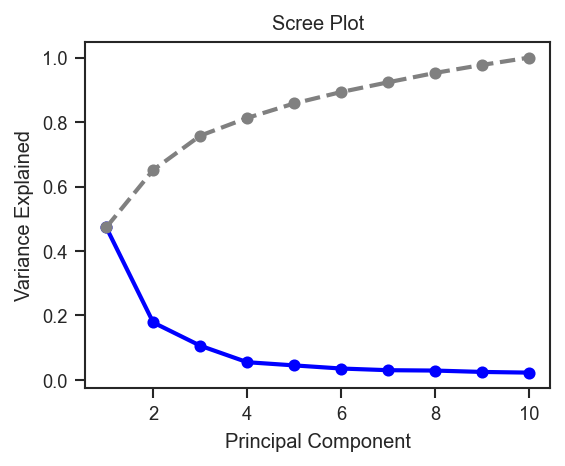
Plot PCA scree

Source code in src/scpviz/plotting/dimreduc.py
def plot_pca_scree(ax: "plt.Axes", pca: Any) -> "plt.Axes":
    """
    Plot a scree plot of explained variance from PCA.

    This function visualizes the proportion of variance explained by each
    principal component as a bar chart, helping to assess how many PCs are
    meaningful.

    Args:
        ax (matplotlib.axes.Axes): Axis on which to plot the scree plot.

        pca (sklearn.decomposition.PCA or dict): The fitted PCA object, or a
            dictionary from `.uns` with key `"variance_ratio"`.

    Returns:
        ax (matplotlib.axes.Axes): Axis containing the scree plot.

    Example:
        Basic usage with PCA results from ``.uns``:
            ```python
            import matplotlib.pyplot as plt
            from scpviz import plotting as scplt

            fig, ax = plt.subplots(figsize=(4, 3))
            pdata_norm.pca(on="protein")
            scplt.plot_pca_scree(ax, pdata_norm.prot.uns["pca"])
            plt.show()
            ```

        ![Plot PCA scree](../../assets/plots/plot_pca_scree.png)
    """
    if isinstance(pca, dict):
        variance_ratio = np.array(pca["variance_ratio"])
        n_components = len(variance_ratio)
    else:
        variance_ratio = pca.explained_variance_ratio_
        n_components = pca.n_components_

    PC_values = np.arange(1, n_components + 1)
    cumulative = np.cumsum(variance_ratio)

    ax.plot(PC_values, variance_ratio, 'o-', linewidth=2, label='Explained Variance', color='blue')
    ax.plot(PC_values, cumulative, 'o--', linewidth=2, label='Cumulative Variance', color='gray')
    ax.set_title('Scree Plot')
    ax.set_xlabel('Principal Component')
    ax.set_ylabel('Variance Explained')

    return ax

plot_raincloud

plot_raincloud(
    ax: "plt.Axes",
    pdata: pAnnData,
    classes: str | list[str] | None = None,
    layer: str = "X",
    on: str = "protein",
    order: Any = None,
    color: list[str] = ["blue"],
    boxcolor: str = "black",
    linewidth: float = 0.5,
    debug: bool = False,
) -> Any

Plot raincloud distributions of protein or peptide abundances.

This function generates a raincloud plot (violin + boxplot + scatter) to visualize abundance distributions across groups. Summary statistics (average, standard deviation, rank) are written into .var for downstream use with mark_raincloud().

Parameters:

Name Type Description Default
ax Axes

Axis on which to plot.

required
pdata pAnnData

Input pAnnData object.

required
classes str or list of str

One or more .obs columns to group samples. If None, all samples are combined.

None
layer str

Data layer to use. Default is "X".

'X'
on str

Data level, either "protein" or "peptide". Default is "protein".

'protein'
order list of str

Custom order of class categories. If None, categories appear in data order.

None
color list of str

Colors for each class distribution. Default is ["blue"].

['blue']
boxcolor str

Color for boxplot outlines. Default is "black".

'black'
linewidth float

Line width for box/whisker elements. Default is 0.5.

0.5
debug bool

If True, return both axis and computed data arrays.

False

Returns:

Name Type Description
ax Axes

If debug=False: axis with raincloud plot.

tuple matplotlib.axes.Axes, list of np.ndarray

If debug=True: (axis, data_X) where data_X are the transformed abundance distributions per group.

Note

Statistics (Average, Stdev, Rank) are stored in .var and can be used with mark_raincloud() to highlight specific features.

Example

Plot raincloud distributions by cell line and condition (one color per combined class):

import matplotlib.cm as cm
import matplotlib.pyplot as plt
from scpviz import plotting as scplt
from scpviz import utils as scu

classes_2 = ["cellline", "condition"]
rain_colors = [cm.tab10(i % 10) for i in range(len(scu.get_classlist(pdata.prot, classes_2)))]

fig, ax = plt.subplots(figsize=(5, 4))
scplt.plot_raincloud(ax, pdata, classes=classes_2, color=rain_colors)
plt.show()
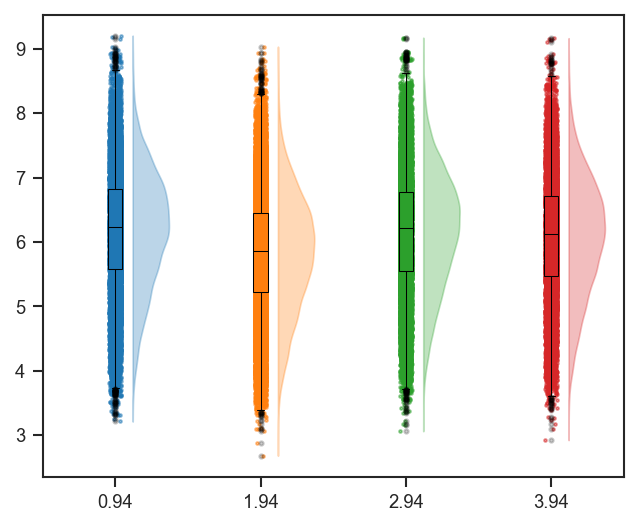
Plot raincloud

Same pattern on single-cell protein data after directlfq (classes aligned with UMAP, e.g. region):

import matplotlib.cm as cm
import matplotlib.pyplot as plt
from scpviz import plotting as scplt
from scpviz import utils as scu

classes_sc = ["region"]
rain_colors = [cm.tab10(i % 10) for i in range(len(scu.get_classlist(pdata_sc.prot, classes_sc)))]

fig, ax = plt.subplots(figsize=(5, 4))
scplt.plot_raincloud(ax, pdata_sc, classes=classes_sc, color=rain_colors)
plt.show()
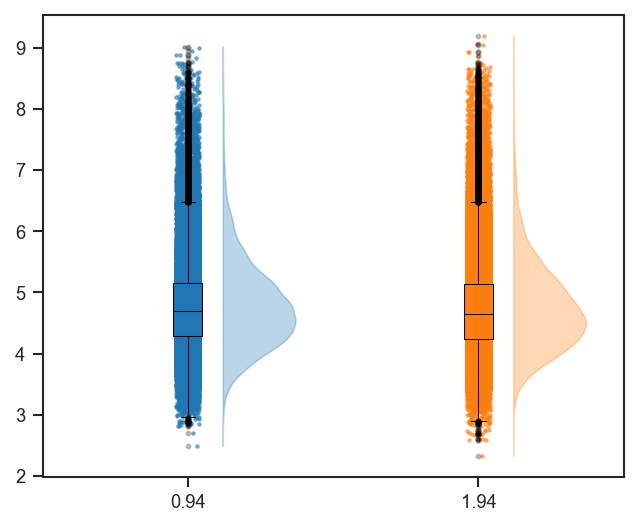
Plot raincloud (single-cell)

See Also

mark_raincloud: Highlight specific features on a raincloud plot.
plot_rankquant: Alternative distribution visualization using rank abundance.

Source code in src/scpviz/plotting/abundance.py
def plot_raincloud(ax: "plt.Axes", pdata: pAnnData, classes: str | list[str] | None = None, layer: str = "X", on: str = "protein", order: Any = None, color: list[str] = ["blue"], boxcolor: str = "black", linewidth: float = 0.5, debug: bool = False) -> Any:
    """
    Plot raincloud distributions of protein or peptide abundances.

    This function generates a raincloud plot (violin + boxplot + scatter)
    to visualize abundance distributions across groups. Summary statistics
    (average, standard deviation, rank) are written into `.var` for downstream
    use with `mark_raincloud()`.

    Args:
        ax (matplotlib.axes.Axes): Axis on which to plot.
        pdata (pAnnData): Input pAnnData object.
        classes (str or list of str, optional): One or more `.obs` columns to
            group samples. If None, all samples are combined.
        layer (str): Data layer to use. Default is `"X"`.
        on (str): Data level, either `"protein"` or `"peptide"`. Default is `"protein"`.
        order (list of str, optional): Custom order of class categories. If None,
            categories appear in data order.
        color (list of str): Colors for each class distribution. Default is `["blue"]`.
        boxcolor (str): Color for boxplot outlines. Default is `"black"`.
        linewidth (float): Line width for box/whisker elements. Default is 0.5.
        debug (bool): If True, return both axis and computed data arrays.

    Returns:
        ax (matplotlib.axes.Axes): If `debug=False`: axis with raincloud plot.

        tuple (matplotlib.axes.Axes, list of np.ndarray): If `debug=True`: `(axis, data_X)` where `data_X` are the transformed abundance distributions per group.

    Note:
        Statistics (`Average`, `Stdev`, `Rank`) are stored in `.var` and can be
        used with `mark_raincloud()` to highlight specific features.

    Example:
        Plot raincloud distributions by cell line and condition (one color per combined class):
            ```python
            import matplotlib.cm as cm
            import matplotlib.pyplot as plt
            from scpviz import plotting as scplt
            from scpviz import utils as scu

            classes_2 = ["cellline", "condition"]
            rain_colors = [cm.tab10(i % 10) for i in range(len(scu.get_classlist(pdata.prot, classes_2)))]

            fig, ax = plt.subplots(figsize=(5, 4))
            scplt.plot_raincloud(ax, pdata, classes=classes_2, color=rain_colors)
            plt.show()
            ```

        ![Plot raincloud](../../assets/plots/plot_raincloud.png)

        Same pattern on single-cell protein data after ``directlfq`` (``classes`` aligned with UMAP, e.g. ``region``):
            ```python
            import matplotlib.cm as cm
            import matplotlib.pyplot as plt
            from scpviz import plotting as scplt
            from scpviz import utils as scu

            classes_sc = ["region"]
            rain_colors = [cm.tab10(i % 10) for i in range(len(scu.get_classlist(pdata_sc.prot, classes_sc)))]

            fig, ax = plt.subplots(figsize=(5, 4))
            scplt.plot_raincloud(ax, pdata_sc, classes=classes_sc, color=rain_colors)
            plt.show()
            ```

        ![Plot raincloud (single-cell)](../../assets/plots/plot_raincloud_sc.png)

    See Also:
        mark_raincloud: Highlight specific features on a raincloud plot.  
        plot_rankquant: Alternative distribution visualization using rank abundance.
    """
    u = _plotting_pkg_utils()
    adata = u.get_adata(pdata, on)

    classes_list = u.get_classlist(adata, classes=classes, order=order)
    data_X = []

    for j, class_value in enumerate(classes_list):
        rank_data = u.resolve_class_filter(adata, classes, class_value, debug=True)

        plot_df = rank_data.to_df().transpose()
        plot_df['Average: '+class_value] = np.nanmean(rank_data.X.toarray(), axis=0)
        plot_df['Stdev: '+class_value] = np.nanstd(rank_data.X.toarray(), axis=0)
        plot_df.sort_values(by=['Average: '+class_value], ascending=False, inplace=True)
        plot_df['Rank: '+class_value] = np.where(plot_df['Average: '+class_value].isna(), np.nan, np.arange(1, len(plot_df) + 1))

        sorted_indices = plot_df.index

        plot_df = plot_df.loc[adata.var.index]
        adata.var['Average: ' + class_value] = plot_df['Average: ' + class_value]
        adata.var['Stdev: ' + class_value] = plot_df['Stdev: ' + class_value]
        adata.var['Rank: ' + class_value] = plot_df['Rank: ' + class_value]
        plot_df = plot_df.reindex(sorted_indices)

        stats_df = plot_df.filter(regex = 'Average: |Stdev: |Rank: ', axis=1)
        plot_df = plot_df.drop(stats_df.columns, axis=1)

        nsample = plot_df.shape[1]
        nprot = plot_df.shape[0]

        # merge all abundance columns into one column
        X = np.zeros((nsample*nprot))
        for i in range(nsample):
            X[i*nprot:(i+1)*nprot] = plot_df.iloc[:, i].values

        X = X[~np.isnan(X)] # remove NaN values
        X = X[X != 0] # remove 0 values
        X = np.log10(X)

        data_X.append(X)

    print('data_X shape: ', len(data_X)) if debug else None

    # boxplot
    bp = ax.boxplot(data_X, positions=np.arange(1,len(classes_list)+1)-0.06, widths=0.1, patch_artist = True,
                    flierprops=dict(marker='o', alpha=0.2, markersize=2, markerfacecolor=boxcolor, markeredgecolor=boxcolor),
                    whiskerprops=dict(color=boxcolor, linestyle='-', linewidth=linewidth),
                    medianprops=dict(color=boxcolor, linewidth=linewidth),
                    boxprops=dict(facecolor='none', color=boxcolor, linewidth=linewidth),
                    capprops=dict(color=boxcolor, linewidth=linewidth))

    # Violinplot
    vp = ax.violinplot(data_X, points=500, vert=True, positions=np.arange(1,len(classes_list)+1)+0.06,
                showmeans=False, showextrema=False, showmedians=False)

    for idx, b in enumerate(vp['bodies']):
        # Get the center of the plot
        m = np.mean(b.get_paths()[0].vertices[:, 1])
        # Modify it so we only see the upper half of the violin plot
        b.get_paths()[0].vertices[:, 0] = np.clip(b.get_paths()[0].vertices[:, 0], idx+1.06, idx+2.06)
        # Change to the desired color
        b.set_color(color[idx])
    # Scatterplot data
    for idx in range(len(data_X)):
        features = data_X[idx]
        # Add jitter effect so the features do not overlap on the y-axis
        y = np.full(len(features), idx + .8)
        idxs = np.arange(len(y))
        out = y.astype(float)
        out.flat[idxs] += np.random.uniform(low=.1, high=.18, size=len(idxs))
        y = out
        ax.scatter(y, features, s=2., c=color[idx], alpha=0.5)

    if debug:
        return ax, data_X
    else:
        return ax

plot_rankquant

plot_rankquant(
    ax: "plt.Axes",
    pdata: pAnnData,
    classes: str | list[str] | None = None,
    layer: str = "X",
    on: str = "protein",
    cmap: Any = ["Blues"],
    color: Any = ["blue"],
    order: Any = None,
    s: float = 20,
    alpha: float = 0.2,
    calpha: float = 1,
    exp_alpha: float = 70,
    debug: bool = False,
) -> Any

Plot rank abundance distributions across samples or groups.

This function visualizes rank abundance of proteins or peptides, optionally grouped by sample-level classes. Distributions are drawn as scatter plots with adjustable opacity and color schemes. Mean, standard deviation, and rank statistics are written to .var for downstream annotation.

Parameters:

Name Type Description Default
ax Axes

Axis on which to plot.

required
pdata pAnnData

Input pAnnData object.

required
classes str or list of str

One or more .obs columns to group samples. If None, samples are combined into identifier classes.

None
layer str

Data layer to use. Default is "X".

'X'
on str

Data level to plot, either "protein" or "peptide". Default is "protein".

'protein'
cmap str or list of str

Colormap(s) used for scatter distributions. Default is ["Blues"].

['Blues']
color list of str

List of colors used for scatter distributions. Defaults to ["blue"].

['blue']
order list of str

Custom order of class categories. If None, categories appear in data order.

None
s float

Marker size. Default is 20.

20
alpha float

Marker transparency for distributions. Default is 0.2.

0.2
calpha float

Marker transparency for class means. Default is 1.

1
exp_alpha float

Exponent for scaling probability density values by average abundance. Default is 70.

70
debug bool

If True, print debug information during computation.

False

Returns:

Name Type Description
ax Axes

Axis containing the rank abundance plot.

Example

Plot rank abundance grouped by cell line and condition:

import matplotlib.pyplot as plt
from scpviz import plotting as scplt

fig, ax = plt.subplots(figsize=(4, 4))
scplt.plot_rankquant(ax, pdata, classes=["cellline", "condition"])
plt.show()
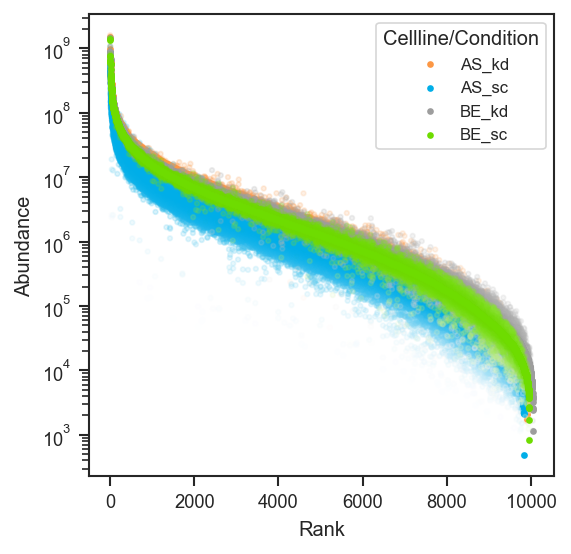
Plot rankquant

Plot rank abundance on single-cell protein data (use the same classes you use for UMAP, e.g. region):

import matplotlib.pyplot as plt
from scpviz import plotting as scplt

fig, ax = plt.subplots(figsize=(4, 4))
scplt.plot_rankquant(ax, pdata_sc, classes=["region"])
plt.show()
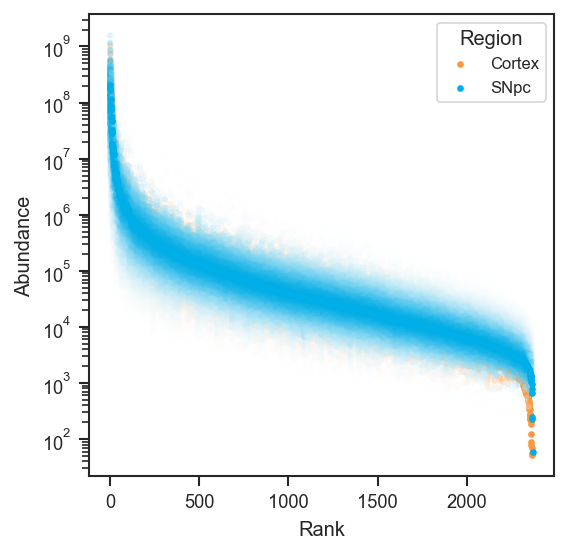
Plot rankquant (single-cell)

See Also

mark_rankquant: Highlight specific proteins or genes on a rank abundance plot.

Source code in src/scpviz/plotting/abundance.py
def plot_rankquant(ax: "plt.Axes", pdata: pAnnData, classes: str | list[str] | None = None, layer: str = "X", on: str = "protein", cmap: Any = ["Blues"], color: Any = ["blue"], order: Any = None, s: float = 20, alpha: float = 0.2, calpha: float = 1, exp_alpha: float = 70, debug: bool = False) -> Any:
    """
    Plot rank abundance distributions across samples or groups.

    This function visualizes rank abundance of proteins or peptides, optionally
    grouped by sample-level classes. Distributions are drawn as scatter plots
    with adjustable opacity and color schemes. Mean, standard deviation, and
    rank statistics are written to `.var` for downstream annotation.

    Args:
        ax (matplotlib.axes.Axes): Axis on which to plot.
        pdata (pAnnData): Input pAnnData object.
        classes (str or list of str, optional): One or more `.obs` columns to
            group samples. If None, samples are combined into identifier classes.
        layer (str): Data layer to use. Default is `"X"`.
        on (str): Data level to plot, either `"protein"` or `"peptide"`. Default is `"protein"`.
        cmap (str or list of str): Colormap(s) used for scatter distributions.
            Default is `["Blues"]`.
        color (list of str): List of colors used for scatter distributions.
            Defaults to `["blue"]`.
        order (list of str, optional): Custom order of class categories. If None,
            categories appear in data order.
        s (float): Marker size. Default is 20.
        alpha (float): Marker transparency for distributions. Default is 0.2.
        calpha (float): Marker transparency for class means. Default is 1.
        exp_alpha (float): Exponent for scaling probability density values by
            average abundance. Default is 70.
        debug (bool): If True, print debug information during computation.

    Returns:
        ax (matplotlib.axes.Axes): Axis containing the rank abundance plot.

    Example:
        Plot rank abundance grouped by cell line and condition:
            ```python
            import matplotlib.pyplot as plt
            from scpviz import plotting as scplt

            fig, ax = plt.subplots(figsize=(4, 4))
            scplt.plot_rankquant(ax, pdata, classes=["cellline", "condition"])
            plt.show()
            ```

        ![Plot rankquant](../../assets/plots/plot_rankquant.png)

        Plot rank abundance on single-cell protein data (use the same ``classes`` you use for UMAP, e.g. ``region``):
            ```python
            import matplotlib.pyplot as plt
            from scpviz import plotting as scplt

            fig, ax = plt.subplots(figsize=(4, 4))
            scplt.plot_rankquant(ax, pdata_sc, classes=["region"])
            plt.show()
            ```

        ![Plot rankquant (single-cell)](../../assets/plots/plot_rankquant_sc.png)

    See Also:
        mark_rankquant: Highlight specific proteins or genes on a rank abundance plot.            

    """
    # all the plot_dfs should now be stored in pdata.var
    pdata.rank(classes, on, layer)

    adata = utils.get_adata(pdata, on)
    classes_list = utils.get_classlist(adata, classes = classes, order = order)

    # Ensure colormap and color list match number of classes
    cmap = cmap if cmap and len(cmap) == len(classes_list) else get_color('cmap', n=len(classes_list))
    color = color if color and len(color) == len(classes_list) else get_color('colors', n=len(classes_list))

    for j, class_value in enumerate(classes_list):
        if classes is None or isinstance(classes, (str, list)):
            values = class_value.split('_') if classes is not str else class_value
            rank_data = utils.filter(adata, classes, values, debug=False)

        plot_df = rank_data.to_df().transpose()
        plot_df['Average: '+class_value] = np.nanmean(rank_data.X.toarray(), axis=0)
        plot_df['Stdev: '+class_value] = np.nanstd(rank_data.X.toarray(), axis=0)
        plot_df.sort_values(by=['Average: '+class_value], ascending=False, inplace=True)
        plot_df['Rank: '+class_value] = np.where(plot_df['Average: '+class_value].isna(), np.nan, np.arange(1, len(plot_df) + 1))

        sorted_indices = plot_df.index
        plot_df = plot_df.loc[adata.var.index]
        adata.var['Average: ' + class_value] = plot_df['Average: ' + class_value]
        adata.var['Stdev: ' + class_value] = plot_df['Stdev: ' + class_value]
        adata.var['Rank: ' + class_value] = plot_df['Rank: ' + class_value]
        plot_df = plot_df.reindex(sorted_indices)

        # if taking from pdata.var, can continue from here
        # problem is that we need rank_data, the data consisting of samples from this class to make
        # stats df should have 3 column, average stdev and rank
        # plot_df should only have the abundance 
        stats_df = plot_df.filter(regex = 'Average: |Stdev: |Rank: ', axis=1)
        plot_df = plot_df.drop(stats_df.columns, axis=1)
        print(stats_df.shape) if debug else None
        print(plot_df.shape) if debug else None

        nsample = plot_df.shape[1]
        nprot = plot_df.shape[0]

        # Abundance matrix: shape (nprot, nsample)
        X_matrix = plot_df.values  # shape: (nprot, nsample)
        ranks = stats_df['Rank: ' + class_value].values  # shape: (nprot,)
        mu = np.log10(np.clip(stats_df['Average: ' + class_value].values, 1e-6, None))
        std = np.log10(np.clip(stats_df['Stdev: ' + class_value].values, 1e-6, None))
        # Flatten abundance data (X) and repeat ranks (Y)
        X = X_matrix.flatten(order='F')  # Fortran order stacks column-wise, matching your loop
        Y = np.tile(ranks, nsample)
        # Compute Z-values
        logX = np.log10(np.clip(X, 1e-6, None))
        z = ((logX - np.tile(mu, nsample)) / np.tile(std, nsample)) ** 2
        Z = np.exp(-z * exp_alpha)
        # Remove NaNs
        mask = ~np.isnan(X)
        X = X[mask]
        Y = Y[mask]
        Z = Z[mask]

        print(f'nsample: {nsample}, nprot: {np.max(Y)}') if debug else None

        ax.scatter(Y, X, c=Z, marker='.',cmap=cmap[j], s=s,alpha=alpha)
        ax.scatter(stats_df['Rank: '+class_value], 
                   stats_df['Average: '+class_value], 
                   marker='.', 
                   color=color[j], 
                   alpha=calpha,
                   label=class_value)
        ax.set_yscale('log')
        ax.set_xlabel('Rank')
        ax.set_ylabel('Abundance')

    # format the argument string classes to be first letter capitalized
    legend_title = (
        "/".join(cls.capitalize() for cls in classes)
        if isinstance(classes, list)
        else classes.capitalize() if isinstance(classes, str)
        else None)

    ax.legend(title=legend_title, loc='best', frameon=True, fontsize='small')
    return ax

plot_significance

plot_significance(
    ax: "plt.Axes",
    y: float,
    h: float,
    x1: float = 0,
    x2: float = 1,
    col: str = "k",
    pval: float | str = "n.s.",
    fontsize: int = 12,
) -> None

Plot significance bars on a matplotlib axis.

This function draws horizontal significance bars (e.g., for statistical annotations) between two x-positions with a label indicating the p-value or significance level.

Parameters:

Name Type Description Default
ax Axes

Axis on which to plot the significance bars.

required
y float

Vertical coordinate of the top of the bars.

required
h float

Height of the vertical ticks extending downward from y.

required
x1 float

X-coordinate of the first bar endpoint.

0
x2 float

X-coordinate of the second bar endpoint.

1
col str

Color of the bars.

'k'
pval float or str

P-value or significance label.

  • If a float, it is compared against thresholds (e.g., 0.05, 0.01) to assign significance markers (*, **, ***).

  • If a string, it is directly rendered as the label.

'n.s.'
fontsize int

Font size of the significance text.

12

Returns:

Type Description
None

None

Example

Minimal bar comparison with a significance bracket:

import matplotlib.pyplot as plt
from scpviz import plotting as scplt

fig, ax = plt.subplots(figsize=(2, 3))
ax.bar([0, 1], [10, 15])
scplt.plot_significance(ax, 16.0, 1.0, x1=0, x2=1, pval="*")
plt.show()
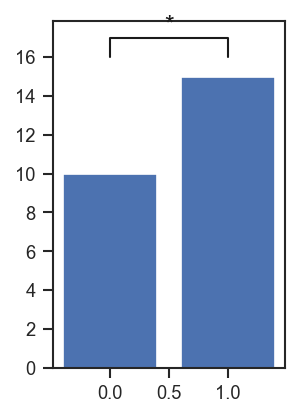
Plot significance

Annotate a swarm + bar plot with a t-test p-value:

import matplotlib.pyplot as plt
import seaborn as sns
from scipy.stats import ttest_ind

fig, ax = plt.subplots(figsize=(1.74, 2.13))
sns.swarmplot(data=summary_df, x="treatment", y="protein_count", ax=ax, color="k")
sns.barplot(
    data=summary_df,
    x="treatment",
    y="protein_count",
    ax=ax,
    errorbar="ci",
    alpha=1,
    palette=color_dict,
)

control = summary_df[summary_df["treatment"] == "Control"]["protein_count"]
treated = summary_df[summary_df["treatment"] == "Treated"]["protein_count"]

scplt.plot_significance(
    ax,
    y=2630,
    h=30,
    pval=ttest_ind(control, treated).pvalue,
    fontsize=8,
)

Source code in src/scpviz/plotting/style.py
def plot_significance(
    ax: "plt.Axes",
    y: float,
    h: float,
    x1: float = 0,
    x2: float = 1,
    col: str = "k",
    pval: float | str = "n.s.",
    fontsize: int = 12,
) -> None:
    """
    Plot significance bars on a matplotlib axis.

    This function draws horizontal significance bars (e.g., for statistical annotations)
    between two x-positions with a label indicating the p-value or significance level.

    Args:
        ax (matplotlib.axes.Axes): Axis on which to plot the significance bars.
        y (float): Vertical coordinate of the top of the bars.
        h (float): Height of the vertical ticks extending downward from `y`.
        x1 (float): X-coordinate of the first bar endpoint.
        x2 (float): X-coordinate of the second bar endpoint.
        col (str): Color of the bars.
        pval (float or str): P-value or significance label.

            - If a float, it is compared against thresholds (e.g., 0.05, 0.01) to assign
              significance markers (`*`, `**`, `***`).

            - If a string, it is directly rendered as the label.

        fontsize (int): Font size of the significance text.

    Returns:
        None

    Example:
        Minimal bar comparison with a significance bracket:
            ```python
            import matplotlib.pyplot as plt
            from scpviz import plotting as scplt

            fig, ax = plt.subplots(figsize=(2, 3))
            ax.bar([0, 1], [10, 15])
            scplt.plot_significance(ax, 16.0, 1.0, x1=0, x2=1, pval="*")
            plt.show()
            ```

        ![Plot significance](../../assets/plots/plot_significance.png)

        Annotate a swarm + bar plot with a t-test p-value:
            ```python
            import matplotlib.pyplot as plt
            import seaborn as sns
            from scipy.stats import ttest_ind

            fig, ax = plt.subplots(figsize=(1.74, 2.13))
            sns.swarmplot(data=summary_df, x="treatment", y="protein_count", ax=ax, color="k")
            sns.barplot(
                data=summary_df,
                x="treatment",
                y="protein_count",
                ax=ax,
                errorbar="ci",
                alpha=1,
                palette=color_dict,
            )

            control = summary_df[summary_df["treatment"] == "Control"]["protein_count"]
            treated = summary_df[summary_df["treatment"] == "Treated"]["protein_count"]

            scplt.plot_significance(
                ax,
                y=2630,
                h=30,
                pval=ttest_ind(control, treated).pvalue,
                fontsize=8,
            )
            ```
    """

    # check variable type of pval
    sig = 'n.s.'
    if isinstance(pval, float):
        if pval > 0.05:
            sig = 'n.s.'
        else:
            sig = '*' * int(np.floor(-np.log10(pval)))
    else:
        sig = pval

    ax.plot([x1, x1, x2, x2], [y, y+h, y+h, y], lw=1, c=col)
    ax.text((x1+x2)*.5, y+h, sig, ha='center', va='bottom', color=col, fontsize=fontsize)

plot_summary

plot_summary(
    ax: "plt.Axes",
    pdata: "pAnnData",
    value: str = "protein_count",
    classes: str | list[str] | None = None,
    plot_mean: bool = True,
    **kwargs: Any
) -> "plt.Axes | list[plt.Axes]"

Plot summary statistics of sample metadata.

This function visualizes values from pdata.summary (e.g., protein count, peptide count, abundance) as bar plots, optionally grouped by sample-level classes. It supports both per-sample visualization and mean values across groups.

Parameters:

Name Type Description Default
ax Axes

Axis on which to plot.

required
pdata pAnnData

Input pAnnData object with .summary metadata table.

required
value str

Column in pdata.summary to plot. Default is 'protein_count'.

'protein_count'
classes str or list of str

Sample-level classes to group by. - If None: plot per-sample values directly.

  • If str: group by the specified column, aggregating with mean if plot_mean=True.

  • If list: when multiple classes are provided, combinations of class values are used for grouping and subplots are created per unique value of classes[0].

None
plot_mean bool

Whether to plot mean ± standard deviation by class. If True, classes must be provided. Default is True.

True
**kwargs Any

Additional keyword arguments passed to seaborn plotting functions.

{}

Returns:

Name Type Description
ax matplotlib.axes.Axes or list of matplotlib.axes.Axes

The axis (or

'plt.Axes | list[plt.Axes]'

list of axes if subplots are created) with the plotted summary.

Raises:

Type Description
ValueError

If plot_mean=True but classes is not specified.

ValueError

If classes is invalid (not None, str, or non-empty list).

Example

Sample count summary by cell line and condition:

import matplotlib.pyplot as plt
from scpviz import plotting as scplt

fig, ax = plt.subplots(figsize=(5, 3))
scplt.plot_summary(ax, pdata, classes=["cellline", "condition"])
plt.show()
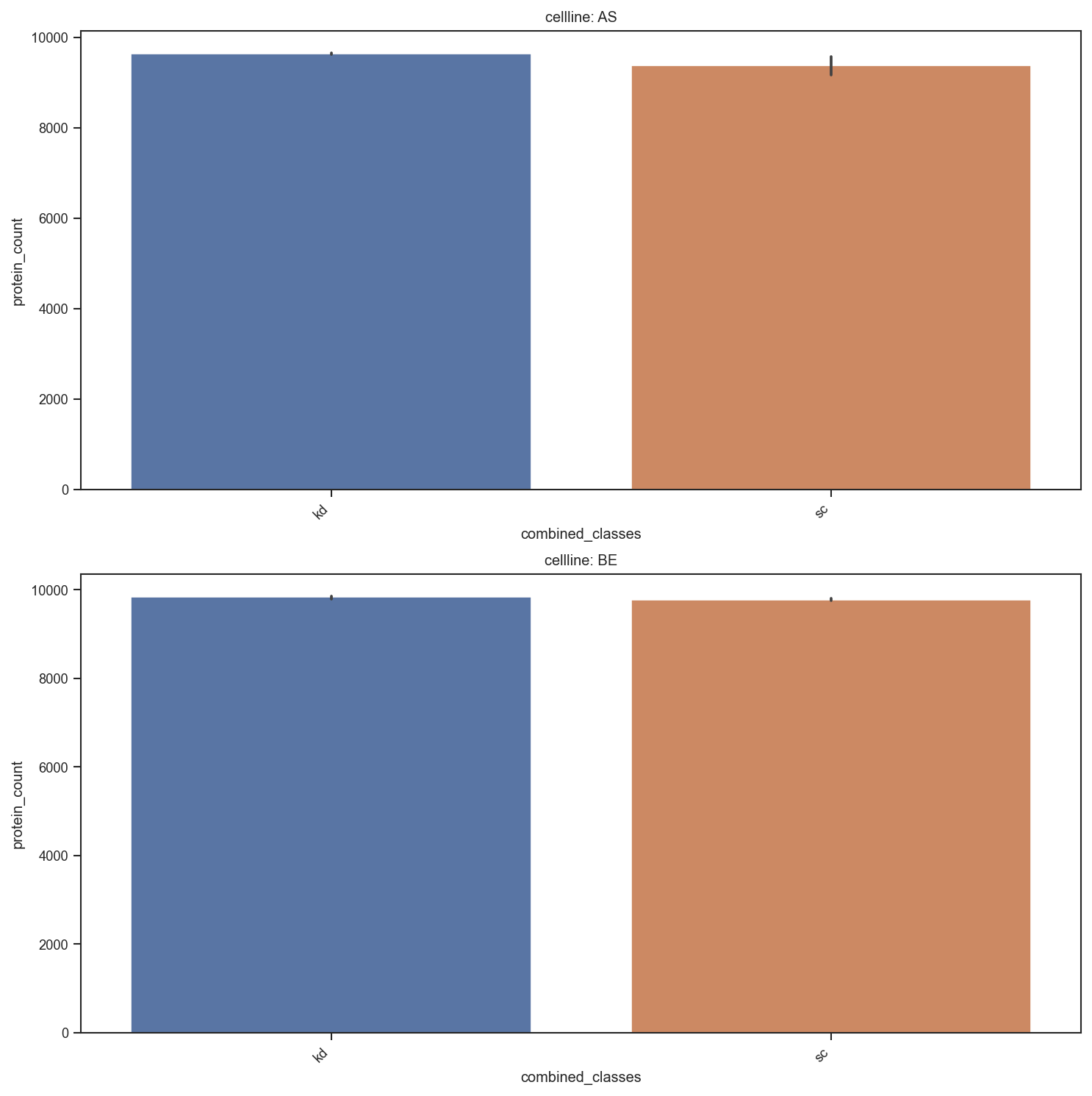
Plot summary

Source code in src/scpviz/plotting/style.py
def plot_summary(
    ax: "plt.Axes",
    pdata: "pAnnData",
    value: str = "protein_count",
    classes: str | list[str] | None = None,
    plot_mean: bool = True,
    **kwargs: Any,
) -> "plt.Axes | list[plt.Axes]":
    """
    Plot summary statistics of sample metadata.

    This function visualizes values from `pdata.summary` (e.g., protein count,
    peptide count, abundance) as bar plots, optionally grouped by sample-level classes.
    It supports both per-sample visualization and mean values across groups.

    Args:
        ax (matplotlib.axes.Axes): Axis on which to plot.
        pdata (pAnnData): Input pAnnData object with `.summary` metadata table.
        value (str): Column in `pdata.summary` to plot. Default is `'protein_count'`.
        classes (str or list of str, optional): Sample-level classes to group by.
            - If None: plot per-sample values directly.

            - If str: group by the specified column, aggregating with mean if `plot_mean=True`.

            - If list: when multiple classes are provided, combinations of class values
              are used for grouping and subplots are created per unique value of `classes[0]`.

        plot_mean (bool): Whether to plot mean ± standard deviation by class.
            If True, `classes` must be provided. Default is True.
        **kwargs: Additional keyword arguments passed to seaborn plotting functions.

    Returns:
        ax (matplotlib.axes.Axes or list of matplotlib.axes.Axes): The axis (or 
        list of axes if subplots are created) with the plotted summary.

    Raises:
        ValueError: If `plot_mean=True` but `classes` is not specified.
        ValueError: If `classes` is invalid (not None, str, or non-empty list).

    Example:
        Sample count summary by cell line and condition:
            ```python
            import matplotlib.pyplot as plt
            from scpviz import plotting as scplt

            fig, ax = plt.subplots(figsize=(5, 3))
            scplt.plot_summary(ax, pdata, classes=["cellline", "condition"])
            plt.show()
            ```

        ![Plot summary](../../assets/plots/plot_summary.png)
    """

    if pdata.summary is None:
        pdata._update_summary()

    summary_data = pdata.summary.copy()

    if plot_mean:
        if classes is None:
            raise ValueError("Classes must be specified when plot_mean is True.")
        elif isinstance(classes, str):
            sns.barplot(x=classes, y=value, hue=classes, data=summary_data, errorbar='sd', ax=ax, **kwargs)
            ax.set_xticklabels(ax.get_xticklabels(), rotation=45, ha='right')
        elif isinstance(classes, list) and len(classes) > 0:
            if len(classes) == 1:
                sns.catplot(x=classes[0], y=value, data=summary_data, hue=classes[0], kind='bar', ax=ax, **kwargs)
                ax.set_xticklabels(ax.get_xticklabels(), rotation=45, ha='right')
            elif len(classes) >= 2:
                summary_data['combined_classes'] = summary_data[classes[1:]].astype(str).agg('-'.join, axis=1)

                unique_values = summary_data[classes[0]].unique()
                num_unique_values = len(unique_values)

                fig, ax = plt.subplots(nrows=num_unique_values, figsize=(10, 5 * num_unique_values))

                if num_unique_values == 1:
                    ax = [ax]

                for ax_sub, unique_value in zip(ax, unique_values):
                    subset_data = summary_data[summary_data[classes[0]] == unique_value]
                    sns.barplot(x='combined_classes', y=value, data=subset_data, hue='combined_classes', ax=ax_sub, **kwargs)
                    ax_sub.set_title(f"{classes[0]}: {unique_value}")
                    ax_sub.set_xticklabels(ax_sub.get_xticklabels(), rotation=45, ha='right')
    else:
        if classes is None:
            sns.barplot(x=summary_data.index, y=value, data=summary_data, ax=ax, **kwargs)
            ax.set_xticklabels(ax.get_xticklabels(), rotation=45, ha='right')
        elif isinstance(classes, str):
            sns.barplot(x=summary_data.index, y=value, hue=classes, data=summary_data, ax=ax, **kwargs)
            ax.set_xticklabels(ax.get_xticklabels(), rotation=45, ha='right')
        elif isinstance(classes, list) and len(classes) > 0:
            if len(classes) == 1:
                sns.barplot(x=summary_data.index, y=value, hue=classes[0], data=summary_data, ax=ax, **kwargs)
                ax.set_xticklabels(ax.get_xticklabels(), rotation=45, ha='right')
            elif len(classes) >= 2:
                summary_data['combined_classes'] = summary_data[classes[1:]].astype(str).agg('-'.join, axis=1)
                # Create a subplot for each unique value in classes[0]
                unique_values = summary_data[classes[0]].unique()
                num_unique_values = len(unique_values)

                fig, ax = plt.subplots(nrows=num_unique_values, figsize=(10, 5 * num_unique_values))

                if num_unique_values == 1:
                    ax = [ax]  # Ensure axes is iterable

                for ax_sub, unique_value in zip(ax, unique_values):
                    subset_data = summary_data[summary_data[classes[0]] == unique_value]
                    sns.barplot(x=subset_data.index, y=value, hue='combined_classes', data=subset_data, ax=ax_sub, **kwargs)
                    ax_sub.set_title(f"{classes[0]}: {unique_value}")
                    ax_sub.set_xticklabels(ax_sub.get_xticklabels(), rotation=45, ha='right')

                plt.tight_layout()            
        else:
            raise ValueError("Invalid 'classes' parameter. It should be None, a string, or a non-empty list.")

    plt.tight_layout()

    return ax

plot_umap

plot_umap(
    ax: "plt.Axes",
    pdata: pAnnData,
    color=None,
    edge_color=None,
    marker_shape=None,
    classes=None,
    layer="X",
    on="protein",
    cmap="default",
    edge_cmap="default",
    shape_cmap="default",
    show_labels=False,
    label_column=None,
    s=20,
    alpha=0.8,
    umap_params={},
    text_size=10,
    edge_lw=0.8,
    add_ellipses=False,
    ellipse_group=None,
    ellipse_cmap="default",
    ellipse_kwargs=None,
    force=False,
    return_fit=False,
    subset_mask=None,
    mapping_keys=None,
    mapping=None,
    mapping_on_missing: str = "warn",
    **kwargs: Any
) -> "plt.Axes | tuple[plt.Axes, dict[str, Any]]"

Plot UMAP projection of protein or peptide abundance data.

Computes (or reuses) a UMAP embedding and visualizes samples in 1D/2D/3D, with flexible styling via face color (color), edge color (edge_color), marker shapes (marker_shape), labels, and optional confidence ellipses.

Parameters:

Name Type Description Default
ax Axes

Axis to plot on. Must be 3D if n_components=3.

required
pdata pAnnData

The pAnnData object containing .prot, .pep, and .summary.

required
color str or list of str or None

Face coloring for points.

  • None: grey face color for all points.
  • str: an .obs key (categorical or continuous) OR a gene/protein identifier (continuous abundance coloring).
  • list of str: combine multiple .obs keys into a single categorical label (e.g., ["cellline", "treatment"]).
None
edge_color str or list of str or None

Edge coloring for points (categorical only).

  • None: no edge coloring (edges disabled).
  • str: an .obs key (categorical).
  • list of str: combine multiple .obs keys into a single categorical label.
None
marker_shape str or list of str or None

Marker shapes for points (categorical only).

  • None: use a single marker ("o").
  • str: an .obs key (categorical).
  • list of str: combine multiple .obs keys into a single categorical label.
None
classes str or list of str or None

Deprecated alias for color.

  • If classes is provided and color is None, classes is used as color.
  • If both are provided, color is used and classes is ignored.
None
layer str

Data layer to use for UMAP input (default: "X").

'X'
on str

Whether to use "protein" or "peptide" data (default: "protein").

'protein'
cmap str, list, or dict

Palette/colormap for face coloring (color).

  • "default": internal categorical palette via get_color(); for continuous abundance coloring, uses a standard continuous colormap.
  • list: colors assigned to sorted class labels (categorical).
  • dict: {label: color} mapping (categorical).
  • str / colormap: continuous colormap name/object (abundance).
'default'
edge_cmap str, list, or dict

Palette for edge coloring (edge_color, categorical only).

  • "default": internal categorical palette via get_color().
  • list: colors assigned to sorted class labels.
  • dict: {label: color} mapping.
'default'
shape_cmap str, list, or dict

Marker mapping for marker_shape (categorical only).

  • "default": cycles markers in this order: ["o", "s", "^", "D", "v", "P", "X", "<", ">", "h", "*"]
  • list: markers assigned to sorted class labels.
  • dict: {label: marker} mapping.
'default'
show_labels bool or list

Whether to label points.

  • False: no labels.
  • True: label all samples.
  • list: label only specified samples.
False
label_column str

Column in pdata.summary to use for labels when show_labels=True. If not provided, sample names are used.

None
s float

Marker size (default: 20).

20
alpha float

Marker opacity (default: 0.8).

0.8
umap_params dict

Parameters for UMAP computation. Common keys:

  • n_components (default: 2)
  • n_neighbors
  • min_dist
  • metric
  • spread
  • random_state (default: 42)
  • n_pcs (neighbors step)
{}
subset_mask array - like or Series

Boolean mask to subset samples. If a Series is provided, it will be aligned to adata.obs.index.

None
text_size int

Font size for axis labels and legends (default: 10).

10
edge_lw float

Edge linewidth when edge_color is used (default: 0.8).

0.8
add_ellipses bool

If True, overlay confidence ellipses per group (2D only).

False
ellipse_group str or list of str

Explicit .obs key(s) to group ellipses. If None, grouping is chosen by priority:

  1. categorical color
  2. edge_color
  3. marker_shape
  4. otherwise raises ValueError
None
ellipse_cmap str, list, or dict

Ellipse color mapping.

  • "default": if grouping uses categorical color or edge_color, ellipses reuse those colors; if grouping uses marker_shape, ellipses use get_color().
  • list: colors assigned to sorted group labels.
  • dict: {label: color} mapping.
  • str: matplotlib colormap name (used to generate a palette across groups).
'default'
ellipse_kwargs dict

Extra keyword arguments passed to the ellipse patch.

None
mapping_keys list of str

.obs columns whose tuple of levels keys mapping. Must be provided together with mapping.

None
mapping dict

Tuple-keyed style dicts (color, edge_color, marker). See plot_pca for semantics; cannot be combined with edge_color / edge_cmap.

None
mapping_on_missing str

"warn" (default) or "raise" (see plot_pca).

'warn'
force bool

If True, recompute UMAP even if cached.

False
return_fit bool

If True, return the fitted UMAP object.

False
**kwargs Any

Extra keyword arguments passed to ax.scatter().

{}

Returns:

Name Type Description
ax Axes

Axis containing the UMAP plot.

fit_umap UMAP

The fitted UMAP object (only if return_fit=True).

Raises:

Type Description
AssertionError

If n_components=3 and the axis is not 3D.

ValueError

If edge_color is continuous (use color= for abundance instead).

ValueError

If marker_shape is not a categorical .obs key.

ValueError

If add_ellipses=True but no categorical grouping is available.

Note
  • If color is continuous (abundance), a colorbar is shown automatically.
  • edge_color and marker_shape are categorical only.
  • Use classes= only for backwards compatibility; prefer color=.
Example

UMAP after pca(on="protein"), colored by sample metadata (example uses region and cohort-specific umap_params):

import matplotlib.pyplot as plt
from scpviz import plotting as scplt

fig, ax = plt.subplots(figsize=(4.5, 4))
pdata_sc.pca(on="protein")
scplt.plot_umap(
    ax,
    pdata_sc,
    color=["region"],
    cmap={"Cortex": "#D19DCB", "SNpc": "#85BE9E"},
    force=True,
    umap_params={"min_dist": 0.3, "n_neighbors": 30, "random_state": 42},
    s=10,
    alpha=0.85,
)
scplt.shift_legend(ax)
plt.show()
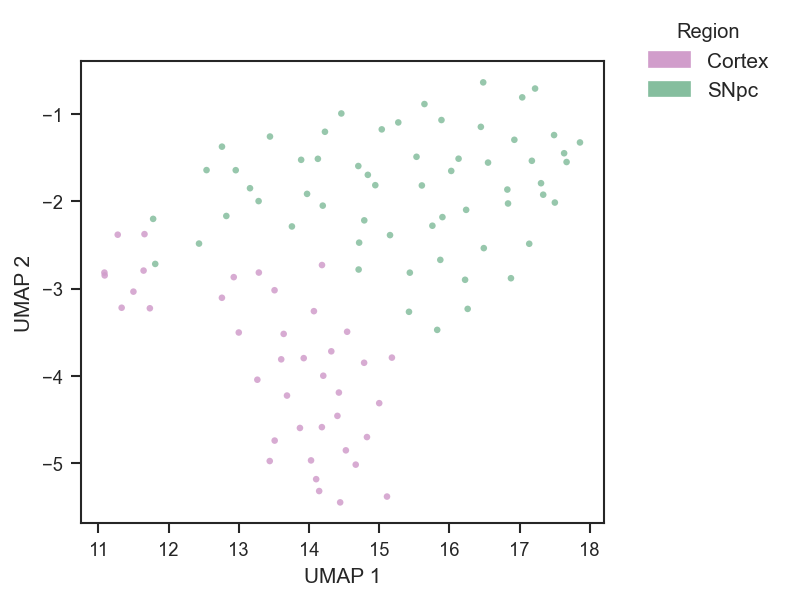
Plot UMAP

Plot by treatment group with default palette, using custom UMAP parameters:

umap_params = {'n_neighbors': 10, 'min_dist': 0.1}
plot_umap(ax, pdata, color='treatment', umap_params=umap_params)

Plot by protein abundance (continuous coloring):

plot_umap(ax, pdata, color='P12345', cmap='plasma')

Plot with custom palette:

color_palette = {'ctrl': '#CCCCCC', 'treated': '#E41A1C'}
edge_palette = {'wt': '#000000', 'mut': '#377EB8'}

plot_umap(ax, pdata, color='group', edge_color='treatment', cmap=color_palette, edge_cmap=edge_palette)

Marker shapes by categorical key:

shape_map = {"WT": "o", "MUT": "s"}
plot_umap(ax, pdata, color="treatment", marker_shape="genotype", shape_cmap=shape_map)

Add ellipses grouped explicitly (useful when color is continuous):

ellipse_colors = {"WT": "#000000", "MUT": "#377EB8"}
plot_umap(
    ax, pdata,
    color="UBE4B", cmap="viridis",
    marker_shape="genotype",
    add_ellipses=True,
    ellipse_group="genotype",
    ellipse_cmap=ellipse_colors,
    ellipse_kwargs={"alpha": 0.10, "lw": 1.5},
)

Plot a 3D UMAP:

umap_params = {'n_components':3}
ax = fig.add_subplot(111, projection='3d')
plot_umap(ax, pdata, color='treatment', umap_params=umap_params)

Tuple-key mapping (literal face + edge per combination of .obs columns):

umap_params = {"n_neighbors": 10, "min_dist": 0.1}
mapping_keys = ["cellline", "condition"]
mapping = {
    ("A", "ctrl"): {"color": "white", "edge_color": "black"},
    ("A", "treat"): {"color": "white", "edge_color": "blue"},
    ("B", "ctrl"): {"color": "lightgrey", "edge_color": "black"},
    ("B", "treat"): {"color": "lightgrey", "edge_color": "blue"},
}
plot_umap(
    ax, pdata,
    mapping_keys=mapping_keys,
    mapping=mapping,
    umap_params=umap_params,
    force=True,
)

Global abundance face color with per-combination edges:

umap_params = {"n_neighbors": 10, "min_dist": 0.1}
mapping_keys = ["cellline", "condition"]
mapping = {
    ("A", "ctrl"): {"edge_color": "black"},
    ("A", "treat"): {"edge_color": "steelblue"},
    ("B", "ctrl"): {"edge_color": "black"},
    ("B", "treat"): {"edge_color": "steelblue"},
}
plot_umap(
    ax, pdata,
    color="UBE4B",
    cmap="plasma",
    mapping_keys=mapping_keys,
    mapping=mapping,
    umap_params=umap_params,
)

Sequential overlays on the same axes (same UMAP, different subset_mask). Replace columns and palettes with your metadata; use matching umap_params and force so all layers share one embedding:

umap_params = {"n_neighbors": 10, "min_dist": 0.1}
line = "LineA"
cell_line_color = {"LineA": "#4C72B0", "LineB": "#DD8452"}
cell_line_color_6h = {"LineA": "#9fb8d9", "LineB": "#e8b896"}

mask_dark = (
    (pdata.summary["treatment"] == "Drug")
    & (pdata.summary["cell_line"] == line)
    & (pdata.summary["duration"] == "24hr")
)
mask_light = (
    (pdata.summary["treatment"] == "Drug")
    & (pdata.summary["cell_line"] == line)
    & (pdata.summary["duration"] == "6hr")
)
mask_ctrl = (
    (pdata.summary["treatment"] == "Vehicle")
    & (pdata.summary["cell_line"] == line)
)

fig = plt.figure(figsize=(4, 4))
ax = fig.add_subplot(111, projection="3d")

ax, _ = plot_umap(
    ax,
    pdata,
    color="cell_line",
    cmap=cell_line_color,
    edge_color="duration",
    edge_cmap={"6hr": "grey", "24hr": "black"},
    umap_params={**umap_params, "n_components": 3},
    subset_mask=mask_dark,
    return_fit=True,
    force=True,
)
ax, _ = plot_umap(
    ax,
    pdata,
    color="cell_line",
    cmap=cell_line_color_6h,
    edge_color="duration",
    edge_cmap={"6hr": "grey", "24hr": "black"},
    umap_params={**umap_params, "n_components": 3},
    subset_mask=mask_light,
    return_fit=True,
    force=False,
)
plot_umap(
    ax,
    pdata,
    color="cell_line",
    cmap={k: "white" for k in cell_line_color},
    edge_color="cell_line",
    edge_cmap=cell_line_color,
    edge_lw=1.2,
    umap_params={**umap_params, "n_components": 3},
    subset_mask=mask_ctrl,
    force=False,
)

Source code in src/scpviz/plotting/dimreduc.py
1459
1460
1461
1462
1463
1464
1465
1466
1467
1468
1469
1470
1471
1472
1473
1474
1475
1476
1477
1478
1479
1480
1481
1482
1483
1484
1485
1486
1487
1488
1489
1490
1491
1492
1493
1494
1495
1496
1497
1498
1499
1500
1501
1502
1503
1504
1505
1506
1507
1508
1509
1510
1511
1512
1513
1514
1515
1516
1517
1518
1519
1520
1521
1522
1523
1524
1525
1526
1527
1528
1529
1530
1531
1532
1533
1534
1535
1536
1537
1538
1539
1540
1541
1542
1543
1544
1545
1546
1547
1548
1549
1550
1551
1552
1553
1554
1555
1556
1557
1558
1559
1560
1561
1562
1563
1564
1565
1566
1567
1568
1569
1570
1571
1572
1573
1574
1575
1576
1577
1578
1579
1580
1581
1582
1583
1584
1585
1586
1587
1588
1589
1590
1591
1592
1593
1594
1595
1596
1597
1598
1599
1600
1601
1602
1603
1604
1605
1606
1607
1608
1609
1610
1611
1612
1613
1614
1615
1616
1617
1618
1619
1620
1621
1622
1623
1624
1625
1626
1627
1628
1629
1630
1631
1632
1633
1634
1635
1636
1637
1638
1639
1640
1641
1642
1643
1644
1645
1646
1647
1648
1649
1650
1651
1652
1653
1654
1655
1656
1657
1658
1659
1660
1661
1662
1663
1664
1665
1666
1667
1668
1669
1670
1671
1672
1673
1674
1675
1676
1677
1678
1679
1680
1681
1682
1683
1684
1685
1686
1687
1688
1689
1690
1691
1692
1693
1694
1695
1696
1697
1698
1699
1700
1701
1702
1703
1704
1705
1706
1707
1708
1709
1710
1711
1712
1713
1714
1715
1716
1717
1718
1719
1720
1721
1722
1723
1724
1725
1726
1727
1728
1729
1730
1731
1732
1733
1734
1735
1736
1737
1738
1739
1740
1741
1742
1743
1744
1745
1746
1747
1748
1749
1750
1751
1752
1753
1754
1755
1756
1757
1758
1759
1760
1761
1762
1763
1764
1765
1766
1767
1768
1769
1770
1771
1772
1773
1774
1775
1776
1777
1778
1779
1780
1781
1782
1783
1784
1785
1786
1787
1788
1789
1790
1791
1792
1793
1794
1795
1796
1797
1798
1799
1800
1801
1802
1803
1804
1805
1806
1807
1808
1809
1810
1811
1812
1813
1814
1815
1816
1817
1818
1819
1820
1821
1822
1823
1824
1825
1826
1827
1828
1829
def plot_umap(ax: "plt.Axes", pdata: pAnnData, color=None, edge_color=None, marker_shape=None, classes = None, 
              layer = "X", on = 'protein', cmap='default', edge_cmap="default", shape_cmap="default", show_labels=False, label_column=None,
              s=20, alpha=.8, umap_params={}, text_size = 10, edge_lw=0.8, 
              add_ellipses=False, ellipse_group=None, ellipse_cmap='default', ellipse_kwargs=None, 
              force = False, return_fit=False, subset_mask=None,
              mapping_keys=None, mapping=None, mapping_on_missing: str = "warn",
              **kwargs: Any) -> "plt.Axes | tuple[plt.Axes, dict[str, Any]]":
    """
    Plot UMAP projection of protein or peptide abundance data.

    Computes (or reuses) a UMAP embedding and visualizes samples in 1D/2D/3D, with
    flexible styling via face color (`color`), edge color (`edge_color`), marker
    shapes (`marker_shape`), labels, and optional confidence ellipses.

    Args:
        ax (matplotlib.axes.Axes): Axis to plot on. Must be 3D if `n_components=3`.
        pdata (scpviz.pAnnData): The pAnnData object containing `.prot`, `.pep`, and `.summary`.

        color (str or list of str or None): Face coloring for points.

            - None: grey face color for all points.
            - str: an `.obs` key (categorical or continuous) OR a gene/protein identifier
              (continuous abundance coloring).
            - list of str: combine multiple `.obs` keys into a single categorical label
              (e.g., `["cellline", "treatment"]`).

        edge_color (str or list of str or None): Edge coloring for points (categorical only).

            - None: no edge coloring (edges disabled).
            - str: an `.obs` key (categorical).
            - list of str: combine multiple `.obs` keys into a single categorical label.

        marker_shape (str or list of str or None): Marker shapes for points (categorical only).

            - None: use a single marker (`"o"`).
            - str: an `.obs` key (categorical).
            - list of str: combine multiple `.obs` keys into a single categorical label.

        classes (str or list of str or None): Deprecated alias for `color`.

            - If `classes` is provided and `color` is None, `classes` is used as `color`.
            - If both are provided, `color` is used and `classes` is ignored.

        layer (str): Data layer to use for UMAP input (default: `"X"`).
        on (str): Whether to use `"protein"` or `"peptide"` data (default: `"protein"`).

        cmap (str, list, or dict): Palette/colormap for face coloring (`color`).

            - `"default"`: internal categorical palette via `get_color()`; for continuous
              abundance coloring, uses a standard continuous colormap.
            - list: colors assigned to sorted class labels (categorical).
            - dict: `{label: color}` mapping (categorical).
            - str / colormap: continuous colormap name/object (abundance).

        edge_cmap (str, list, or dict): Palette for edge coloring (`edge_color`, categorical only).

            - `"default"`: internal categorical palette via `get_color()`.
            - list: colors assigned to sorted class labels.
            - dict: `{label: color}` mapping.

        shape_cmap (str, list, or dict): Marker mapping for `marker_shape` (categorical only).

            - `"default"`: cycles markers in this order:
              `["o", "s", "^", "D", "v", "P", "X", "<", ">", "h", "*"]`
            - list: markers assigned to sorted class labels.
            - dict: `{label: marker}` mapping.

        show_labels (bool or list): Whether to label points.

            - False: no labels.
            - True: label all samples.
            - list: label only specified samples.

        label_column (str, optional): Column in `pdata.summary` to use for labels when
            `show_labels=True`. If not provided, sample names are used.

        s (float): Marker size (default: 20).
        alpha (float): Marker opacity (default: 0.8).

        umap_params (dict, optional): Parameters for UMAP computation. Common keys:

            - `n_components` (default: 2)
            - `n_neighbors`
            - `min_dist`
            - `metric`
            - `spread`
            - `random_state` (default: 42)
            - `n_pcs` (neighbors step)

        subset_mask (array-like or pandas.Series, optional): Boolean mask to subset samples.
            If a Series is provided, it will be aligned to `adata.obs.index`.

        text_size (int): Font size for axis labels and legends (default: 10).
        edge_lw (float): Edge linewidth when `edge_color` is used (default: 0.8).

        add_ellipses (bool): If True, overlay confidence ellipses per group (2D only).
        ellipse_group (str or list of str, optional): Explicit `.obs` key(s) to group ellipses.
            If None, grouping is chosen by priority:

            1. categorical `color`
            2. `edge_color`
            3. `marker_shape`
            4. otherwise raises ValueError

        ellipse_cmap (str, list, or dict): Ellipse color mapping.

            - `"default"`: if grouping uses categorical `color` or `edge_color`, ellipses reuse
              those colors; if grouping uses `marker_shape`, ellipses use `get_color()`.
            - list: colors assigned to sorted group labels.
            - dict: `{label: color}` mapping.
            - str: matplotlib colormap name (used to generate a palette across groups).

        ellipse_kwargs (dict, optional): Extra keyword arguments passed to the ellipse patch.

        mapping_keys (list of str, optional): `.obs` columns whose tuple of levels keys `mapping`.
            Must be provided together with ``mapping``.

        mapping (dict, optional): Tuple-keyed style dicts (``color``, ``edge_color``, ``marker``).
            See ``plot_pca`` for semantics; cannot be combined with ``edge_color`` / ``edge_cmap``.

        mapping_on_missing (str): ``"warn"`` (default) or ``"raise"`` (see ``plot_pca``).

        force (bool): If True, recompute UMAP even if cached.
        return_fit (bool): If True, return the fitted UMAP object.
        **kwargs (Any): Extra keyword arguments passed to `ax.scatter()`.

    Returns:
        ax (matplotlib.axes.Axes): Axis containing the UMAP plot.
        fit_umap (umap.UMAP): The fitted UMAP object (only if `return_fit=True`).

    Raises:
        AssertionError: If `n_components=3` and the axis is not 3D.
        ValueError: If `edge_color` is continuous (use `color=` for abundance instead).
        ValueError: If `marker_shape` is not a categorical `.obs` key.
        ValueError: If `add_ellipses=True` but no categorical grouping is available.

    Note:
        - If `color` is continuous (abundance), a colorbar is shown automatically.
        - `edge_color` and `marker_shape` are categorical only.
        - Use `classes=` only for backwards compatibility; prefer `color=`.

    Example:
        UMAP after ``pca(on="protein")``, colored by sample metadata (example uses ``region`` and cohort-specific ``umap_params``):
            ```python
            import matplotlib.pyplot as plt
            from scpviz import plotting as scplt

            fig, ax = plt.subplots(figsize=(4.5, 4))
            pdata_sc.pca(on="protein")
            scplt.plot_umap(
                ax,
                pdata_sc,
                color=["region"],
                cmap={"Cortex": "#D19DCB", "SNpc": "#85BE9E"},
                force=True,
                umap_params={"min_dist": 0.3, "n_neighbors": 30, "random_state": 42},
                s=10,
                alpha=0.85,
            )
            scplt.shift_legend(ax)
            plt.show()
            ```

        ![Plot UMAP](../../assets/plots/plot_umap.png)

        Plot by treatment group with default palette, using custom UMAP parameters:
            ```python
            umap_params = {'n_neighbors': 10, 'min_dist': 0.1}
            plot_umap(ax, pdata, color='treatment', umap_params=umap_params)
            ```

        Plot by protein abundance (continuous coloring):
            ```python
            plot_umap(ax, pdata, color='P12345', cmap='plasma')
            ```

        Plot with custom palette:
            ```python
            color_palette = {'ctrl': '#CCCCCC', 'treated': '#E41A1C'}
            edge_palette = {'wt': '#000000', 'mut': '#377EB8'}

            plot_umap(ax, pdata, color='group', edge_color='treatment', cmap=color_palette, edge_cmap=edge_palette)
            ```

        Marker shapes by categorical key:
            ```python
            shape_map = {"WT": "o", "MUT": "s"}
            plot_umap(ax, pdata, color="treatment", marker_shape="genotype", shape_cmap=shape_map)
            ```

        Add ellipses grouped explicitly (useful when `color` is continuous):
            ```python
            ellipse_colors = {"WT": "#000000", "MUT": "#377EB8"}
            plot_umap(
                ax, pdata,
                color="UBE4B", cmap="viridis",
                marker_shape="genotype",
                add_ellipses=True,
                ellipse_group="genotype",
                ellipse_cmap=ellipse_colors,
                ellipse_kwargs={"alpha": 0.10, "lw": 1.5},
            )
            ```

        Plot a 3D UMAP:
            ```python
            umap_params = {'n_components':3}
            ax = fig.add_subplot(111, projection='3d')
            plot_umap(ax, pdata, color='treatment', umap_params=umap_params)
            ```

        Tuple-key ``mapping`` (literal face + edge per combination of ``.obs`` columns):
            ```python
            umap_params = {"n_neighbors": 10, "min_dist": 0.1}
            mapping_keys = ["cellline", "condition"]
            mapping = {
                ("A", "ctrl"): {"color": "white", "edge_color": "black"},
                ("A", "treat"): {"color": "white", "edge_color": "blue"},
                ("B", "ctrl"): {"color": "lightgrey", "edge_color": "black"},
                ("B", "treat"): {"color": "lightgrey", "edge_color": "blue"},
            }
            plot_umap(
                ax, pdata,
                mapping_keys=mapping_keys,
                mapping=mapping,
                umap_params=umap_params,
                force=True,
            )
            ```

        Global abundance face color with per-combination edges:
            ```python
            umap_params = {"n_neighbors": 10, "min_dist": 0.1}
            mapping_keys = ["cellline", "condition"]
            mapping = {
                ("A", "ctrl"): {"edge_color": "black"},
                ("A", "treat"): {"edge_color": "steelblue"},
                ("B", "ctrl"): {"edge_color": "black"},
                ("B", "treat"): {"edge_color": "steelblue"},
            }
            plot_umap(
                ax, pdata,
                color="UBE4B",
                cmap="plasma",
                mapping_keys=mapping_keys,
                mapping=mapping,
                umap_params=umap_params,
            )
            ```

        Sequential overlays on the same axes (same UMAP, different ``subset_mask``). Replace
        columns and palettes with your metadata; use matching ``umap_params`` and ``force``
        so all layers share one embedding:
            ```python
            umap_params = {"n_neighbors": 10, "min_dist": 0.1}
            line = "LineA"
            cell_line_color = {"LineA": "#4C72B0", "LineB": "#DD8452"}
            cell_line_color_6h = {"LineA": "#9fb8d9", "LineB": "#e8b896"}

            mask_dark = (
                (pdata.summary["treatment"] == "Drug")
                & (pdata.summary["cell_line"] == line)
                & (pdata.summary["duration"] == "24hr")
            )
            mask_light = (
                (pdata.summary["treatment"] == "Drug")
                & (pdata.summary["cell_line"] == line)
                & (pdata.summary["duration"] == "6hr")
            )
            mask_ctrl = (
                (pdata.summary["treatment"] == "Vehicle")
                & (pdata.summary["cell_line"] == line)
            )

            fig = plt.figure(figsize=(4, 4))
            ax = fig.add_subplot(111, projection="3d")

            ax, _ = plot_umap(
                ax,
                pdata,
                color="cell_line",
                cmap=cell_line_color,
                edge_color="duration",
                edge_cmap={"6hr": "grey", "24hr": "black"},
                umap_params={**umap_params, "n_components": 3},
                subset_mask=mask_dark,
                return_fit=True,
                force=True,
            )
            ax, _ = plot_umap(
                ax,
                pdata,
                color="cell_line",
                cmap=cell_line_color_6h,
                edge_color="duration",
                edge_cmap={"6hr": "grey", "24hr": "black"},
                umap_params={**umap_params, "n_components": 3},
                subset_mask=mask_light,
                return_fit=True,
                force=False,
            )
            plot_umap(
                ax,
                pdata,
                color="cell_line",
                cmap={k: "white" for k in cell_line_color},
                edge_color="cell_line",
                edge_cmap=cell_line_color,
                edge_lw=1.2,
                umap_params={**umap_params, "n_components": 3},
                subset_mask=mask_ctrl,
                force=False,
            )
            ```

    """
    default_umap_params = {'n_components': 2, 'random_state': 42}
    umap_param = {**default_umap_params, **(umap_params if umap_params else {})}

    if umap_param['n_components'] == 3:
        assert ax.name == '3d', "The ax must be a 3D projection, please define projection='3d'"

    # check deprecated classes argument
    if classes is not None and color is None:
        print(f"{utils.format_log_prefix('warn')} `classes` is deprecated; use `color=` instead.")
        color = classes
    elif classes is not None and color is not None:
        print(f"{utils.format_log_prefix('warn')} Both `classes` and `color` were provided; using `color` and ignoring `classes`.")

    adata = utils.get_adata(pdata, on)

    if force == False:
        if 'X_umap' in adata.obsm.keys():
            print(f'{utils.format_log_prefix("warn")} UMAP already exists in {on} data, using existing UMAP. Run with `force=True` to recompute.')
        else:
            pdata.umap(on=on, layer=layer, **umap_param)
    else:
        print(f'UMAP calculation forced, re-calculating UMAP')
        pdata.umap(on=on, layer=layer, force_neighbors=True, **umap_param)

    Xt = adata.obsm['X_umap']
    umap = adata.uns['umap']
    mask = _resolve_subset_mask(adata, subset_mask)
    obs_names_plot = adata.obs_names[mask]

    n_comp = umap_param["n_components"]

    pc_idx = [0] if n_comp == 1 else ([0, 1] if n_comp == 2 else [0, 1, 2])
    dim_labels = ["UMAP 1"] if n_comp == 1 else (["UMAP 1", "UMAP 2"] if n_comp == 2 else ["UMAP 1", "UMAP 2", "UMAP 3"])

    y_1d = np.arange(np.sum(mask)) if n_comp == 1 else None

    if label_column and label_column in pdata.summary.columns:
        label_series = pdata.summary.loc[obs_names_plot, label_column]
    else:
        label_series = obs_names_plot

    ax = _plot_embedding_scatter(ax=ax, adata=adata, Xt=Xt, mask=mask, obs_names_plot=obs_names_plot,
        color=color, edge_color=edge_color, marker_shape=marker_shape, layer=layer, cmap=cmap, edge_cmap=edge_cmap, shape_cmap=shape_cmap,
        edge_lw=edge_lw, s=s, alpha=alpha, text_size=text_size, 
        axis_prefix="UMAP", dim_labels=dim_labels, pc_idx=pc_idx, y_1d=y_1d,
        show_labels=show_labels, label_series=label_series,
        add_ellipses=add_ellipses, ellipse_kwargs=ellipse_kwargs, ellipse_group=ellipse_group, ellipse_cmap=ellipse_cmap, plot_confidence_ellipse=_plot_confidence_ellipse,
        mapping_keys=mapping_keys, mapping=mapping, mapping_on_missing=mapping_on_missing,
        **kwargs,
    )

    if return_fit:
        return ax, umap
    else:
        return ax

plot_upset

plot_upset(
    pdata, classes, return_contents=False, **kwargs: Any
) -> Any

Plot an UpSet diagram of shared proteins or peptides across groups.

This function generates an UpSet plot for >2 sets based on presence/absence data across specified sample-level classes. Uses the upsetplot package for visualization.

Parameters:

Name Type Description Default
pdata pAnnData

Input pAnnData object.

required
classes str or list of str

Sample-level classes to partition proteins or peptides into sets.

required
return_contents bool

If True, return both the UpSet object and the underlying set contents used for plotting.

False
**kwargs Any

Additional keyword arguments passed to upsetplot.UpSet. See the upsetplot documentation for more details. Common arguments include:

  • sort_categories_by (str): How to sort categories. Options are "cardinality", "input", "-cardinality", or "-input".
  • min_subset_size (int): Minimum subset size to display.
{}

Returns:

Type Description
Any

The upsetplot.UpSet instance, or (upset, membership_df) if return_contents=True (membership as a multi-index DataFrame).

Example

UpSet for cellline and condition (show_counts=False can help when saving some PNGs with matplotlib / upsetplot):

import matplotlib.pyplot as plt
from scpviz import plotting as scplt

upplot = scplt.plot_upset(pdata, classes=["cellline", "condition"], show_counts=False)
upplot.plot()
plt.show()
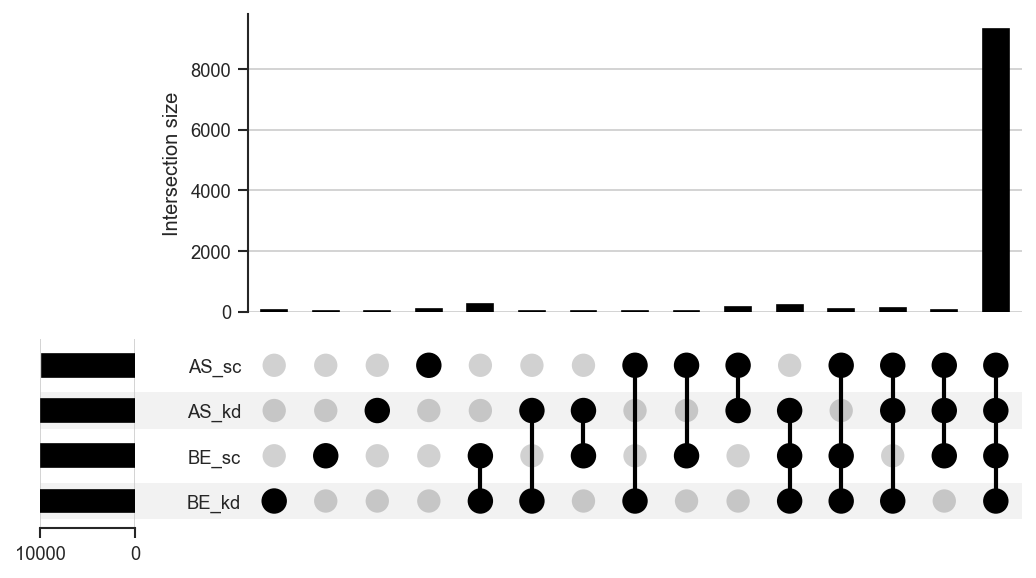
Plot upset

Highlight disjoint subsets (resolve keys with get_upset_contents(..., upsetForm=False)):

import matplotlib.pyplot as plt
from scpviz import plotting as scplt
from scpviz import utils as scu

keys = list(
    scu.get_upset_contents(pdata, classes=["cellline", "condition"], upsetForm=False).keys()
)
be_kd = next((k for k in keys if "BE" in k and "kd" in k), keys[0])
as_sc = next((k for k in keys if "AS" in k and "sc" in k), keys[-1])
others = [k for k in keys if k not in (be_kd, as_sc)]

upplot = scplt.plot_upset(pdata, classes=["cellline", "condition"], show_counts=False)
upplot.style_subsets(
    present=[be_kd],
    absent=others,
    edgecolor="black",
    facecolor="#E59866",
    linewidth=2,
    label="highlight A",
)
upplot.style_subsets(
    present=[as_sc],
    absent=[k for k in keys if k != as_sc],
    edgecolor="black",
    facecolor="#5DADE2",
    linewidth=2,
    label="highlight B",
)
upplot.plot()
plt.show()
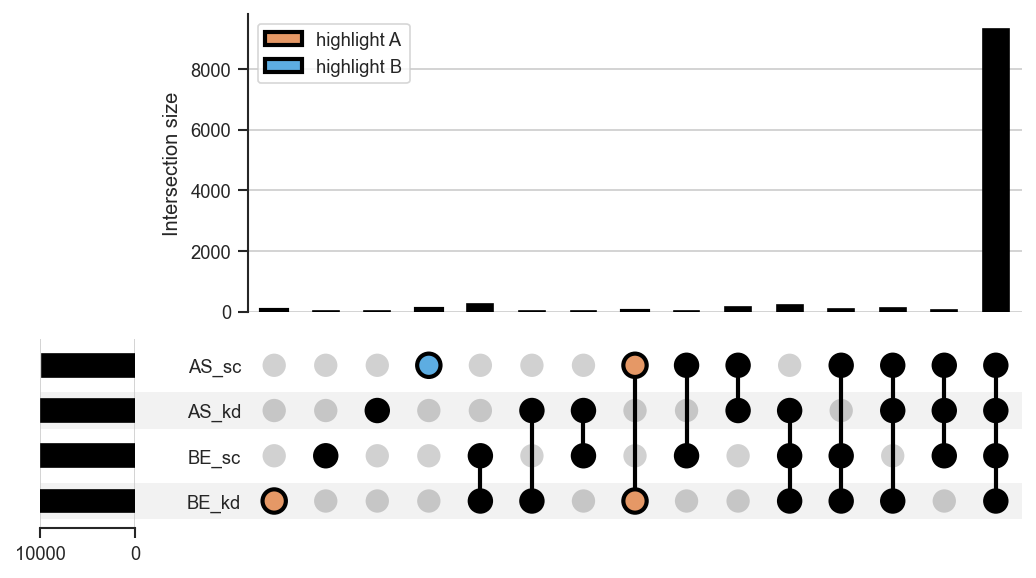
Plot upset styled

See Also

plot_venn: Plot a Venn diagram for 2 to 3 sets.
plot_rankquant: Rank-based visualization of protein/peptide distributions.

Source code in src/scpviz/plotting/sets.py
def plot_upset(
    pdata,
    classes,
    return_contents=False,
    **kwargs: Any,
) -> Any:
    """
    Plot an UpSet diagram of shared proteins or peptides across groups.

    This function generates an UpSet plot for >2 sets based on presence/absence
    data across specified sample-level classes. Uses the `upsetplot` package
    for visualization.

    Args:
        pdata (pAnnData): Input pAnnData object.

        classes (str or list of str): Sample-level classes to partition proteins
            or peptides into sets.

        return_contents (bool): If True, return both the UpSet object and the
            underlying set contents used for plotting.

        **kwargs (Any): Additional keyword arguments passed to `upsetplot.UpSet`.
            See the [upsetplot documentation](https://upsetplot.readthedocs.io/en/stable/)
            for more details. Common arguments include:

            - `sort_categories_by` (str): How to sort categories. Options are
              `"cardinality"`, `"input"`, `"-cardinality"`, or `"-input"`.
            - `min_subset_size` (int): Minimum subset size to display.

    Returns:
        The ``upsetplot.UpSet`` instance, or ``(upset, membership_df)`` if ``return_contents=True`` (membership as a multi-index DataFrame).

    Example:
        UpSet for ``cellline`` and ``condition`` (``show_counts=False`` can help when saving some PNGs with matplotlib / upsetplot):
            ```python
            import matplotlib.pyplot as plt
            from scpviz import plotting as scplt

            upplot = scplt.plot_upset(pdata, classes=["cellline", "condition"], show_counts=False)
            upplot.plot()
            plt.show()
            ```

        ![Plot upset](../../assets/plots/plot_upset.png)

        Highlight disjoint subsets (resolve keys with ``get_upset_contents(..., upsetForm=False)``):
            ```python
            import matplotlib.pyplot as plt
            from scpviz import plotting as scplt
            from scpviz import utils as scu

            keys = list(
                scu.get_upset_contents(pdata, classes=["cellline", "condition"], upsetForm=False).keys()
            )
            be_kd = next((k for k in keys if "BE" in k and "kd" in k), keys[0])
            as_sc = next((k for k in keys if "AS" in k and "sc" in k), keys[-1])
            others = [k for k in keys if k not in (be_kd, as_sc)]

            upplot = scplt.plot_upset(pdata, classes=["cellline", "condition"], show_counts=False)
            upplot.style_subsets(
                present=[be_kd],
                absent=others,
                edgecolor="black",
                facecolor="#E59866",
                linewidth=2,
                label="highlight A",
            )
            upplot.style_subsets(
                present=[as_sc],
                absent=[k for k in keys if k != as_sc],
                edgecolor="black",
                facecolor="#5DADE2",
                linewidth=2,
                label="highlight B",
            )
            upplot.plot()
            plt.show()
            ```

        ![Plot upset styled](../../assets/plots/plot_upset_styled.png)

    See Also:
        plot_venn: Plot a Venn diagram for 2 to 3 sets.  
        plot_rankquant: Rank-based visualization of protein/peptide distributions.
    """

    upset_contents = _plotting_pkg_utils().get_upset_contents(pdata, classes=classes)
    show_counts = kwargs.pop("show_counts", True)
    upplot = _plotting_pkg_upsetplot().UpSet(
        upset_contents,
        subset_size="count",
        show_counts=show_counts,
        facecolor="black",
        **kwargs,
    )

    if return_contents:
        return upplot, upset_contents
    else:
        return upplot

plot_venn

plot_venn(
    ax,
    pdata,
    classes,
    set_colors="default",
    weighted=False,
    return_contents=False,
    label_order=None,
    fixed_subset_sizes=None,
    **kwargs: Any
) -> plt.Axes | tuple[plt.Axes, dict[str, set[str]]]

Plot a Venn diagram of shared proteins or peptides across groups.

This function generates a 2- or 3-set Venn diagram based on presence/absence data across specified sample-level classes. For more than 3 sets, use plot_upset() instead.

Parameters:

Name Type Description Default
ax Axes

Axis on which to plot.

required
pdata pAnnData

Input pAnnData object.

required
classes str or list of str

Sample-level classes to partition proteins or peptides into sets.

required
set_colors str or list of str

Colors for the sets.

  • "default": use internal color palette.
  • list of str: custom color list with length equal to the number of sets.
'default'
weighted bool

If True, circle/region areas are proportional to set sizes (area-weighted). If False, draws an unweighted Venn (equal-sized regions).

False
return_contents bool

If True, return both the axis and the underlying set contents used for plotting.

False
label_order list of str

Custom order of set labels. Must contain the same elements as classes.

None
**kwargs Any

Additional keyword arguments passed to matplotlib-venn functions.

{}

Returns:

Type Description
Axes | tuple[Axes, dict[str, set[str]]]

The axes containing the Venn diagram, or (ax, upset_contents) if return_contents=True (upset_contents maps class labels to sets of feature identifiers).

Raises:

Type Description
ValueError

If number of sets is not 2 or 3.

ValueError

If label_order does not contain the same elements as classes.

ValueError

If custom set_colors length does not match number of sets.

Example

Two-set Venn by cell line:

import matplotlib.pyplot as plt
from scpviz import plotting as scplt

fig, ax = plt.subplots(figsize=(3, 3))
scplt.plot_venn(ax, pdata, classes="cellline")
plt.show()
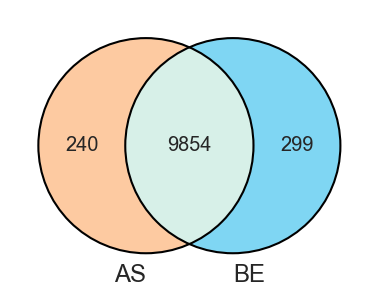
Plot venn

Plot a 2-set Venn diagram of shared proteins:

fig, ax = plt.subplots()
scplt.plot_venn(
    ax, pdata_1mo_snpc, classes="sample",
    set_colors=["#1f77b4", "#ff7f0e"]
)

Plot a weighted set by counts:

fig, ax = plt.subplots(figsize=(3, 3))
scplt.plot_venn(
    ax, pdata, classes='treatment',
    weighted=True)

Plot a weighted set by specifying a fixed subset size:

fig, ax = plt.subplots(figsize=(3, 3))
scplt.plot_venn(
    ax, pdata, classes='treatment',
    weighted=True, fixed_subset_sizes=(1,1,3))

See Also

plot_upset: Plot an UpSet diagram for >3 sets.
plot_rankquant: Rank-based visualization of protein/peptide distributions.

Source code in src/scpviz/plotting/sets.py
def plot_venn(
    ax,
    pdata,
    classes,
    set_colors="default",
    weighted=False,
    return_contents=False,
    label_order=None,
    fixed_subset_sizes=None,
    **kwargs: Any,
) -> plt.Axes | tuple[plt.Axes, dict[str, set[str]]]:
    """
    Plot a Venn diagram of shared proteins or peptides across groups.

    This function generates a 2- or 3-set Venn diagram based on presence/absence
    data across specified sample-level classes. For more than 3 sets, use
    `plot_upset()` instead.

    Args:
        ax (matplotlib.axes.Axes): Axis on which to plot.
        pdata (pAnnData): Input pAnnData object.
        classes (str or list of str): Sample-level classes to partition proteins
            or peptides into sets.
        set_colors (str or list of str): Colors for the sets.

            - `"default"`: use internal color palette.
            - list of str: custom color list with length equal to the number of sets.

        weighted (bool): If True, circle/region areas are proportional to set sizes (area-weighted). If False, draws an unweighted Venn (equal-sized regions).
        return_contents (bool): If True, return both the axis and the underlying
            set contents used for plotting.
        label_order (list of str, optional): Custom order of set labels. Must
            contain the same elements as `classes`.
        **kwargs (Any): Additional keyword arguments passed to matplotlib-venn functions.

    Returns:
        The axes containing the Venn diagram, or ``(ax, upset_contents)`` if ``return_contents=True`` (``upset_contents`` maps class labels to sets of feature identifiers).

    Raises:
        ValueError: If number of sets is not 2 or 3.
        ValueError: If `label_order` does not contain the same elements as `classes`.
        ValueError: If custom `set_colors` length does not match number of sets.

    Example:
        Two-set Venn by cell line:
            ```python
            import matplotlib.pyplot as plt
            from scpviz import plotting as scplt

            fig, ax = plt.subplots(figsize=(3, 3))
            scplt.plot_venn(ax, pdata, classes="cellline")
            plt.show()
            ```

        ![Plot venn](../../assets/plots/plot_venn.png)

        Plot a 2-set Venn diagram of shared proteins:
            ```python
            fig, ax = plt.subplots()
            scplt.plot_venn(
                ax, pdata_1mo_snpc, classes="sample",
                set_colors=["#1f77b4", "#ff7f0e"]
            )
            ```

        Plot a weighted set by counts:
            ```python
            fig, ax = plt.subplots(figsize=(3, 3))
            scplt.plot_venn(
                ax, pdata, classes='treatment',
                weighted=True)
            ```

        Plot a weighted set by specifying a fixed subset size:
            ```python
            fig, ax = plt.subplots(figsize=(3, 3))
            scplt.plot_venn(
                ax, pdata, classes='treatment',
                weighted=True, fixed_subset_sizes=(1,1,3))
            ```            

    See Also:
        plot_upset: Plot an UpSet diagram for >3 sets.  
        plot_rankquant: Rank-based visualization of protein/peptide distributions.
    """
    upset_contents = _plotting_pkg_utils().get_upset_contents(pdata, classes, upsetForm=False)

    num_keys = len(upset_contents)
    if set_colors == 'default':
        set_colors = get_color('colors', n=num_keys)
    elif len(set_colors) != num_keys:
        raise ValueError("The number of colors provided must match the number of sets.")

    if label_order is not None:
        if set(label_order) != set(upset_contents.keys()):
            raise ValueError("`label_order` must contain the same elements as `classes`.")
        set_labels = label_order
        set_list = [set(upset_contents[label]) for label in set_labels]
    else:
        set_labels = list(upset_contents.keys())
        set_list = [set(value) for value in upset_contents.values()]

    alpha = kwargs.pop('alpha', 0.5)

        # New API (matplotlib-venn ≥ 0.12)
    try:
        from matplotlib_venn.layout.venn2 import DefaultLayoutAlgorithm as Venn2Layout
        from matplotlib_venn.layout.venn3 import DefaultLayoutAlgorithm as Venn3Layout
        from matplotlib_venn import venn2, venn2_circles, venn3, venn3_circles
        USE_LAYOUT = True
    except ImportError:
        # Older API (no layout subpackage)
        from matplotlib_venn import venn2_unweighted, venn3_unweighted, venn2_circles, venn3_circles
        USE_LAYOUT = False

    if weighted:
        venn_functions = {
            2: lambda: (venn2(set_list, ax = ax, set_labels=set_labels, set_colors=tuple(set_colors), alpha=alpha,
                                layout_algorithm=(Venn2Layout(fixed_subset_sizes=fixed_subset_sizes) if fixed_subset_sizes is not None else None), **kwargs),
                        venn2_circles(subsets=fixed_subset_sizes if fixed_subset_sizes is not None else set_list, ax = ax, linewidth=1)),
            3: lambda: (venn3(set_list, ax = ax, set_labels=set_labels, set_colors=tuple(set_colors), alpha=alpha,
                                layout_algorithm=(Venn3Layout(fixed_subset_sizes=fixed_subset_sizes) if fixed_subset_sizes is not None else None), **kwargs),
                        venn3_circles(subsets=fixed_subset_sizes if fixed_subset_sizes is not None else set_list, ax = ax, linewidth=1))
        }
    else:
        if USE_LAYOUT:
            venn_functions = {
                2: lambda: (venn2(set_list, ax = ax, set_labels=set_labels, set_colors=tuple(set_colors), alpha=alpha, layout_algorithm=Venn2Layout(fixed_subset_sizes=(1,1,1)), **kwargs),
                            venn2_circles(subsets=(1, 1, 1), ax = ax,  linewidth=1)),
                3: lambda: (venn3(set_list, ax = ax, set_labels=set_labels, set_colors=tuple(set_colors), alpha=alpha, layout_algorithm=Venn3Layout(fixed_subset_sizes=(1,1,1,1,1,1,1)), **kwargs),
                            venn3_circles(subsets=(1, 1, 1, 1, 1, 1, 1), ax = ax, linewidth=1))
            }
        else:
            venn_functions = {
                2: lambda: (venn2_unweighted(set_list, ax = ax, set_labels=set_labels, set_colors=tuple(set_colors), alpha=alpha, **kwargs),
                            venn2_circles(subsets=(1, 1, 1), ax = ax, linewidth=1)),
                3: lambda: (venn3_unweighted(set_list, ax = ax, set_labels=set_labels, set_colors=tuple(set_colors), alpha=alpha, **kwargs),
                            venn3_circles(subsets=(1, 1, 1, 1, 1, 1, 1), ax = ax, linewidth=1)) }

    if num_keys in venn_functions:
        v, c = venn_functions[num_keys]()
    else:
        raise ValueError("Venn diagrams only accept either 2 or 3 sets. For more than 3 sets, use the plot_upset function.")

    if return_contents:
        return ax, upset_contents
    return ax

plot_volcano

plot_volcano(
    ax: "plt.Axes",
    pdata: pAnnData | None = None,
    values: Any = None,
    method: str = "ttest",
    fold_change_mode: str = "mean",
    label: Any = 5,
    label_type="Gene",
    color=None,
    alpha=0.5,
    pval=0.05,
    log2fc=1,
    linewidth=0.5,
    fontsize=8,
    no_marks=False,
    classes=None,
    de_data=None,
    return_df=False,
    group_annot=True,
    group_annot_kwargs=None,
    group1_kwargs=None,
    group2_kwargs=None,
    up_kwargs=None,
    down_kwargs=None,
    **kwargs: Any
) -> Any

Plot a volcano plot of differential expression results.

This function calculates differential expression (DE) between two groups and visualizes results as a volcano plot. Alternatively, it can use pre-computed DE results (e.g. from pdata.de()).

Parameters:

Name Type Description Default
ax Axes

Axis on which to plot.

required
pdata pAnnData

Input pAnnData object. Required if de_data is not provided.

None
values list or dict

Values to compare between groups.

  • Legacy list format: ["group1", "group2"]

  • Dictionary format: list of dicts specifying multiple conditions, e.g. [{"cellline": "HCT116", "treatment": "DMSO"}, {"cellline": "HCT116", "treatment": "DrugX"}].

None
method str

Statistical test method. Default is "ttest". Options are "ttest", "mannwhitneyu", "wilcoxon".

'ttest'
fold_change_mode str

Method for computing fold change.

  • "mean": log2(mean(group1) / mean(group2))
  • "pairwise_median": median of all pairwise log2 ratios.
  • "pep_pairwise_median": median of peptide-level pairwise log2 ratios, aggregated per protein
'mean'
label int, list, or None

Features to highlight.

  • If int: label top and bottom n features.
  • If list of str: label only the specified features.
  • If list of two ints: [top, bottom] to label asymmetric counts.
  • If None: no labels plotted.
5
label_type str

Label content type. Currently "Gene" is recommended.

'Gene'
color dict

Dictionary mapping significance categories to colors. Defaults to grey/red/blue.

None
alpha float

Point transparency. Default is 0.5.

0.5
pval float

P-value threshold for significance. Default is 0.05.

0.05
log2fc float

Log2 fold change threshold for significance. Default is 1.

1
linewidth float

Line width for threshold lines. Default is 0.5.

0.5
fontsize int

Font size for feature labels. Default is 8.

8
no_marks bool

If True, suppress coloring of significant points and plot all points in grey. Default is False.

False
classes str

Sample class column to use for group comparison.

None
de_data DataFrame

Pre-computed DE results. Must contain "log2fc", "p_value", and "significance" columns.

None
return_df bool

If True, return both the axis and the DataFrame used for plotting. Default is False.

False
group_annot bool

If True, annotate group names and differential expression counts (n) at the top of the plot. If False, suppress all group-related annotations. Default is True.

True
group_annot_kwargs dict

Global configuration for group annotations. Supported keys include:

  • "pos": Dictionary controlling annotation positions in axes fraction coordinates. Expected keys are "group1_xy", "group2_xy", "up_xy", and "down_xy", each mapping to an (x, y) tuple.

  • "bbox": Dictionary of bounding box properties passed to matplotlib.text.Annotation, or None to disable the bounding box for group labels.

None
group1_kwargs dict

Keyword arguments passed to ax.annotate() for the first group label (right-aligned by default). Can be used to override font size, weight, alignment, or other text properties.

None
group2_kwargs dict

Keyword arguments passed to ax.annotate() for the second group label (left-aligned by default). Can be used to override font size, weight, alignment, or other text properties.

None
up_kwargs dict

Keyword arguments passed to ax.annotate() for the upregulated feature count (n=...). Useful for adjusting font size, color, or vertical spacing independently of other annotations.

None
down_kwargs dict

Keyword arguments passed to ax.annotate() for the downregulated feature count (n=...). Useful for adjusting font size, color, or vertical spacing independently of other annotations.

None
**kwargs Any

Additional keyword arguments passed to matplotlib.pyplot.scatter.

{}

Returns:

Name Type Description
ax Axes

Axis with the volcano plot if return_df=False.

tuple (Axes, DataFrame)

Returned if return_df=True.

Usage Tips

mark_volcano: Highlight specific features on an existing volcano plot.
- For selective highlighting, set no_marks=True to render all points in grey, then call mark_volcano() to add specific features of interest.

add_volcano_legend: Add standard legend handles for volcano plots. - Use the helper function add_volcano_legend(ax) to add standard significance legend handles.

Example

Dictionary-style input:

import matplotlib.pyplot as plt
from scpviz import plotting as scplt

fig, ax = plt.subplots(figsize=(4, 4))
values = [
    {"cellline": "BE", "condition": "kd"},
    {"cellline": "BE", "condition": "sc"},
]
ax, df = scplt.plot_volcano(ax, pdata_norm, values=values, return_df=True)
plt.show()
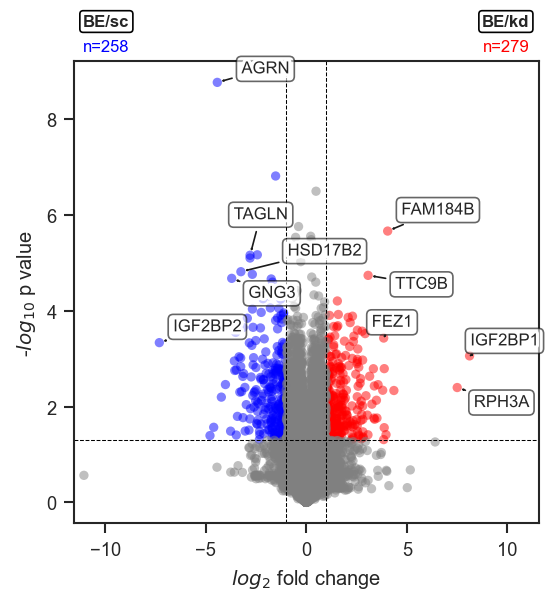
Plot volcano

Legacy input:

import matplotlib.pyplot as plt
import seaborn as sns
from scpviz import plotting as scplt

fig, ax = plt.subplots(figsize=(4, 4))
colors = sns.color_palette("Paired")[4:6]
color_dict = dict(zip(["downregulated", "upregulated"], colors))
ax, df = scplt.plot_volcano(
    ax,
    pdata_norm,
    classes="condition",
    values=["kd", "sc"],
    color=color_dict,
    return_df=True,
)
scplt.add_volcano_legend(ax)
plt.show()
To tweak styling:

Move positions up/down and tweak styling:
```python
values = [
    {"cellline": "BE", "condition": "kd"},
    {"cellline": "BE", "condition": "sc"},
]
scplt.plot_volcano(
    ax, pdata_norm, values=values,
    group_annot_kwargs={"pos": {"group1_xy": (0.98, 1.10), "group2_xy": (0.02, 1.10)}},
    up_kwargs={"fontsize": 9},
    down_kwargs={"fontsize": 9},
)
```
Remove the bbox but keep text:
```python
values = [
    {"cellline": "BE", "condition": "kd"},
    {"cellline": "BE", "condition": "sc"},
]
scplt.plot_volcano(
    ax, pdata_norm, values=values,
    group_annot_kwargs={"bbox": None},
)
```
Turn off all text:
```python
values = [
    {"cellline": "BE", "condition": "kd"},
    {"cellline": "BE", "condition": "sc"},
]
scplt.plot_volcano(ax, pdata_norm, values=values, group_annot=False)
```
Source code in src/scpviz/plotting/volcano.py
def plot_volcano(ax: "plt.Axes", pdata: pAnnData | None = None, values: Any = None, method: str = 'ttest', fold_change_mode: str = 'mean', label: Any = 5,
                 label_type='Gene', color=None, alpha=0.5, pval=0.05, log2fc=1, linewidth=0.5,
                 fontsize=8, no_marks=False, classes=None, de_data=None, return_df=False, 
                 group_annot=True, group_annot_kwargs=None, group1_kwargs=None, group2_kwargs=None, up_kwargs=None, down_kwargs=None, **kwargs: Any) -> Any:
    """
    Plot a volcano plot of differential expression results.

    This function calculates differential expression (DE) between two groups
    and visualizes results as a volcano plot. Alternatively, it can use
    pre-computed DE results (e.g. from `pdata.de()`).

    Args:
        ax (matplotlib.axes.Axes): Axis on which to plot.
        pdata (pAnnData, optional): Input pAnnData object. Required if `de_data`
            is not provided.
        values (list or dict, optional): Values to compare between groups.

            - Legacy list format: `["group1", "group2"]`

            - Dictionary format: list of dicts specifying multiple conditions,
              e.g. `[{"cellline": "HCT116", "treatment": "DMSO"},
                     {"cellline": "HCT116", "treatment": "DrugX"}]`.

        method (str): Statistical test method. Default is `"ttest"`. Options are `"ttest"`, `"mannwhitneyu"`, `"wilcoxon"`.
        fold_change_mode (str): Method for computing fold change.

            - `"mean"`: log2(mean(group1) / mean(group2))
            - `"pairwise_median"`: median of all pairwise log2 ratios.
            - "pep_pairwise_median": median of peptide-level pairwise log2 ratios, aggregated per protein

        label (int, list, or None): Features to highlight.

            - If int: label top and bottom *n* features.
            - If list of str: label only the specified features.
            - If list of two ints: `[top, bottom]` to label asymmetric counts.
            - If None: no labels plotted.

        label_type (str): Label content type. Currently `"Gene"` is recommended.
        color (dict, optional): Dictionary mapping significance categories
            to colors. Defaults to grey/red/blue.
        alpha (float): Point transparency. Default is 0.5.
        pval (float): P-value threshold for significance. Default is 0.05.
        log2fc (float): Log2 fold change threshold for significance. Default is 1.
        linewidth (float): Line width for threshold lines. Default is 0.5.
        fontsize (int): Font size for feature labels. Default is 8.
        no_marks (bool): If True, suppress coloring of significant points and
            plot all points in grey. Default is False.
        classes (str, optional): Sample class column to use for group comparison.
        de_data (pandas.DataFrame, optional): Pre-computed DE results. Must contain
            `"log2fc"`, `"p_value"`, and `"significance"` columns.
        return_df (bool): If True, return both the axis and the DataFrame used
            for plotting. Default is False.
        group_annot (bool): If True, annotate group names and differential
            expression counts (n) at the top of the plot. If False, suppress
            all group-related annotations. Default is True.
        group_annot_kwargs (dict, optional): Global configuration for group
            annotations. Supported keys include:

            - `"pos"`: Dictionary controlling annotation positions in axes
              fraction coordinates. Expected keys are `"group1_xy"`,
              `"group2_xy"`, `"up_xy"`, and `"down_xy"`, each mapping to
              an `(x, y)` tuple.

            - `"bbox"`: Dictionary of bounding box properties passed to
              `matplotlib.text.Annotation`, or `None` to disable the bounding
              box for group labels.

        group1_kwargs (dict, optional): Keyword arguments passed to
            `ax.annotate()` for the first group label (right-aligned by
            default). Can be used to override font size, weight, alignment,
            or other text properties.
        group2_kwargs (dict, optional): Keyword arguments passed to
            `ax.annotate()` for the second group label (left-aligned by
            default). Can be used to override font size, weight, alignment,
            or other text properties.
        up_kwargs (dict, optional): Keyword arguments passed to
            `ax.annotate()` for the upregulated feature count (`n=...`).
            Useful for adjusting font size, color, or vertical spacing
            independently of other annotations.
        down_kwargs (dict, optional): Keyword arguments passed to
            `ax.annotate()` for the downregulated feature count (`n=...`).
            Useful for adjusting font size, color, or vertical spacing
            independently of other annotations.
        **kwargs (Any): Additional keyword arguments passed to `matplotlib.pyplot.scatter`.

    Returns:
        ax (matplotlib.axes.Axes): Axis with the volcano plot if `return_df=False`.
        tuple (matplotlib.axes.Axes, pandas.DataFrame): Returned if `return_df=True`.

    Usage Tips:
        mark_volcano: Highlight specific features on an existing volcano plot.  
        - For selective highlighting, set `no_marks=True` to render all points
          in grey, then call `mark_volcano()` to add specific features of interest.

        add_volcano_legend: Add standard legend handles for volcano plots.
        - Use the helper function `add_volcano_legend(ax)` to add standard
          significance legend handles.

    Example:
        Dictionary-style input:
            ```python
            import matplotlib.pyplot as plt
            from scpviz import plotting as scplt

            fig, ax = plt.subplots(figsize=(4, 4))
            values = [
                {"cellline": "BE", "condition": "kd"},
                {"cellline": "BE", "condition": "sc"},
            ]
            ax, df = scplt.plot_volcano(ax, pdata_norm, values=values, return_df=True)
            plt.show()
            ```

        ![Plot volcano](../../assets/plots/plot_volcano.png)

        Legacy input:
            ```python
            import matplotlib.pyplot as plt
            import seaborn as sns
            from scpviz import plotting as scplt

            fig, ax = plt.subplots(figsize=(4, 4))
            colors = sns.color_palette("Paired")[4:6]
            color_dict = dict(zip(["downregulated", "upregulated"], colors))
            ax, df = scplt.plot_volcano(
                ax,
                pdata_norm,
                classes="condition",
                values=["kd", "sc"],
                color=color_dict,
                return_df=True,
            )
            scplt.add_volcano_legend(ax)
            plt.show()
            ```
        To tweak styling:

            Move positions up/down and tweak styling:
            ```python
            values = [
                {"cellline": "BE", "condition": "kd"},
                {"cellline": "BE", "condition": "sc"},
            ]
            scplt.plot_volcano(
                ax, pdata_norm, values=values,
                group_annot_kwargs={"pos": {"group1_xy": (0.98, 1.10), "group2_xy": (0.02, 1.10)}},
                up_kwargs={"fontsize": 9},
                down_kwargs={"fontsize": 9},
            )
            ```
            Remove the bbox but keep text:
            ```python
            values = [
                {"cellline": "BE", "condition": "kd"},
                {"cellline": "BE", "condition": "sc"},
            ]
            scplt.plot_volcano(
                ax, pdata_norm, values=values,
                group_annot_kwargs={"bbox": None},
            )
            ```
            Turn off all text:
            ```python
            values = [
                {"cellline": "BE", "condition": "kd"},
                {"cellline": "BE", "condition": "sc"},
            ]
            scplt.plot_volcano(ax, pdata_norm, values=values, group_annot=False)
            ```


    """
    import numpy as np
    import pandas as pd
    import matplotlib.pyplot as plt
    from adjustText import adjust_text
    import matplotlib.patheffects as PathEffects

    if de_data is None and pdata is None:
        raise ValueError("Either de_data or pdata must be provided.")

    if de_data is not None:
        volcano_df = de_data.copy()
    else:
        if values is None:
          raise ValueError("If pdata is provided, values must also be provided.")
        if isinstance(values, list) and isinstance(values[0], dict):
          volcano_df = pdata.de(values=values, method=method, pval=pval, log2fc=log2fc, fold_change_mode=fold_change_mode)
        else:
            volcano_df = pdata.de(class_type=classes, values=values, method=method, pval=pval, log2fc=log2fc, fold_change_mode=fold_change_mode)

    df = volcano_df.copy()
    volcano_df = volcano_df.dropna(subset=['p_value']).copy()
    volcano_df = volcano_df[volcano_df["significance"] != "not comparable"]

    default_color = {'not significant': 'grey', 'upregulated': 'red', 'downregulated': 'blue'}
    if color:
        default_color.update(color)
    elif no_marks:
        default_color = {k: 'grey' for k in default_color}

    scatter_kwargs = dict(s=20, edgecolors='none')
    scatter_kwargs.update(kwargs)
    colors = volcano_df['significance'].astype(str).map(default_color)

    ax.scatter(volcano_df['log2fc'], volcano_df['-log10(p_value)'],
               c=colors, alpha=alpha, **scatter_kwargs)

    ax.axhline(-np.log10(pval), color='black', linestyle='--', linewidth=linewidth)
    ax.axvline(log2fc, color='black', linestyle='--', linewidth=linewidth)
    ax.axvline(-log2fc, color='black', linestyle='--', linewidth=linewidth)

    ax.set_xlabel('$log_{2}$ fold change')
    ax.set_ylabel('-$log_{10}$ p value')

    log2fc_clean = volcano_df['log2fc'].replace([np.inf, -np.inf], np.nan).dropna()
    if log2fc_clean.empty:
        max_abs_log2fc = 1  # default range if nothing valid
    else:
        max_abs_log2fc = log2fc_clean.abs().max() + 0.5
    ax.set_xlim(-max_abs_log2fc, max_abs_log2fc)


    if not no_marks and label not in [None, 0, [0, 0]]:
        if isinstance(label, int):
            upregulated = volcano_df[volcano_df['significance'] == 'upregulated'].sort_values('significance_score', ascending=False)
            downregulated = volcano_df[volcano_df['significance'] == 'downregulated'].sort_values('significance_score', ascending=True)
            label_df = pd.concat([upregulated.head(label), downregulated.head(label)])
        elif isinstance(label, list):
            if len(label) == 2 and all(isinstance(i, int) for i in label):
                upregulated = volcano_df[volcano_df['significance'] == 'upregulated'].sort_values('significance_score', ascending=False)
                downregulated = volcano_df[volcano_df['significance'] == 'downregulated'].sort_values('significance_score', ascending=True)
                label_df = pd.concat([upregulated.head(label[0]), downregulated.head(label[1])])
            else:
                label_lower = [str(l).lower() for l in label]
                label_df = volcano_df[
                volcano_df.index.str.lower().isin(label_lower) |
                volcano_df['Genes'].str.lower().isin(label_lower)
            ]

        else:
            raise ValueError("label must be int or list")

        texts = []
        for i in range(len(label_df)):
            gene = label_df.iloc[i].get('Genes', label_df.index[i])
            txt = plt.text(label_df.iloc[i]['log2fc'],
                           label_df.iloc[i]['-log10(p_value)'],
                           s=gene,
                           fontsize=fontsize,
                           bbox=dict(facecolor='white', edgecolor='black', boxstyle='round', alpha=0.6))
            txt.set_path_effects([PathEffects.withStroke(linewidth=3, foreground='w')])
            texts.append(txt)

        adjust_text(texts, expand=(2, 2), arrowprops=dict(arrowstyle='->', color='k', zorder=5))

    # Add group names and DE counts to plot
    def format_group(values_entry, classes):
        if isinstance(values_entry, dict):
            return "/".join(str(v) for v in values_entry.values())
        elif isinstance(values_entry, list) and isinstance(classes, list) and len(values_entry) == len(classes):
            return "/".join(str(v) for v in values_entry)
        return str(values_entry)

    group1 = group2 = ""
    if isinstance(values, list) and len(values) == 2:
        group1 = format_group(values[0], classes)
        group2 = format_group(values[1], classes)

    up_count = (volcano_df['significance'] == 'upregulated').sum()
    down_count = (volcano_df['significance'] == 'downregulated').sum()

    # --- Group annotations (configurable) ---
    if group_annot:
        def _merge(base, extra):
            out = dict(base)
            if extra:
                out.update(extra)
            return out

        group_annot_kwargs = group_annot_kwargs or {}
        group1_kwargs = group1_kwargs or {}
        group2_kwargs = group2_kwargs or {}
        up_kwargs = up_kwargs or {}
        down_kwargs = down_kwargs or {}

        # Defaults (can be overridden via *_kwargs)
        bbox_style = dict(boxstyle="round,pad=0.2", facecolor="white", edgecolor="black")

        base_text = dict(xycoords="axes fraction", fontsize=fontsize, annotation_clip=False,        )
        base_group = dict(weight="bold", bbox=bbox_style, va="bottom")
        base_count = dict(va="bottom")

        # Default positions (can be overridden globally or per-item)
        default_pos = dict(group1_xy=(0.98, 1.07), up_xy=(0.98, 1.015),  group2_xy=(0.02, 1.07), down_xy=(0.02, 1.015),)
        pos = _merge(default_pos, group_annot_kwargs.get("pos"))

        # Allow overriding bbox (or disabling it by bbox=None)
        bbox_override = group_annot_kwargs.get("bbox", bbox_style)
        if bbox_override is None:
            base_group = dict(base_group)
            base_group.pop("bbox", None)
        else:
            base_group = dict(base_group, bbox=bbox_override)

        # Group labels
        ax.annotate(group1, xy=pos["group1_xy"],  ha="right", **_merge(_merge(base_text, base_group), group1_kwargs),
        )
        ax.annotate(group2, xy=pos["group2_xy"], ha="left", **_merge(_merge(base_text, base_group), group2_kwargs),
        )

        # Counts
        ax.annotate(f"n={up_count}", xy=pos["up_xy"], ha="right",
            **_merge(_merge(_merge(base_text, base_count), {"color": default_color.get("upregulated", "red")}), up_kwargs))
        ax.annotate(f"n={down_count}", xy=pos["down_xy"], ha="left",
            **_merge(_merge(_merge(base_text, base_count), {"color": default_color.get("downregulated", "blue")}), down_kwargs))

    if return_df:
        return ax, df
    else:
        return ax

plot_volcano_adata

plot_volcano_adata(
    ax: "plt.Axes",
    adata: Any = None,
    values: Any = None,
    class_type: Any = None,
    de_data: Any = None,
    gene_col=None,
    method="ttest",
    fold_change_mode="mean",
    layer="X",
    label=5,
    fontsize=8,
    alpha=0.5,
    color=None,
    linewidth=0.5,
    pval=0.05,
    log2fc=1.0,
    no_marks=False,
    return_df=False,
    **kwargs
) -> Any

Volcano plot for AnnData with the same API behavior as pdata.plot_volcano.

Required
  • Either de_data OR (adata and values). For legacy-style values (group labels or list-of-lists), also pass class_type as documented in :func:scpviz.utils.stats.de_adata.
Supports
  • Dictionary-style values: [{"cellline":"HCT116","tx":"DMSO"}, {...}]
  • Legacy-style values: ["A","B"]
  • Legacy multi-col values: [["HCT116","DMSO"], ["HCT116","DrugX"]]

Produces: identical volcano to pAnnData version.

Example

After DE on adata with the same comparison as :func:plot_volcano, the figure matches :func:plot_volcano (same PNG):

```python
import matplotlib.pyplot as plt
from scpviz import plotting as scplt

fig, ax = plt.subplots(figsize=(4, 4))
values = [
    {"cellline": "BE", "condition": "kd"},
    {"cellline": "BE", "condition": "sc"},
]
ax, df = scplt.plot_volcano_adata(
    ax, pdata_norm.prot, values=values, return_df=True
)
plt.show()
```

Plot volcano (same style as plot_volcano_adata)

Source code in src/scpviz/plotting/volcano.py
def plot_volcano_adata(ax: "plt.Axes", adata: Any = None, values: Any = None, class_type: Any = None, de_data: Any = None,
    gene_col=None, method='ttest', fold_change_mode='mean', layer='X', label=5, fontsize=8,
    alpha=0.5, color=None, linewidth=0.5, pval=0.05, log2fc=1.0, no_marks=False,
    return_df=False, **kwargs
) -> Any:
    """
    Volcano plot for AnnData with the *same API behavior* as pdata.plot_volcano.

    Required:
        - Either ``de_data`` OR (``adata`` and ``values``). For legacy-style ``values`` (group labels or list-of-lists), also pass ``class_type`` as documented in :func:`scpviz.utils.stats.de_adata`.

    Supports:
        - Dictionary-style values: [{"cellline":"HCT116","tx":"DMSO"}, {...}]
        - Legacy-style values: ["A","B"]
        - Legacy multi-col values: [["HCT116","DMSO"], ["HCT116","DrugX"]]

    Produces: identical volcano to pAnnData version.

    Example:
        After DE on ``adata`` with the same comparison as :func:`plot_volcano`, the figure matches :func:`plot_volcano` (same PNG):

            ```python
            import matplotlib.pyplot as plt
            from scpviz import plotting as scplt

            fig, ax = plt.subplots(figsize=(4, 4))
            values = [
                {"cellline": "BE", "condition": "kd"},
                {"cellline": "BE", "condition": "sc"},
            ]
            ax, df = scplt.plot_volcano_adata(
                ax, pdata_norm.prot, values=values, return_df=True
            )
            plt.show()
            ```

        ![Plot volcano (same style as plot_volcano_adata)](../../assets/plots/plot_volcano.png)
    """
    import numpy as np
    import pandas as pd
    import matplotlib.pyplot as plt
    from adjustText import adjust_text
    import matplotlib.patheffects as PathEffects

    if de_data is not None:
        df = de_data.copy()
        # For labels: user must supply labels manually if needed
        group1_label = df.attrs.get("group1_label", None)
        group2_label = df.attrs.get("group2_label", None)

    else:
        if adata is None or values is None:
            raise ValueError("When de_data is not provided, must supply adata and values.")

        df = utils.de_adata(adata=adata, values=values, class_type=class_type,
            method=method, fold_change_mode=fold_change_mode, layer=layer,
            pval=pval, log2fc=log2fc, gene_col=gene_col
        )

        def format_group(val, class_type):
            if isinstance(val, dict):
                return "/".join(str(v) for v in val.values())
            elif isinstance(val, list) and isinstance(class_type, list):
                return "/".join(str(v) for v in val)
            else:
                return str(val)

        group1_label = format_group(values[0], class_type)
        group2_label = format_group(values[1], class_type)

    # volcano plotting
    volcano_df = df.dropna(subset=['p_value']).copy()
    volcano_df = volcano_df[volcano_df["significance"] != "not comparable"]

    default_color = {'not significant': 'grey', 'upregulated': 'red', 'downregulated': 'blue'}
    if color:
        default_color.update(color)
    elif no_marks:
        default_color = {k: 'grey' for k in default_color}

    scatter_kwargs = dict(s=20, edgecolors='none')
    scatter_kwargs.update(kwargs)

    colors = volcano_df['significance'].astype(str).map(default_color)

    ax.scatter(
        volcano_df['log2fc'],
        volcano_df['-log10(p_value)'],
        c=colors, alpha=alpha,
        **scatter_kwargs
    )

    # threshold lines
    ax.axhline(-np.log10(pval), color='black', linestyle='--', linewidth=linewidth)
    ax.axvline(log2fc, color='black', linestyle='--', linewidth=linewidth)
    ax.axvline(-log2fc, color='black', linestyle='--', linewidth=linewidth)

    ax.set_xlabel('$log_{2}$ fold change')
    ax.set_ylabel('-$log_{10}$ p value')

    # symmetric x-limits
    log2fc_clean = pd.to_numeric(volcano_df['log2fc'], errors='coerce').dropna()
    max_abs = log2fc_clean.abs().max() + 0.5 if not log2fc_clean.empty else 1
    ax.set_xlim(-max_abs, max_abs)

    if not no_marks and label not in [None, 0, [0, 0]]:
        if isinstance(label, int):
            up = volcano_df[volcano_df['significance'] == 'upregulated'].sort_values(
                'significance_score', ascending=False
            )
            down = volcano_df[volcano_df['significance'] == 'downregulated'].sort_values(
                'significance_score', ascending=True
            )
            label_df = pd.concat([up.head(label), down.head(label)])

        elif isinstance(label, list):
            if len(label) == 2 and all(isinstance(i, int) for i in label):
                up = volcano_df[volcano_df['significance'] == 'upregulated'].sort_values(
                    'significance_score', ascending=False
                )
                down = volcano_df[volcano_df['significance'] == 'downregulated'].sort_values(
                    'significance_score', ascending=True
                )
                label_df = pd.concat([up.head(label[0]), down.head(label[1])])

            else:
                ll = [str(v).lower() for v in label]
                label_df = volcano_df[
                    volcano_df.index.str.lower().isin(ll) |
                    volcano_df.get("Genes", pd.Series("", index=volcano_df.index)).str.lower().isin(ll)
                ]

        else:
            raise ValueError("label must be int or list")

        # plot labels
        texts = []
        for idx, row in label_df.iterrows():
            text_val = row.get('Genes', idx)
            txt = ax.text(
                row['log2fc'], row['-log10(p_value)'],
                s=text_val,
                fontsize=fontsize,
                bbox=dict(facecolor='white', edgecolor='black', boxstyle='round', alpha=0.6)
            )
            txt.set_path_effects([PathEffects.withStroke(linewidth=3, foreground='w')])
            texts.append(txt)

        adjust_text(texts, expand=(2, 2),
                    arrowprops=dict(arrowstyle='->', color='k', zorder=5))

    bbox_style = dict(boxstyle='round,pad=0.2', facecolor='white', edgecolor='black')

    if group1_label:
        ax.annotate(group1_label, xy=(0.98, 1.07), xycoords='axes fraction',
                    ha='right', va='bottom', fontsize=fontsize,
                    weight='bold', bbox=bbox_style)

    if group2_label:
        ax.annotate(group2_label, xy=(0.02, 1.07), xycoords='axes fraction',
                    ha='left', va='bottom', fontsize=fontsize,
                    weight='bold', bbox=bbox_style)

    up_count = (volcano_df['significance'] == 'upregulated').sum()
    down_count = (volcano_df['significance'] == 'downregulated').sum()

    ax.annotate(f'n={up_count}', xy=(0.98, 1.015), xycoords='axes fraction',
                ha='right', va='bottom', fontsize=fontsize,
                color=default_color['upregulated'])

    ax.annotate(f'n={down_count}', xy=(0.02, 1.015), xycoords='axes fraction',
                ha='left', va='bottom', fontsize=fontsize,
                color=default_color['downregulated'])

    return (ax, df) if return_df else ax

resolve_marker_shapes

resolve_marker_shapes(
    adata: AnnData,
    marker_shape: Any,
    shape_cmap: Any = "default",
) -> Any

Resolve marker shapes for categorical sample groupings.

Parameters:

Name Type Description Default
adata AnnData

AnnData object.

required
marker_shape str, list of str, or None

.obs column(s) used to assign markers. - None: return None (use a single marker). - str: categorical .obs key. - list: combine multiple .obs columns into a single categorical label.

required
shape_cmap str, list, or dict

Marker assignment. - "default": uses an internal default marker list. - list: markers assigned to sorted class labels. - dict: {label: marker} mapping.

'default'

Returns:

Name Type Description
markers list[str] or None

Marker per observation (len = n_obs), or None.

shape_legend list[Line2D] or None

Legend handles for marker shapes.

shape_map dict or None

Mapping {label: marker}.

Source code in src/scpviz/plotting/dimreduc.py
def resolve_marker_shapes(
    adata: ad.AnnData, marker_shape: Any, shape_cmap: Any = "default"
) -> Any:
    """
    Resolve marker shapes for categorical sample groupings.

    Args:
        adata (anndata.AnnData): AnnData object.
        marker_shape (str, list of str, or None): `.obs` column(s) used to assign markers.
            - None: return None (use a single marker).
            - str: categorical `.obs` key.
            - list: combine multiple `.obs` columns into a single categorical label.
        shape_cmap (str, list, or dict): Marker assignment.
            - "default": uses an internal default marker list.
            - list: markers assigned to sorted class labels.
            - dict: {label: marker} mapping.

    Returns:
        markers (list[str] or None): Marker per observation (len = n_obs), or None.
        shape_legend (list[Line2D] or None): Legend handles for marker shapes.
        shape_map (dict or None): Mapping {label: marker}.
    """
    if marker_shape is None:
        return None, None, None

    # only allow categorical `.obs`
    if isinstance(marker_shape, str) and marker_shape in adata.obs.columns:
        labels = utils.get_samplenames(adata, marker_shape)
    elif isinstance(marker_shape, list) and all(c in adata.obs.columns for c in marker_shape):
        labels = utils.get_samplenames(adata, marker_shape)
    else:
        raise ValueError("marker_shape must be an `.obs` categorical key (str) or list of keys.")

    class_labels = sorted(set(labels))

    if shape_cmap == "default":
        marker_list = ["o", "s", "^", "D", "v", "P", "X", "<", ">", "h", "*"]
        shape_map = {c: marker_list[i % len(marker_list)] for i, c in enumerate(class_labels)}
        if len(class_labels) > len(marker_list):
            print(f"{utils.format_log_prefix('warn')} marker_shape has {len(class_labels)} levels; cycling markers.")
    elif isinstance(shape_cmap, list):
        shape_map = {c: shape_cmap[i % len(shape_cmap)] for i, c in enumerate(class_labels)}
    elif isinstance(shape_cmap, dict):
        shape_map = dict(shape_cmap)
    else:
        raise ValueError("shape_cmap must be 'default', a list of markers, or a dict mapping labels to markers.")

    markers = [shape_map[v] for v in labels]

    shape_legend = [
        mlines.Line2D(
            [], [], linestyle="none",
            marker=shape_map[c],
            color="black",  # neutral legend handle
            markerfacecolor="black",
            markeredgecolor="black",
            markersize=7,
            label=str(c),
        )
        for c in class_labels
    ]

    return markers, shape_legend, shape_map

resolve_plot_colors

resolve_plot_colors(
    adata: AnnData,
    classes: Any,
    cmap: Any,
    layer: str = "X",
) -> Any

Resolve colors for PCA or abundance plots.

This helper function determines how samples should be colored in plotting functions based on categorical or continuous class values. It returns mapped color values, a colormap (if applicable), and legend handles.

Parameters:

Name Type Description Default
adata AnnData

AnnData object (protein or peptide level).

required
classes str

Class used for coloring. Can be:

  • An .obs column name (categorical or continuous).
  • A gene or protein identifier, in which case coloring is based on abundance values from the specified layer.
required
cmap str, list, or matplotlib colormap

Colormap to use.

  • "default": uses get_color() scheme.
  • list of colors: categorical mapping.
  • colormap name or object: continuous mapping.
required
layer str

Data layer to extract abundance values from when classes is a gene/protein. Default is "X".

'X'

Returns:

Name Type Description
color_mapped array - like

Values mapped to colors for plotting.

cmap_resolved matplotlib colormap or None

Colormap object for continuous coloring; None if categorical.

legend_elements list or None

Legend handles for categorical coloring; None if continuous.

Source code in src/scpviz/plotting/dimreduc.py
def resolve_plot_colors(
    adata: ad.AnnData, classes: Any, cmap: Any, layer: str = "X"
) -> Any:
    """
    Resolve colors for PCA or abundance plots.

    This helper function determines how samples should be colored in plotting
    functions based on categorical or continuous class values. It returns mapped
    color values, a colormap (if applicable), and legend handles.

    Args:
        adata (anndata.AnnData): AnnData object (protein or peptide level).
        classes (str): Class used for coloring. Can be:

            - An `.obs` column name (categorical or continuous).
            - A gene or protein identifier, in which case coloring is based
              on abundance values from the specified `layer`.

        cmap (str, list, or matplotlib colormap): Colormap to use.

            - `"default"`: uses `get_color()` scheme.
            - list of colors: categorical mapping.
            - colormap name or object: continuous mapping.

        layer (str): Data layer to extract abundance values from when `classes`
            is a gene/protein. Default is `"X"`.

    Returns:      
        color_mapped (array-like): Values mapped to colors for plotting.
        cmap_resolved (matplotlib colormap or None): Colormap object for continuous coloring; None if categorical.
        legend_elements (list or None): Legend handles for categorical coloring; None if continuous.

    """
    legend_elements = None

    # Case 1: No coloring, all grey
    if classes is None:
        color_mapped = ['grey'] * len(adata)
        legend_elements = [mpatches.Patch(color='grey', label='All samples')]
        return color_mapped, None, legend_elements

    # Case 2: Single categorical column from obs
    elif isinstance(classes, str) and classes in adata.obs.columns:
        y = utils.get_samplenames(adata, classes)
        class_labels = sorted(set(y))
        if cmap == 'default':
            palette = get_color('colors', n=len(class_labels))
            color_dict = {c: palette[i] for i, c in enumerate(class_labels)}
        elif isinstance(cmap, list):
            color_dict = {c: cmap[i] for i, c in enumerate(class_labels)}
        elif isinstance(cmap, dict):
            color_dict = cmap
        else:
            cmap_obj = cm.get_cmap(cmap)
            palette = [mcolors.to_hex(cmap_obj(i / max(len(class_labels) - 1, 1))) for i in range(len(class_labels))]
            color_dict = {c: palette[i] for i, c in enumerate(class_labels)}
        color_mapped = [color_dict[val] for val in y]
        legend_elements = [mpatches.Patch(color=color_dict[c], label=c) for c in class_labels]
        return color_mapped, None, legend_elements

    # Case 3: Multiple categorical columns from obs (combined class)
    elif isinstance(classes, list) and all(c in adata.obs.columns for c in classes):
        y = utils.get_samplenames(adata, classes)
        class_labels = sorted(set(y))
        if cmap == 'default':
            palette = get_color('colors', n=len(class_labels))
            color_dict = {c: palette[i] for i, c in enumerate(class_labels)}
        elif isinstance(cmap, list):
            color_dict = {c: cmap[i] for i, c in enumerate(class_labels)}
        elif isinstance(cmap, dict):
            color_dict = cmap
        else:
            cmap_obj = cm.get_cmap(cmap)
            palette = [mcolors.to_hex(cmap_obj(i / max(len(class_labels) - 1, 1))) for i in range(len(class_labels))]
            color_dict = {c: palette[i] for i, c in enumerate(class_labels)}
        color_mapped = [color_dict[val] for val in y]
        legend_elements = [mpatches.Patch(color=color_dict[c], label=c) for c in class_labels]
        return color_mapped, None, legend_elements

    # Case 4: Continuous coloring by protein abundance (accession)
    elif isinstance(classes, str) and classes in adata.var_names:
        X = adata.layers[layer] if layer in adata.layers else adata.X
        if hasattr(X, "toarray"):
            X = X.toarray()
        idx = list(adata.var_names).index(classes)
        color_mapped = X[:, idx]
        if cmap == 'default':
            cmap = 'viridis'
        cmap = cm.get_cmap(cmap) if isinstance(cmap, str) else cmap

        # Add default colorbar handling for abundance-based coloring
        norm = mcolors.Normalize(vmin=color_mapped.min(), vmax=color_mapped.max())
        sm = cm.ScalarMappable(norm=norm, cmap=cmap)
        sm.set_array([])  # required for colorbar

        return color_mapped, cmap, None

    # Case 5: Gene name (mapped to accession)
    elif isinstance(classes, str):
        if "Genes" in adata.var.columns:
            gene_map = adata.var["Genes"].to_dict()
            match = [acc for acc, gene in gene_map.items() if gene == classes]
            if match:
                return resolve_plot_colors(adata, match[0], cmap, layer)
        raise ValueError("Invalid classes input. Must be None, a protein in var_names, or an obs column/list.")

    else:
        raise ValueError("Invalid input. List input supports only classes ([class1, class2]), and string supports classes or protein accession or gene name. ")

shift_legend

shift_legend(
    ax: "plt.Axes",
    anchor_pos: tuple[float, float] = (1.05, 1),
    loc: str = "center left",
) -> None

Reposition all legends on an axis.

Moves every Matplotlib legend on the axis to a custom anchor point (outside or inside the axis) without modifying contents. When multiple legends are present, they are stacked vertically from the anchor point downward with a small gap between them.

Parameters:

Name Type Description Default
ax Axes

Axis containing the legend(s).

required
anchor_pos tuple of float

(x, y) anchor position for the first (or only) legend in axis coordinates. Default is (1.05, 0.5), placing the legend just outside the right edge.

(1.05, 1)
loc str

Legend location relative to the anchor. Default is 'center left'.

'center left'

Returns:

Type Description
None

None

Example

Move a single legend outside the right edge:

        fig, ax = plt.subplots(figsize=(3, 3))
        ax = scplt.plot_pca(pdata, classes='treatment')
        scplt.shift_legend(ax)

Stack multiple legends when color, edge, and shape are all mapped:

        fig, ax = plt.subplots(figsize=(3, 3))
        ax = scplt.plot_pca(pdata, color='treatment', edge_color='cellline',
                            marker_shape='batch')
        scplt.shift_legend(ax, anchor_pos=(1.05, 1.0))

Source code in src/scpviz/plotting/style.py
def shift_legend(
    ax: "plt.Axes",
    anchor_pos: tuple[float, float] = (1.05, 1),
    loc: str = "center left",
) -> None:
    """
    Reposition all legends on an axis.

    Moves every Matplotlib legend on the axis to a custom anchor point
    (outside or inside the axis) without modifying contents. When multiple
    legends are present, they are stacked vertically from the anchor point
    downward with a small gap between them.

    Args:
        ax (matplotlib.axes.Axes): Axis containing the legend(s).
        anchor_pos (tuple of float, optional): (x, y) anchor position for the
            first (or only) legend in axis coordinates. Default is `(1.05, 0.5)`,
            placing the legend just outside the right edge.
        loc (str, optional): Legend location relative to the anchor. Default is
            `'center left'`.

    Returns:
        None

    Example:
        Move a single legend outside the right edge:
            ```python
                    fig, ax = plt.subplots(figsize=(3, 3))
                    ax = scplt.plot_pca(pdata, classes='treatment')
                    scplt.shift_legend(ax)
            ```

        Stack multiple legends when color, edge, and shape are all mapped:
            ```python
                    fig, ax = plt.subplots(figsize=(3, 3))
                    ax = scplt.plot_pca(pdata, color='treatment', edge_color='cellline',
                                        marker_shape='batch')
                    scplt.shift_legend(ax, anchor_pos=(1.05, 1.0))
            ```
    """
    legends = ax.get_figure().legends or []
    # ax.get_legend() returns only the last; collect all via ax.artists

    ax_legends = [a for a in ax.get_children()
                  if isinstance(a, plt.matplotlib.legend.Legend)]

    if not ax_legends:
        return

    if len(ax_legends) == 1:
        leg = ax_legends[0]
        leg.set_clip_on(False)
        leg.set_bbox_to_anchor(anchor_pos)
        leg.set_loc(loc)
        return

    # Multiple legends: stack vertically from anchor_pos downward
    fig = ax.get_figure()
    fig.canvas.draw()
    renderer = fig.canvas.get_renderer()
    ax_height_px = ax.get_window_extent(renderer).height

    x, y_cursor = anchor_pos
    for leg in ax_legends:
        leg.set_clip_on(False)
        leg_height_px = leg.get_window_extent(renderer).height
        leg_height_ax = leg_height_px / ax_height_px
        leg.set_bbox_to_anchor((x, y_cursor))
        leg.set_loc("upper left")
        y_cursor -= leg_height_ax + 0.02

volcano_adjust_and_outline_texts

volcano_adjust_and_outline_texts(
    texts: list[Any],
    expand: tuple[float, float] = (2, 2),
    arrowprops: dict[str, Any] = dict(
        arrowstyle="->", color="k", lw=0.8
    ),
    linewidth: float = 3,
    outline_color: str = "w",
) -> Any

Adjust text labels for volcano plots and apply a white outline for readability.

This function runs adjust_text() on a list of text artists while temporarily removing their path effects to ensure stable label placement. A white outline is re-applied after adjustment to improve legibility on dense volcano plots or scatter backgrounds.

Parameters:

Name Type Description Default
texts list

List of matplotlib.text.Text objects, typically returned from mark_volcano_by_significance(..., return_texts=True).

required
expand tuple

Expansion parameters passed to adjust_text(). Default is (2, 2).

(2, 2)
arrowprops dict or None

Arrow properties passed to adjust_text(). Set to None to disable arrow drawing. Default draws black arrows.

dict(arrowstyle='->', color='k', lw=0.8)
linewidth float

Line width of the outline applied after adjustment. Default is 3.

3
outline_color str

Color of the outline stroke. Default is "w".

'w'

Returns:

Name Type Description
list Any

The same list of text objects (modified in place).

Example

Adjust and outline labels for multiple marked volcano groups:

```python
ax, volcano_df = scplt.plot_volcano(
    ax, pdata_6mo_snpc_norm, values=case_values,
    return_df=True, no_marks=True
)

rps_dict={'downregulated': '#5166FF'}
rpl_dict={'downregulated': '#1F2CCF'}

# in this case, two sets of texts from mark_volcano or mark_volcano_by_significance (return_texts=True)
texts = []
ax, t = scplt.mark_volcano(
    ax, volcano_df, label=rpl_top5, label_color='#1F2CCF',return_texts=True
)
texts.extend(t)

ax, t = scplt.mark_volcano_by_significance(
    ax, volcano_df, label=rps_top5, color=rps_dict, return_texts=True
)
texts.extend(t)

# and for others, use show_names=False to not show any names/arrows
scplt.mark_volcano_by_significance(
    ax, volcano_df, label=rpl_others, color=rpl_dict, show_names=False
)
scplt.mark_volcano_by_significance(
    ax, volcano_df, label=rps_others, color=rps_dict, show_names=False
)

volcano_adjust_and_outline_texts(texts, expand=(2, 2))
```
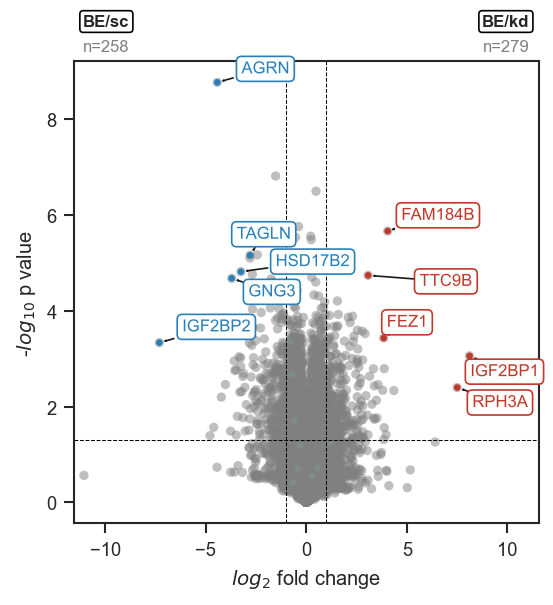
Volcano adjust and outline texts

Note

This function is designed to be used after collecting all labels from multiple mark_volcano_by_significance(..., return_texts=True) calls. Running adjust_text() once globally produces cleaner layouts than multiple per-group adjustments.

Source code in src/scpviz/plotting/volcano.py
def volcano_adjust_and_outline_texts(
    texts: list[Any],
    expand: tuple[float, float] = (2, 2),
    arrowprops: dict[str, Any] = dict(arrowstyle="->", color="k", lw=0.8),
    linewidth: float = 3,
    outline_color: str = "w",
) -> Any:
    """
    Adjust text labels for volcano plots and apply a white outline for readability.

    This function runs `adjust_text()` on a list of text artists while temporarily
    removing their path effects to ensure stable label placement. A white outline
    is re-applied after adjustment to improve legibility on dense volcano plots
    or scatter backgrounds.

    Args:
        texts (list): List of `matplotlib.text.Text` objects, typically returned
            from `mark_volcano_by_significance(..., return_texts=True)`.
        expand (tuple): Expansion parameters passed to `adjust_text()`.
            Default is `(2, 2)`.
        arrowprops (dict or None): Arrow properties passed to `adjust_text()`.
            Set to `None` to disable arrow drawing. Default draws black arrows.
        linewidth (float): Line width of the outline applied after adjustment.
            Default is 3.
        outline_color (str): Color of the outline stroke. Default is `"w"`.

    Returns:
        list: The same list of text objects (modified in place).

    Example:
        Adjust and outline labels for multiple marked volcano groups:

            ```python
            ax, volcano_df = scplt.plot_volcano(
                ax, pdata_6mo_snpc_norm, values=case_values,
                return_df=True, no_marks=True
            )

            rps_dict={'downregulated': '#5166FF'}
            rpl_dict={'downregulated': '#1F2CCF'}

            # in this case, two sets of texts from mark_volcano or mark_volcano_by_significance (return_texts=True)
            texts = []
            ax, t = scplt.mark_volcano(
                ax, volcano_df, label=rpl_top5, label_color='#1F2CCF',return_texts=True
            )
            texts.extend(t)

            ax, t = scplt.mark_volcano_by_significance(
                ax, volcano_df, label=rps_top5, color=rps_dict, return_texts=True
            )
            texts.extend(t)

            # and for others, use show_names=False to not show any names/arrows
            scplt.mark_volcano_by_significance(
                ax, volcano_df, label=rpl_others, color=rpl_dict, show_names=False
            )
            scplt.mark_volcano_by_significance(
                ax, volcano_df, label=rps_others, color=rps_dict, show_names=False
            )

            volcano_adjust_and_outline_texts(texts, expand=(2, 2))
            ```

        ![Volcano adjust and outline texts](../../assets/plots/volcano_adjust_and_outline_texts.png)

    Note:
        This function is designed to be used after collecting all labels from
        multiple `mark_volcano_by_significance(..., return_texts=True)` calls.
        Running `adjust_text()` once globally produces cleaner layouts than
        multiple per-group adjustments.
    """

    from adjustText import adjust_text
    import matplotlib.patheffects as PathEffects

    orig_effects = []
    for txt in texts:
        orig_effects.append(txt.get_path_effects())
        txt.set_path_effects([])

    # adjustText
    adjust_kwargs = {"expand": expand}
    if arrowprops is not None:
        adjust_kwargs["arrowprops"] = arrowprops

    adjust_text(texts, **adjust_kwargs)

    for txt in texts:
        txt.set_path_effects([
            PathEffects.withStroke(linewidth=linewidth, foreground=outline_color)
        ])

    return texts